
AirOps—after undergoing some rebrands—has established a name for itself in the AI marketing tools space. I've tinkered with it for a few months this past year when one of my clients purchased their subscription.
For this review, I've used that experience + retested the tool for one of my clients (hola, Modash) to understand how AirOps fares for monitoring AI visibility and creating AI SEO content.
Summary: AirOps is built for content production, not AI visibility
AirOps works best when you already have a strong foundation of a comprehensive SEO strategy. It can help you create and refresh a vast library of content at scale and save your team a lot of time.
But if you're looking for deep AI visibility insights to inform your AEO strategy, AirOps isn't the right tool. Its AI monitoring capabilities are surface-level at best, with limited LLM coverage and regional data.
There's a lot more nuance to this brief summary, though. Continue reading to understand the ins and outs of AirOps and evaluate whether it's the right fit for you.
You can also read our comprehensive Profound vs AirOps comparison here.
AirOps Pro Plan: Overview
If you're looking to form your AEO strategy and need deep insights about how your business fares in AI search results, you won't find sufficient data here to justify the cost.
The workflow builder is powerful, but has a steep learning curve
Creating custom workflows is at the core of how AirOps operates. Think of this feature like Zapier for your content needs: You can create custom AI-powered workflows for implementing your marketing strategy without writing any code.
For instance, I tried creating a workflow for automating brief creation. You can add the brand kit and knowledge base as the input, ask AirOps to run keyword research, and create a workflow that automates generating the brief based on the keyword. Later, I also added more conditions, like keeping the brief under 500 words.
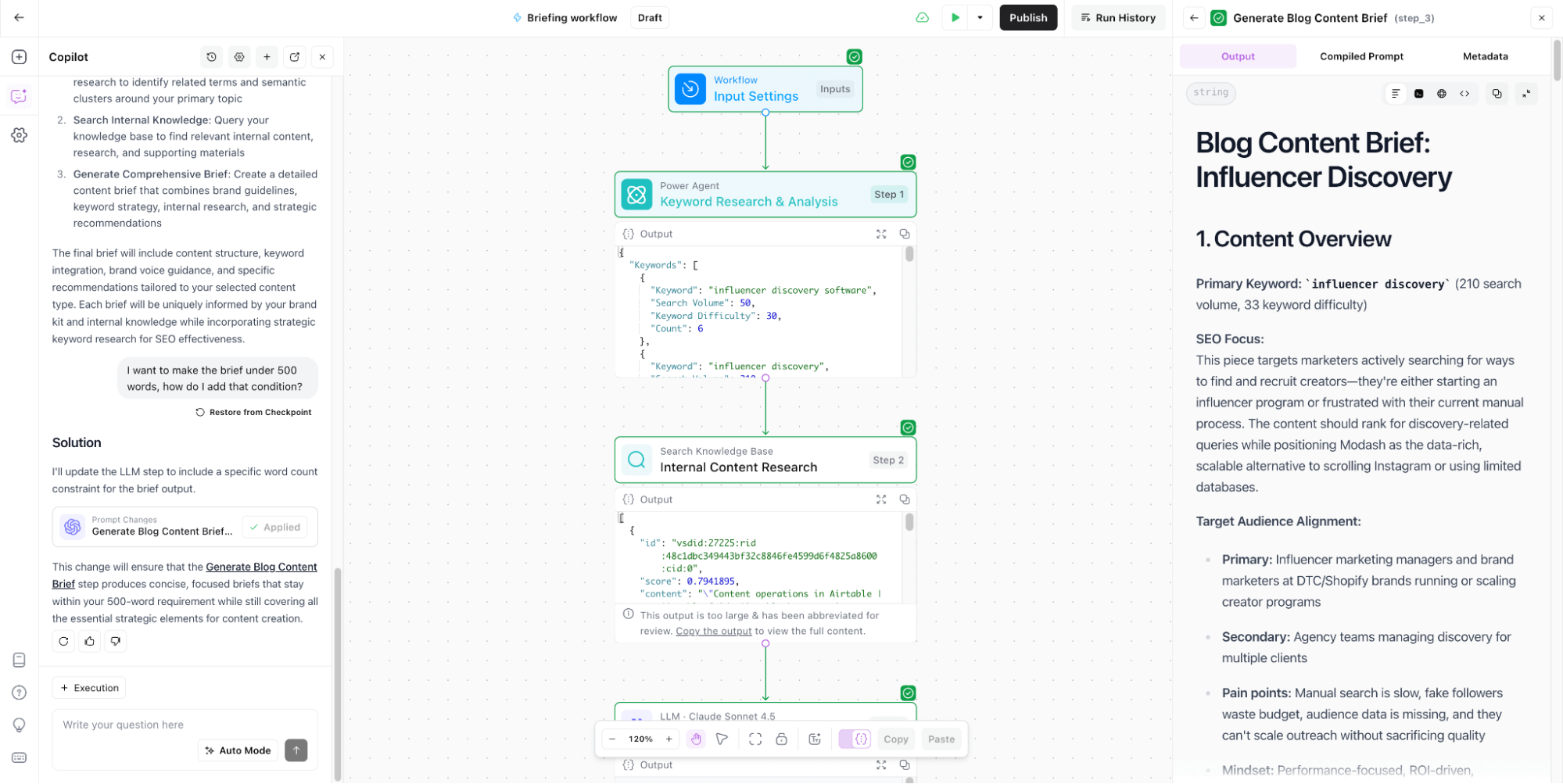
Now I know this sounds really simple and basic—something a scrappy team could also do without any paid tools. But AirOps can help you create and run really complex workflows once you get the hang of it.
Take the team at Buffer: They've created an AirOps workflow for some pieces on their blog that automatically updates all creative, takes internal data from their production database, and updates the text automatically.
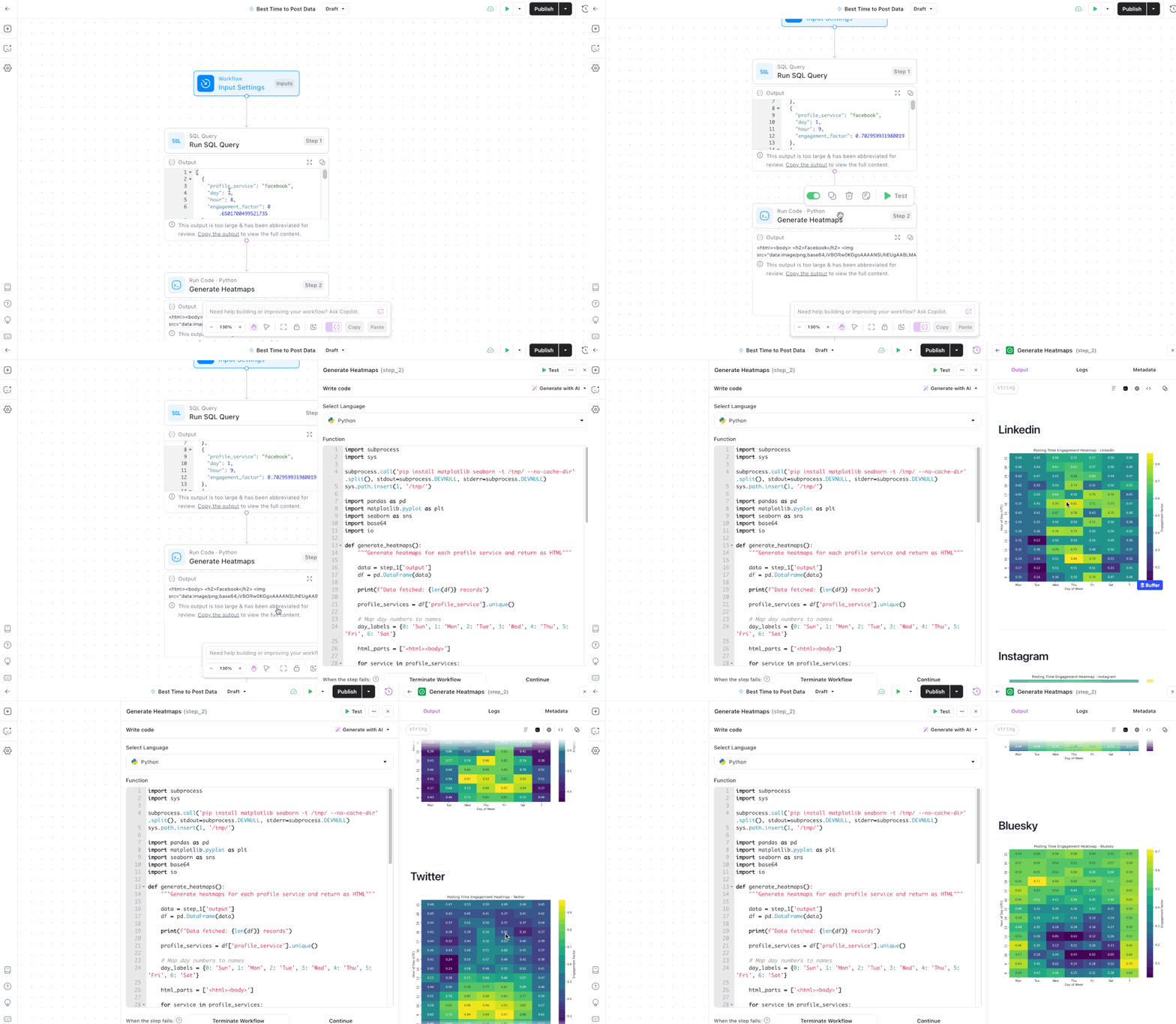
What I will warn about workflows in AirOps is:
- It'll take you more time than you think to get the hang of them. AirOps academy, cohorts, and the embedded Copilot help, but there's still definitely a learning curve to maximize the potential of this feature. Profound has their own University coming out very soon.
- Workflows aren't going to be as useful if you don't already have systems in place. If your team is drowning in one-off tasks, for instance, you wouldn't have a use for this feature. Once you have a set of jobs your team does regularly, you can use workflows to automate them and create repeatable systems.
Comparatively, I found Profound’s Workflow to be a lot easier to use. I could actually hit the ground running without needing to see any tutorials. It’s a lot more intuitive and the options are also incredibly marketer-friendly. I set up the same “create a brief” workflow in Profound in under five minutes!
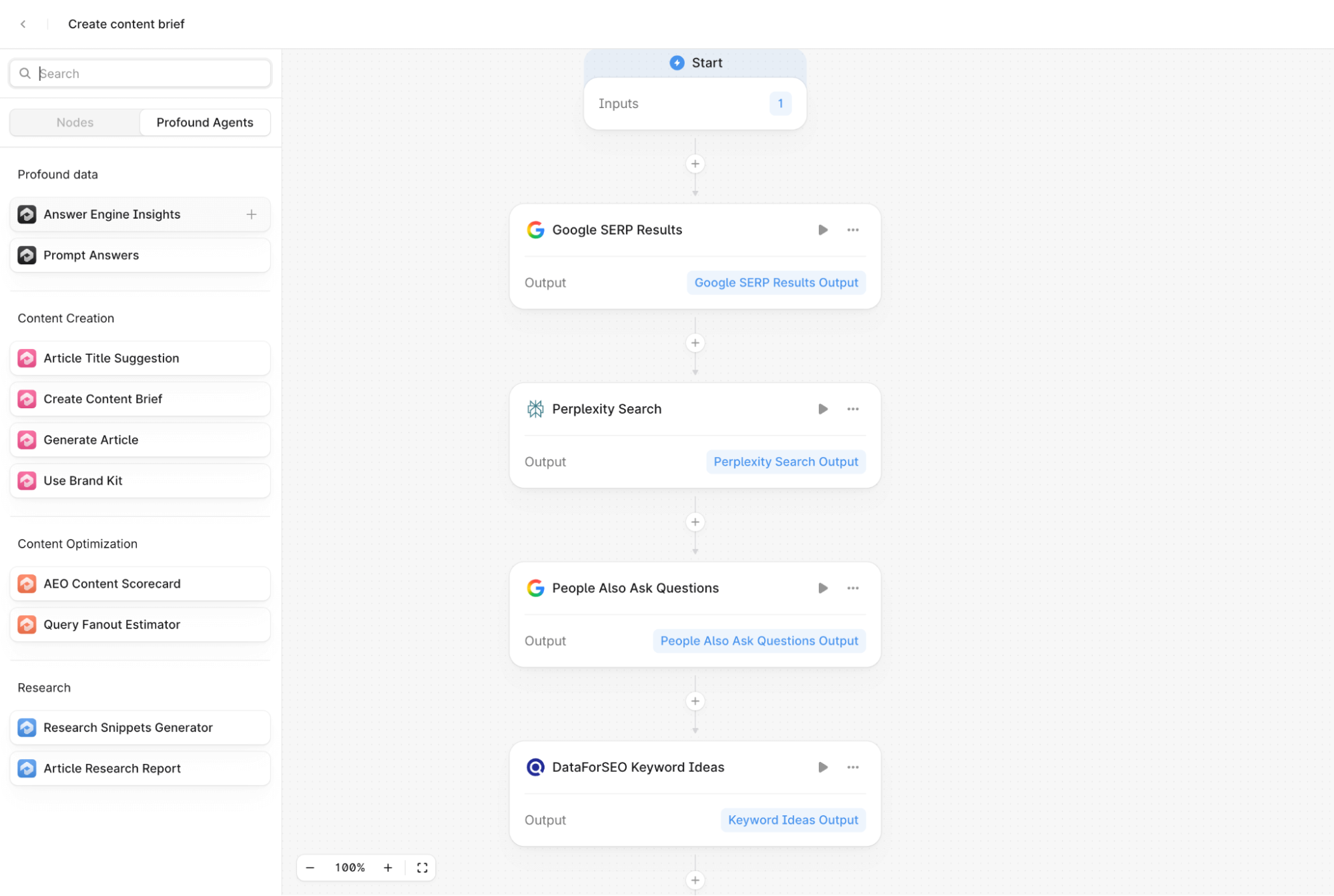
Plus, there are so many useful templates in Profound if you don’t want to start from scratch—AEO content refresh, FAQ generator, content optimization suggestions, and a lot more.
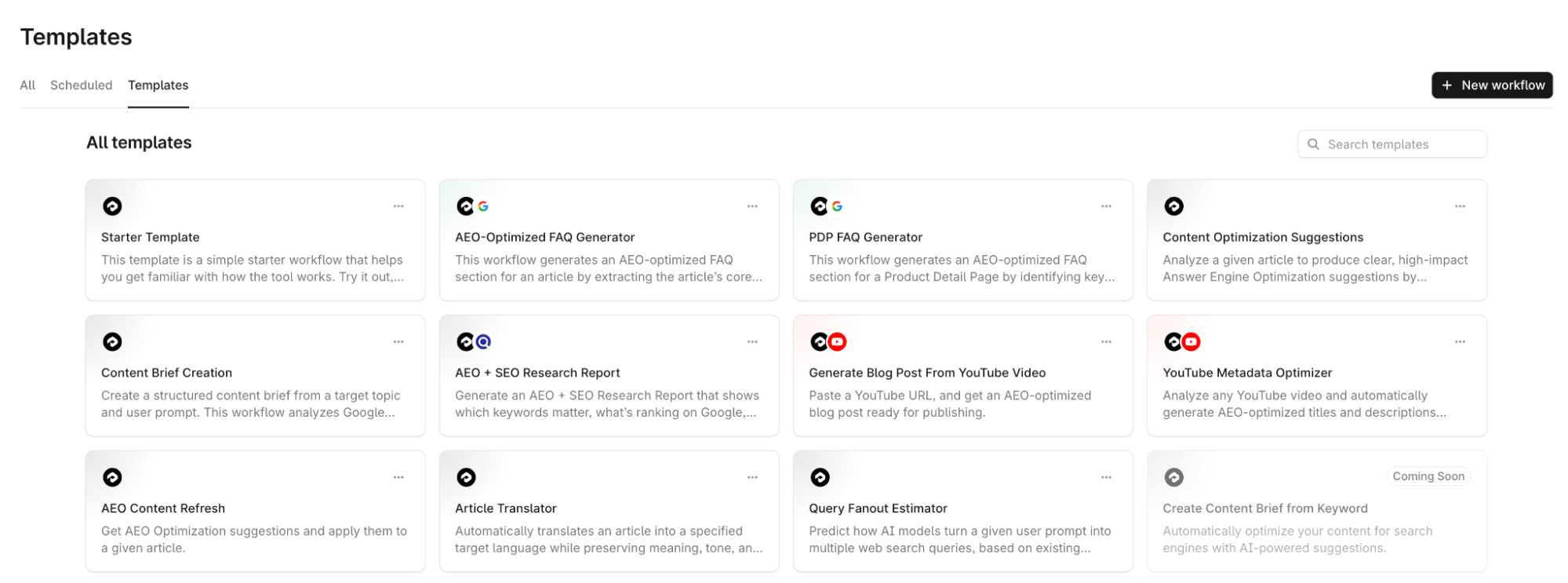
Key takeaway: Workflows in AirOps can be powerful to help you automate a series of repeatable tasks for your team. It takes some time to get the hang of it, though. It’d be more helpful if the platform were more intuitive and had some workflow templates, like Profound.
You can implement one workflow at scale using Grid
My favorite feature of AirOps is the Grid functionality. Using this feature, you can implement your workflows—whatever they are—at scale. Whether you need content creation, SERP analysis, FAQ schema, meta description updates, content refreshes, you name it.
Thankfully, Grid is easier to understand and work with than Workflows. It works just like your Excel sheet—except you can add columns and rows for each Workflow you've built and let it run on hundreds of your URLs at once. The Power Agents can help you layer one workflow with other related tasks so everything runs like a well-oiled machine.
For example, for my briefing workflow created above, I used Grids to not only create many briefs at scale, but also analyze SERP for the target keywords. There are plenty of options in Power Agents that can automate tedious tasks—such as internal linking, schema generator, adding FAQs, and a lot more.
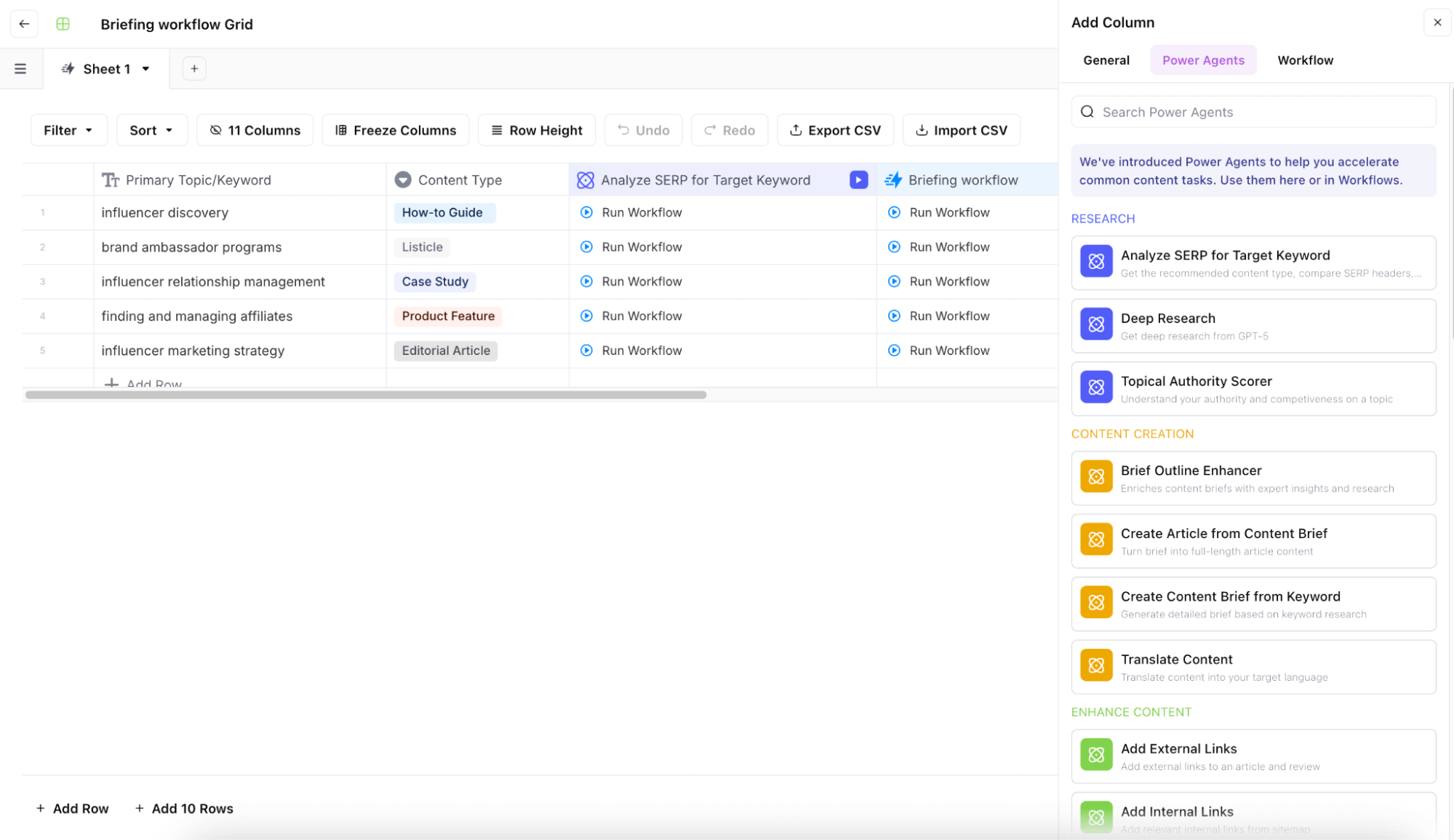
You can also add columns for teammates if you're collaborating with a team, custom URLs, markdown options, etc. Grids basically replace the collaboration you likely do with your team on Google Sheets.
Again, this feature would be useful only if you have a backlog of content that needs refreshing or plenty of articles that need to be written or briefed. If you're a small team publishing 10 or 20 pieces a month, you won't be able to justify the cost.
Key takeaway: Implementing the Workflows becomes very easy in AirOps, thanks to its Grid feature and amazing integrations. You'll only get the best use for this if you have a vast content library and/or consistent tasks-to-be-done.
SEO and CMS integrations
Copy-pasting and formatting an article from a Google Doc to WordPress is one of the most tedious tasks on my to-do list. And I know many marketers feel the same way.
AirOps automates this process entirely because it integrates with many major CMS tools like WordPress, Webflow, and Contentful. Just select the CMS step in your Workflow and run the Grid. This alone saves so much time.
AirOps also integrates with popular SEO tools like Moz and Semrush. So you can add your data from these SEO tools → build your Workflows using your SEO data and adding AEO insights → human-review AirOps generated/modified content → upload your files to your CMS. The process is quite fast and efficient.
My two complaints are:
- Adding and setting up these integrations and mixing them in your Workflows and Grids can be quite overwhelming in the beginning. The process isn't as intuitive as I would've liked it to be.
- The Solo plan doesn't offer all SEO and CMS integrations. You get only Webflow, Moz, and DataforSEO.
Key takeaway: AirOps has good SEO and CMS integrations—like WordPress, Webflow, Ahrefs, and Semrush—to help you implement a cohesive marketing strategy. Many of these integrations are limited to the higher tier plans, though.
The AI generated content is decent, but requires human review
AirOps, like many other AI SEO tools, offers content creation capabilities. You can add your brand kit and knowledge base to the platform to ensure the content generated sounds like you. In my experience, AirOps does a decent job of content generation. It's not publish-ready, of course, but it's good enough to cut significant writing time.
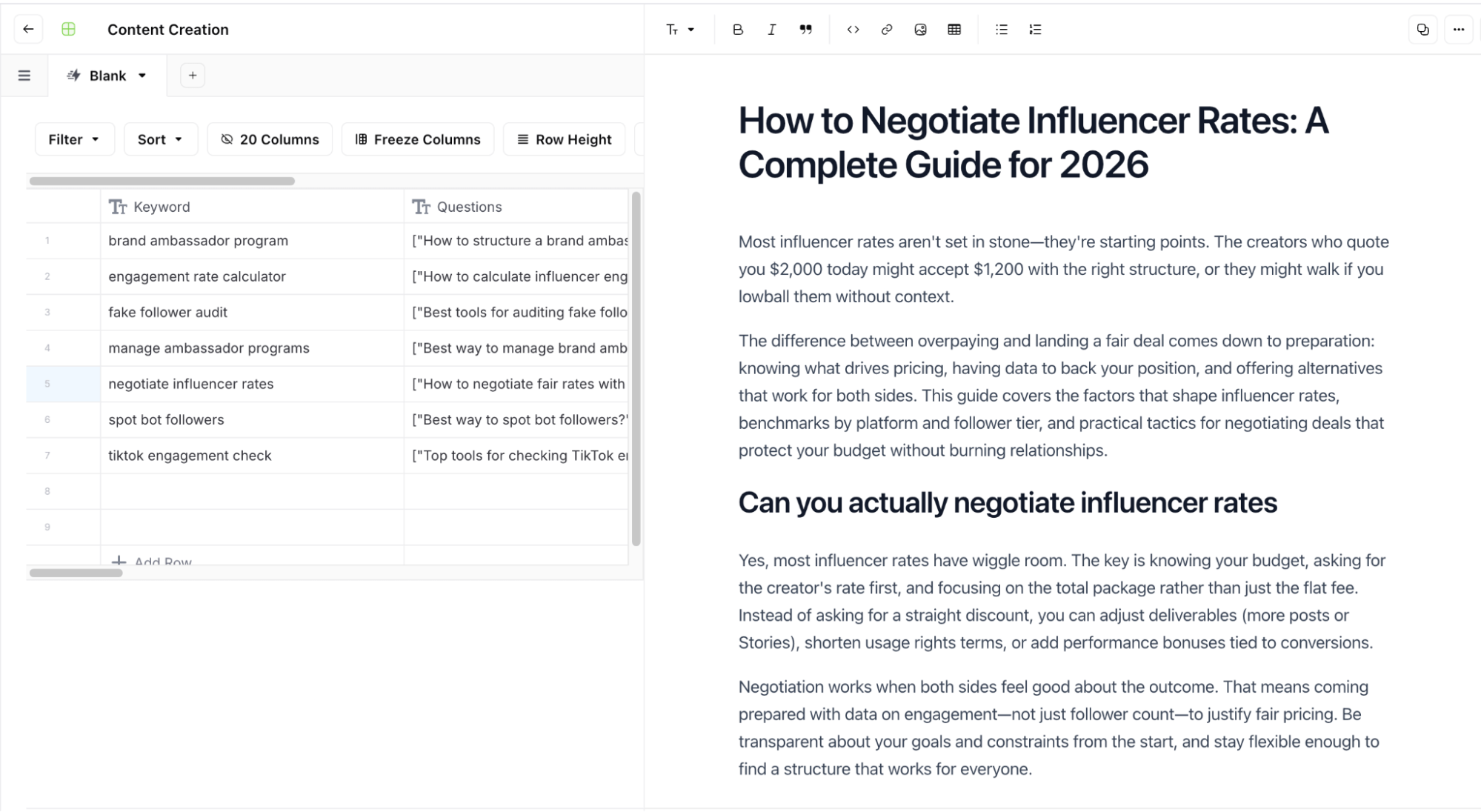
When I used AirOps for a few months, my only complaint was that it took brand guidelines to an extreme. For instance, if your brand kit says your content should be empathetic, AirOps might remove all negative framing, even if it makes contextual sense.
Another thing to remember is AirOps might mess with the structure and formatting in content refreshes. In some content refreshing Workflows I worked on with a client, the tool placed FAQs in the middle of the article, converted all H2s to H3s, and had some other wonky suggestions.
It definitely gets better the more you use it and add specifics to brand guidelines, but it takes a little time.
Profound’s content was better structured and I liked that you can also add additional instructions before running the content generation workflow. Overall, I’d say Profound and AirOps are tied here.
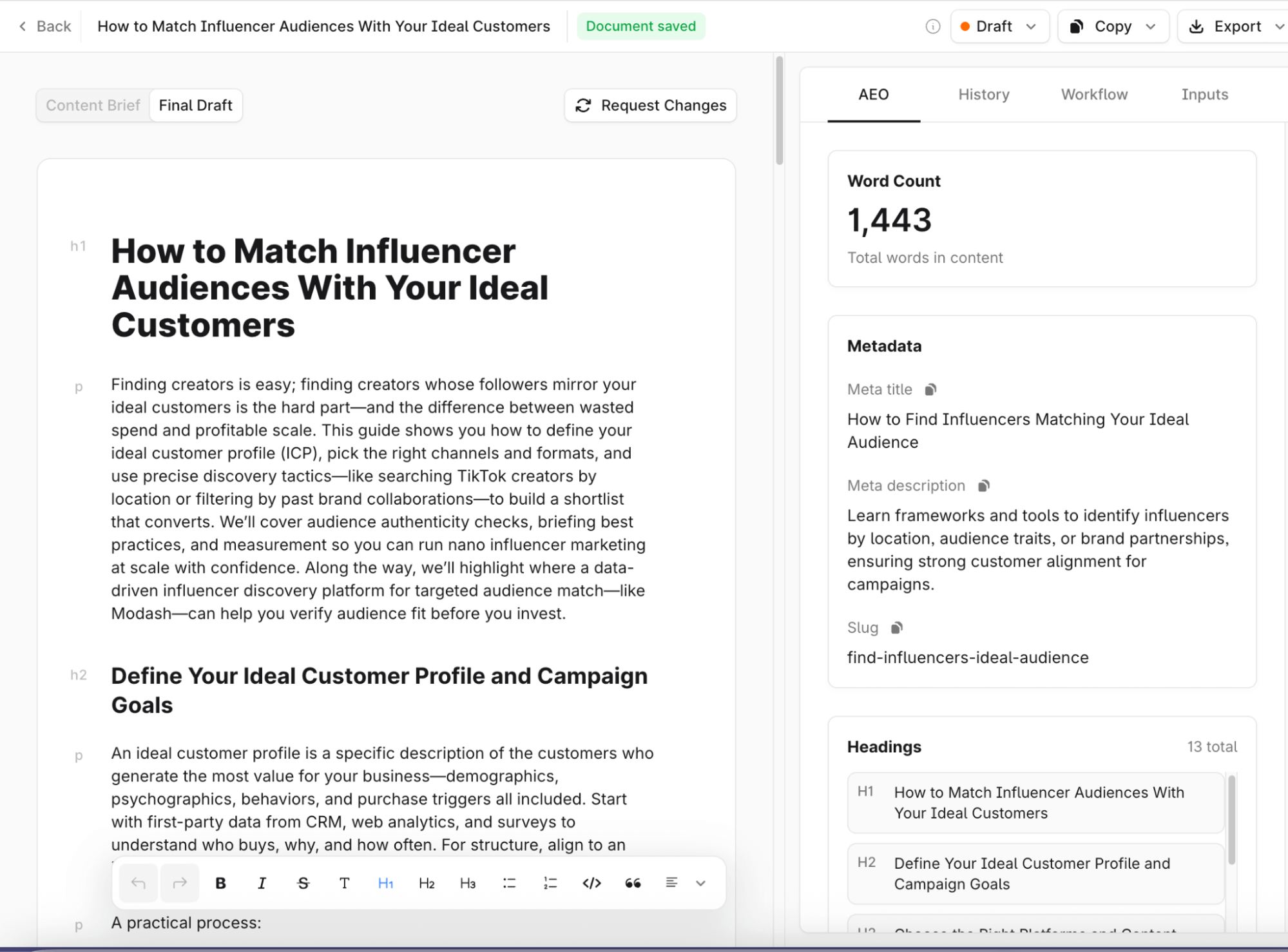
Key takeaway: AirOps can help you create and refresh content at scale, and it does that at a decent quality. Sometimes, it might follow brand guidelines to a fault or make the structure of the article wonky, but those are fixable problems.
AirOps Pro Plan: What needs improvement
AirOps is the perfect choice for many businesses with large content libraries and fast content production. But there are significant drawbacks—especially when it comes to AI visibility—that can make or break your decision. Here are a few things AirOps could improve.
Limited LLM and regional coverage
AirOps' Solo plan only helps you track ChatGPT insights and the Pro & Enterprise plans cover ChatGPT, Gemini, Google AI mode, and Perplexity.
Now, yes, ChatGPT might be the most popular right now, but other AI tools—like Claude, Meta, Grok—are also very popular and widely used. Many people use multiple AI tools anyway—it's not sufficient to rely your strategy on ChatGPT alone.
Profound, for instance, covers 9 Answer Engines in its highest tier plan and continues to add new AI tools at whip speed. When you're investing so much money in an AI visibility tool, you want the tool to scale with your needs.
Similarly, all the insights are also limited to the United States unless you're on the Enterprise plan. This means the data you see is incomplete in terms of both regional and LLM coverage. It's wiser to invest in tools that have global coverage (like Profound), especially if your business caters to people from various locations.
Key takeaway: AirOps doesn't cover many LLMs and regions beyond the United States. There's a possibility they might fulfill these deficiencies in the future, but AI visibility tools like Profound already have this data available today.
The tool is expensive and takes time to provide ROI
The thing that pinched me the most about AirOps is the cost. The Solo plan costs $200/month and the Pro plan costs $2,000/month.
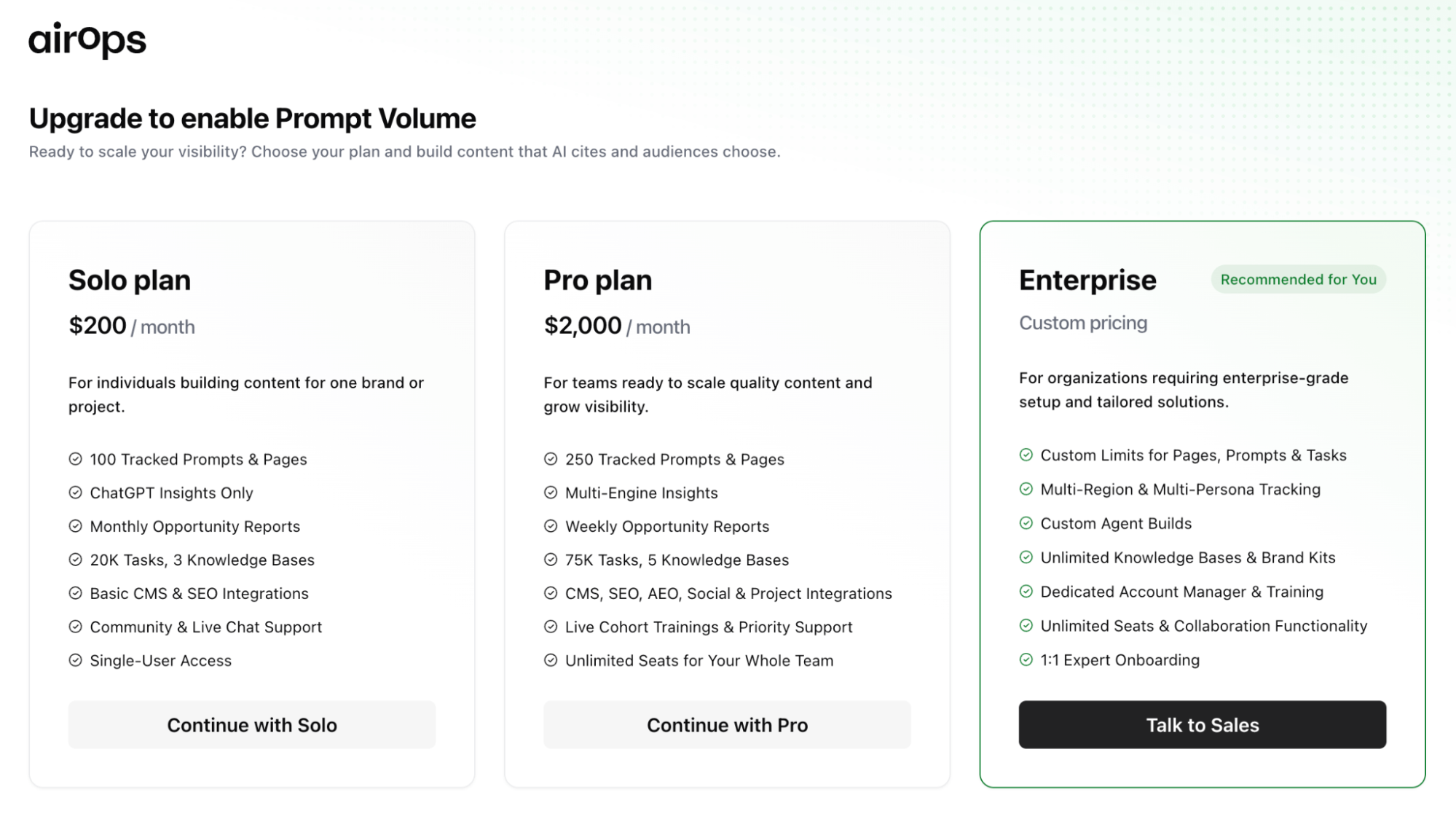
Profound's comparable Starter plan costs $99/month and the Growth plan $399/month—which are much more affordable while offering significantly deeper AI visibility insights.
My issue with the price is that it also doesn't include task-based billing. Many tasks in an AirOps Workflow count as "currency" and while you get 50,000 credits to begin with, you pay more once those finish.
This dynamic pricing concept was my gripe with Semrush's AI visibility tool, too: Task-based billing just makes it too complicated to predict your monthly bill. In AirOps, the pricing is even more complicated because some steps in the workflow count toward your usage while others don't.
In Profound, the pricing is much simpler. You get a fixed number of articles and opportunities in your plan and know exactly how much you'll pay each month.
Lastly, the cost alone might be justifiable for businesses with huge content backlogs and vast content production needs. But it takes a lot of time to get that return on investment because AirOps definitely has a learning curve. It's not too frustrating, but you'll need some time to see the value and set up everything.
Key takeaway: AirOps price begins at $200/month for the Solo plan (that tracks just ChatGPT insights). As your needs scale, it might be out of budget to continue using this tool. The task-based pricing also adds to the overhead and makes pricing a little more complicated.
The AI visibility insights only touch the surface
In AirOps, you can see an overview of your share of voice, overall AI visibility, and a basic sentiment analysis. It's useful if you've just begun your AI SEO strategy and you largely need help with implementing your existing, repeatable systems.
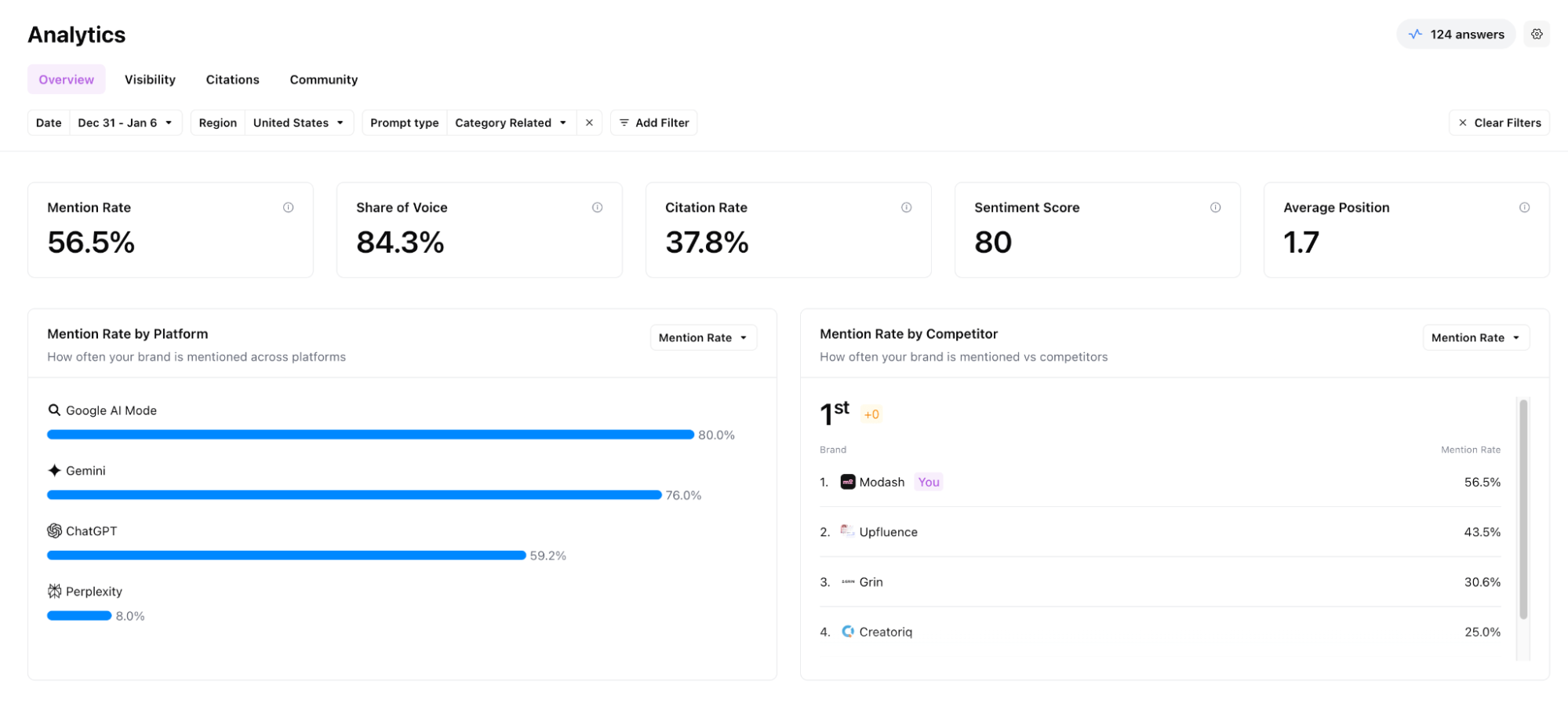
While the data is certainly useful, it doesn't seem enough. For example, I'd really love more insight into sentiment analysis—in what areas is it positive? In which segments is it neutral or negative?
In Profound, for instance, you can see a breakdown of which features in your product are talked about negatively, which are spoken of positively, and understand the key themes surrounding your product. It's so in-depth that there's no room for assumptions or doubts.
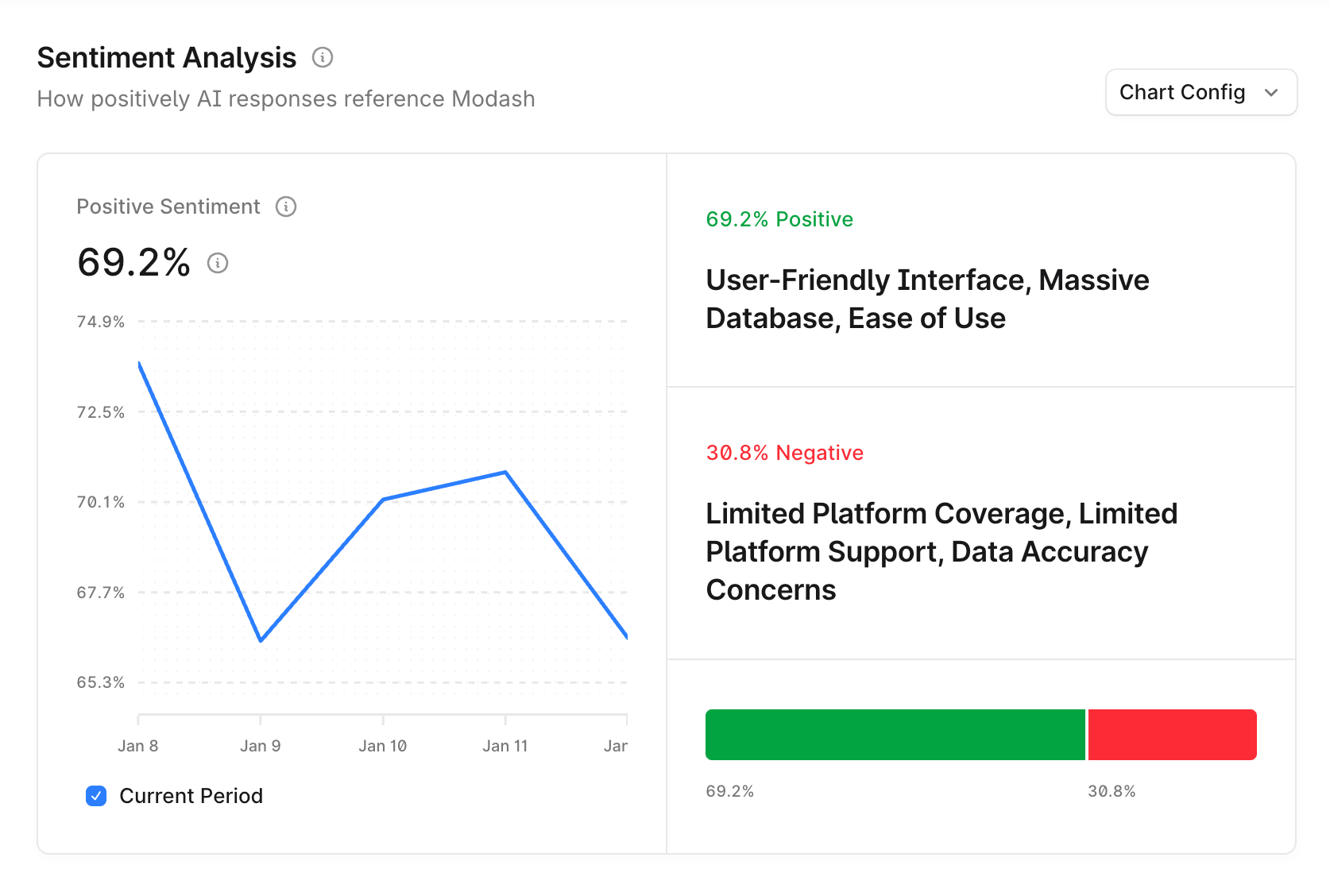
Similarly for citations, AirOps shows basic citation data like your citation share, citing URLs, and competitor benchmarks. Profound goes further by letting you check if your brand appears in top-cited pages for specific prompts and track citations for individual pages on your site.
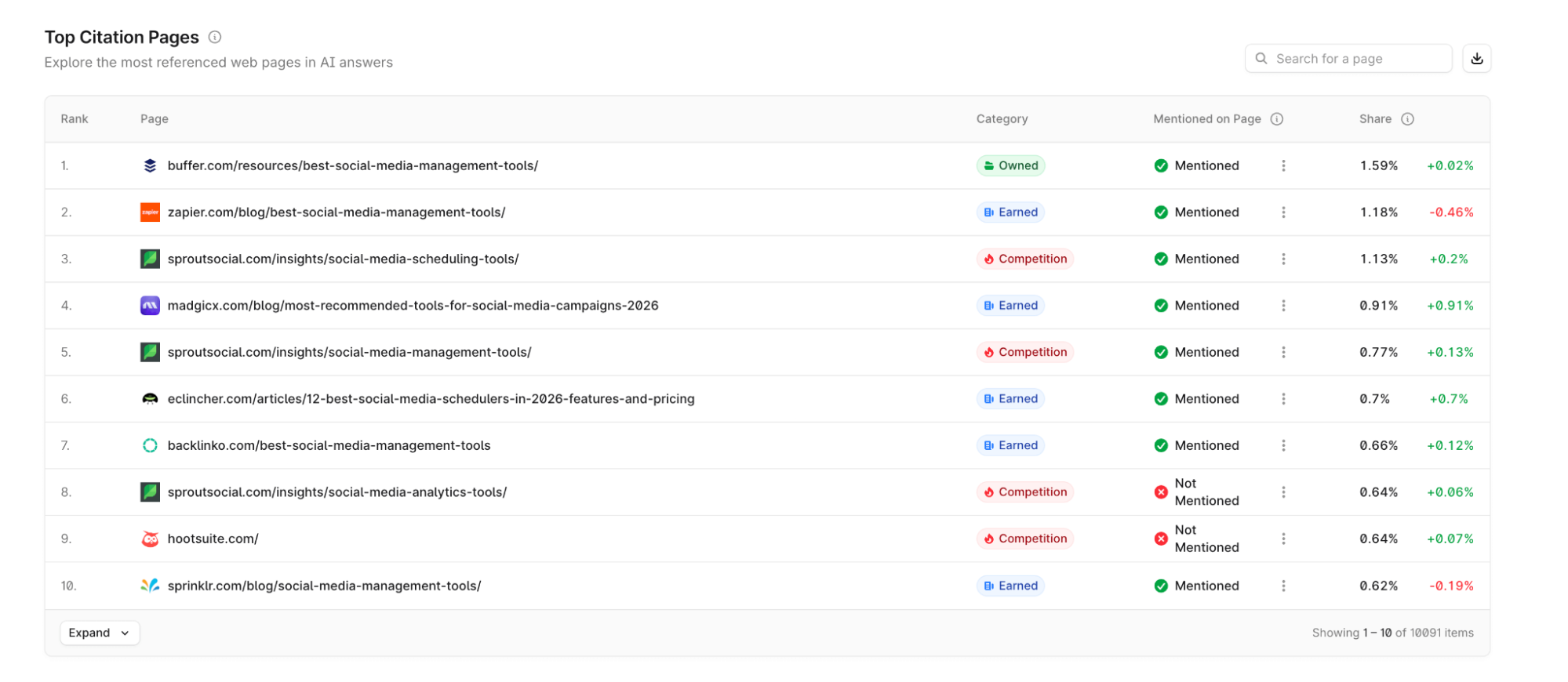
Lastly, the prompt data visibility in AirOps is also scarce. You can see which prompts mention your brand, whether or not your competitors are mentioned, and the platform breakdown. But that's about it. You can't see the prompt's popularity, monitor your visibility for certain prompts, or understand search intent.
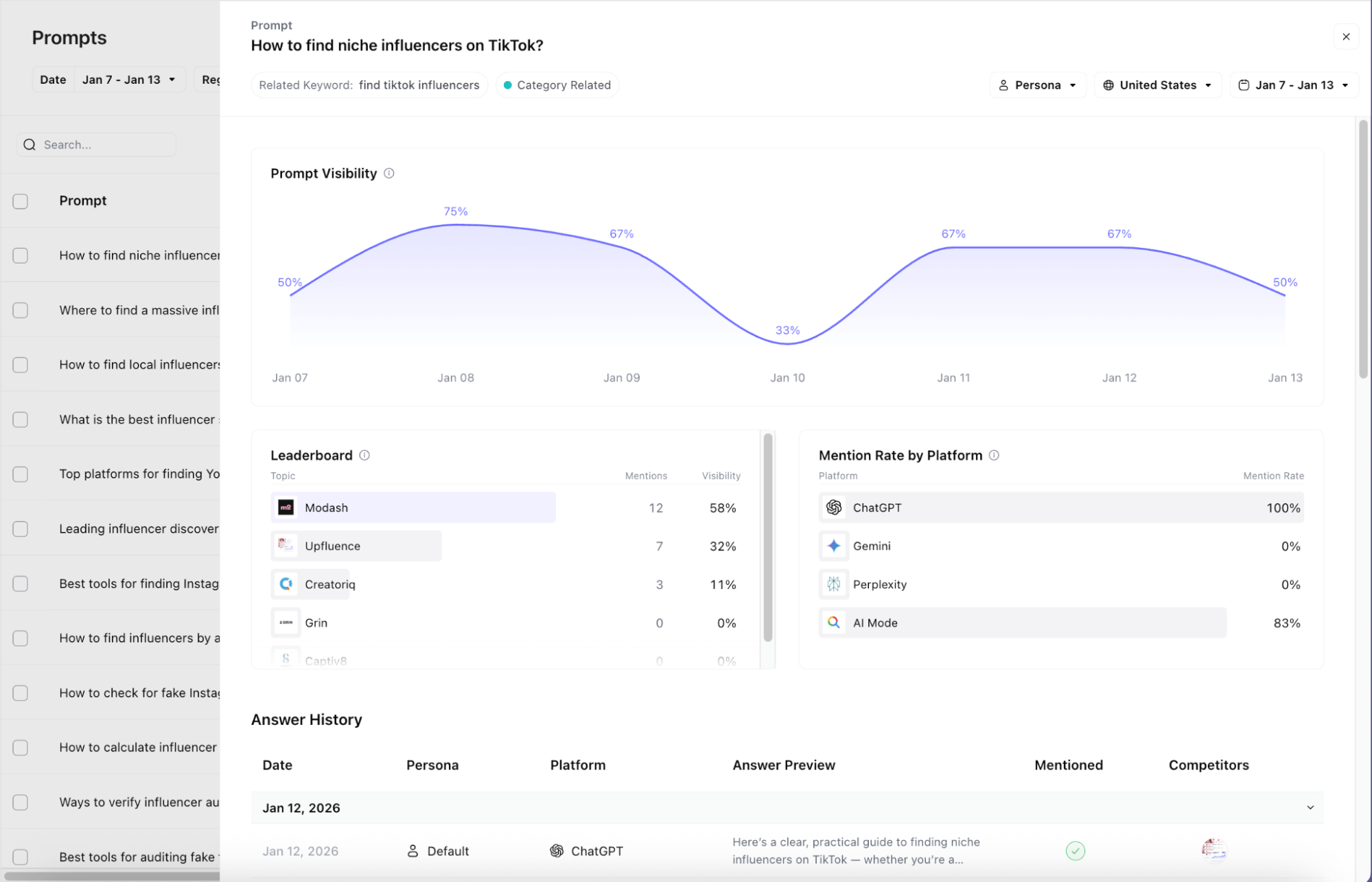
In Profound, you can see your most popular cited pages, track prompt volume, understand search intent, filter for prompts based on demographics (like age, income, regions), see related prompts, and a lot more. It's the complete solution to find the prompts you need to target and capitalize on the ones you're already winning.
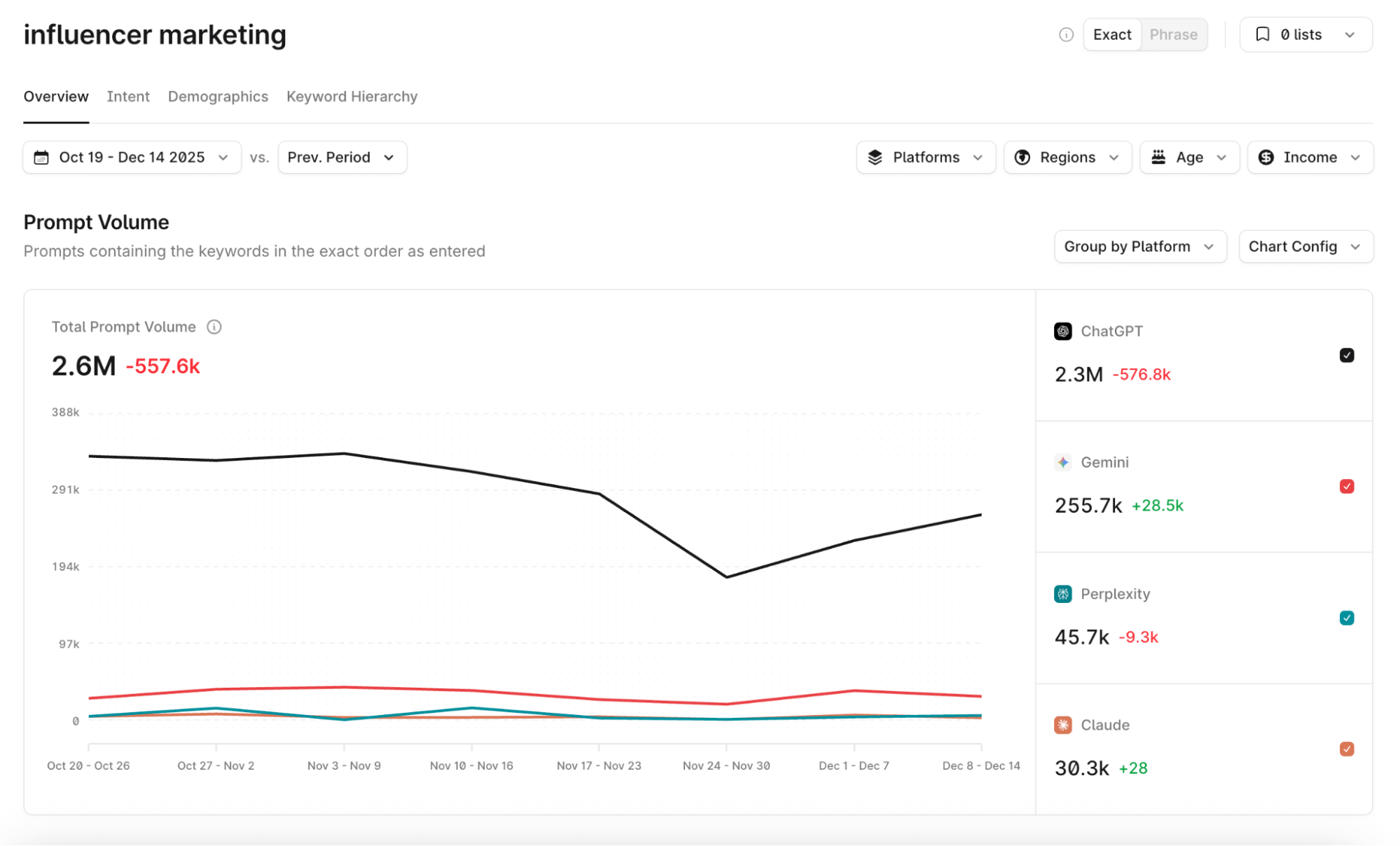
Key takeaway: AirOps AI visibility insights can only coast you along for so long. The limited insight paired with the limited LLM coverage makes it nearly impossible to scale an AEO strategy with AirOps alone.
Opportunities lack context and actionability
AirOps sorts the opportunities it sees for your business to rank better in AI results into various subcategories—like prompt gaps, declining citations, weak content, and more. From here, you can choose to take action on these opportunities by creating a Grid.
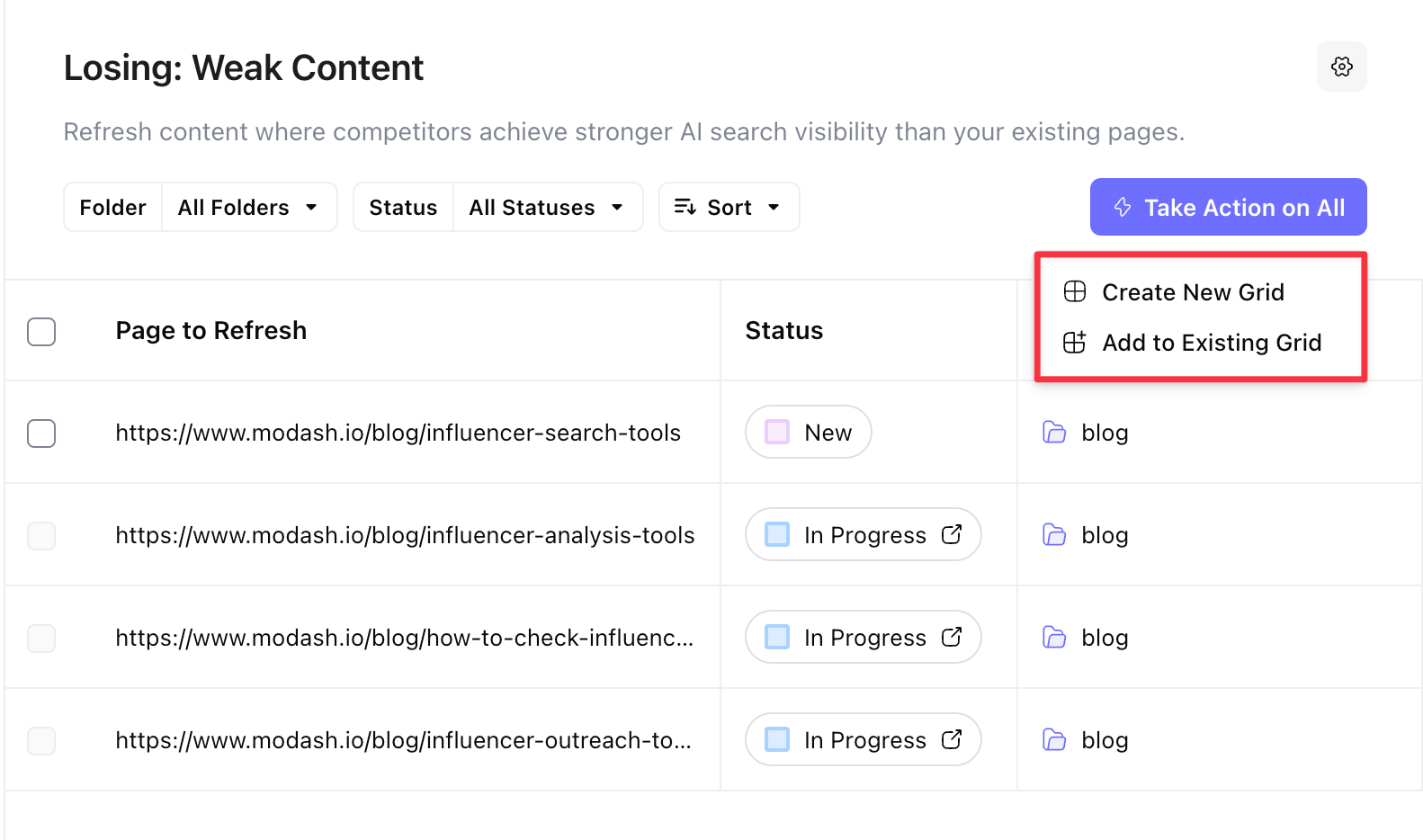
What I would've loved is the grid creating a workflow automatically to implement the AirOps suggestions. And it does do that for a few recommendations, such as AEO refreshes. But for other external suggestions—like "mention gaps" that require outreach—the Grid stays empty.
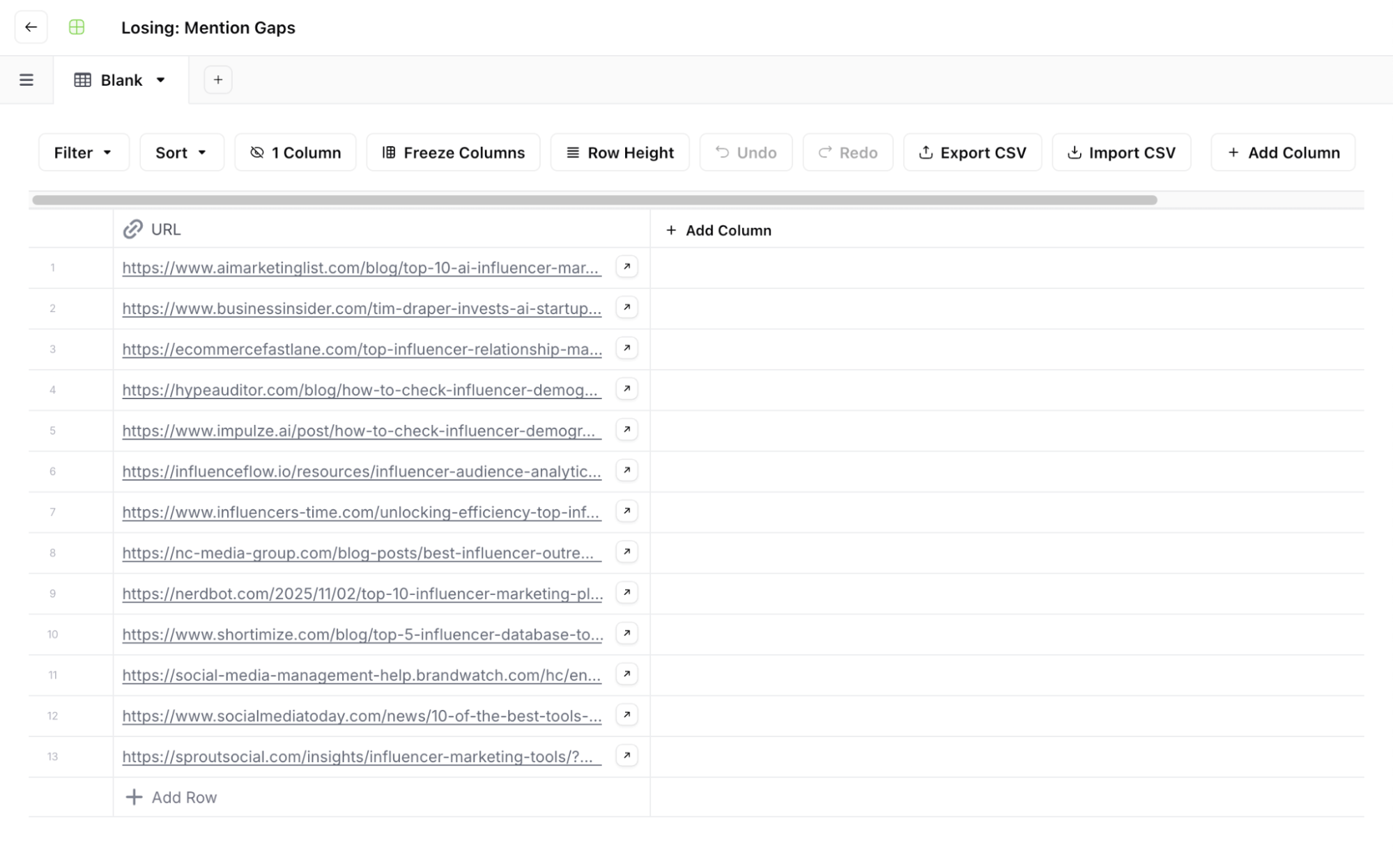
I get that it's a more complex task to implement, but I would've been thrilled if there were some columns with recommendations like "outreach to [name]" or descriptors like "mentions 3 competitors A, B, and C, but not you" so you have some insight on your next steps.
Compare this to Profound, where you get a much more detailed insight into what your move should be to improve your AI visibility (and why the tool recommends its suggestions). When I click on the "Outreach" button here, Profound even crafts a sample email for me to send.
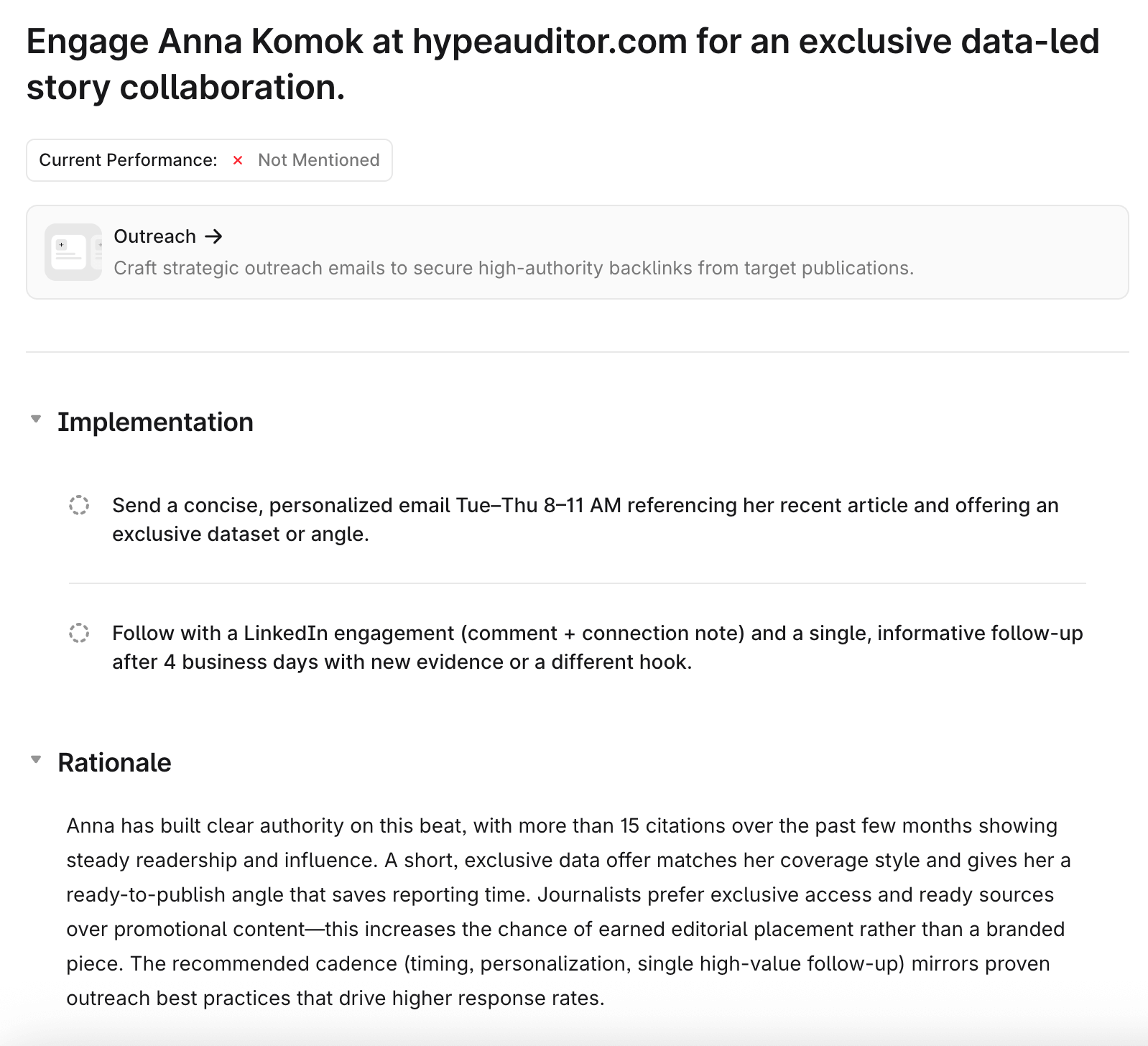
Key takeaway: Many recommended Opportunities in AirOps aren't actionable. You need to understand the why behind the suggestion, find context around it, and (sometimes) implement the recommendation outside of AirOps.
Is AirOps the right choice for you?
I'd recommend choosing AirOps if:
- You don't mind a steep learning curve to unlock the tool's full potential
- You only need surface-level AI visibility monitoring
However, AirOps is likely the wrong choice if you need comprehensive AI visibility data to inform your AEO strategy. The limited LLM coverage (just ChatGPT on the Solo plan), US-only regional data, and surface-level insights make it difficult to build a data-driven approach to AI search optimization.
If you need deep, actionable analytics about your AI visibility—with broad LLM coverage, global regional data, granular sentiment analysis, and truly actionable opportunities—Profound is purpose-built for that. Sign up today and see the difference comprehensive AI visibility data can make for your strategy.