
Good prompt design is the foundation for accurate, actionable AI visibility tracking. Monitoring relevant prompts lets you measure brand presence in AI answers, identify areas that need improvement, and spot search trends.
Focus on irrelevant prompts or an imbalanced list of topics, however, and you'll end up with an unclear (and potentially not actionable) picture of your visibility.
I'll walk you through how to choose the right prompts for AI visibility tracking using a mix of your owned data, your large language model of choice, and Profound tools.
1. Start with traditional SEO inputs
Traditional search engine optimization inputs give you a great foundation for creating an AI prompt list. But that doesn't mean you should plug your keyword list into your AI visibility tool.
Instead, compile the keywords and topic clusters you're targeting for SEO purposes. Then, turn them into the kind of conversational, question-style prompts that people ask in AI search.
Here are a few examples:
- Keyword: "TikTok editing tips" > Prompt: "give me practical TikTok video editing tips to improve engagement"
- Keyword: "best short-form video editing tool" > Prompt: "what's the best short-form video editing tool for creators?"
- Keyword: "CapCut alternatives" > Prompt: "what are some good CapCut alternatives for B2B teams?"
Use your AI chatbot of choice to complete the translation process quickly. Give Gemini or Claude your list of keywords and prompt it to format it as a user question. Make sure to review the output and tweak for language before uploading the list to your AI visibility tool.
SEO inputs are just the first step of building a prompt tracking list. Next, tap into data from a range of internal sources.
2. Gather data from support, sales, and users
Add to your prompt list with data from your team and your users. This step takes work, but it's the right place to spend your time.
Start with your sales team. Ask them what problem areas, pain points, and use cases they hear most often on discovery calls.
Don't forget to ask your sales team about customer needs. What goals are customers trying to achieve with your product? What features are they
Next, check with your customer support team and review your support logs. What issues come up most frequently?
Poll your coworkers, too. Ask them to submit a prompt they'd use to find a company or a solution like yours on ChatGPT.
Then, collect data from leads. Add a "How did you hear about us?" field to your contact form. But instead of just inviting leads to share where they found your company, ask them to share how they found it. What specific prompts did they input into Perplexity or Gemini?
By now, you should have plenty of ideas from your team, users, and leads. Convert them into conversational, question-style prompts and add them to your list.
Depending on which data sources provide the most ideas, your prompt list may skew more toward lower funnel than upper funnel (or vice versa). That's why it's so important to analyze each step of your customer journey and mine each stage for prompts.
3. Consider your entire customer journey
Ideally, you'll have a balanced list of prompts across all customer journey stages. This way, you can track how your brand shows up when people first start exploring problems, when they get serious about buying decisions, and as they experience your solution after making a purchase.
Let's look at developing prompts for each customer journey stage and intent type.
Awareness prompts for AI visibility
Awareness prompts reflect what people search for when they're exploring topics around the solution you provide. People who use these prompts are typically trying to solve a problem or achieve a goal. But they don't know how to do it or which brands might be able to help.
To design awareness prompts, focus on queries with an informational intent. Here's how awareness prompts might look for a CRM platform:
- How do I manage customer contact information?
- Can I track customer contact data in a spreadsheet?
- Tool to automate follow-ups for warm leads
Evaluation prompts for AI visibility
Evaluation prompts reflect what people look for after doing their initial research and compiling a list of potential options to consider. People who use these prompts are usually trying to compare options or look for the best solution in a category.
To design evaluation prompts, focus on queries with a commercial intent, including some branded options. Like these:
- What's the best CRM for small businesses?
- How does HubSpot compare to Pipedrive for startups?
- Easiest CRM for small teams
Conversion prompts for AI visibility
Conversion prompts reflect what people search for when they're finalizing the decision-making process. People who use these prompts are generally ready to buy, so their queries show high intent.
To design conversion prompts, focus on queries with a transactional intent. Like these:
- HubSpot subscription tiers
- How do I book a Pipedrive demo?
- Does Close have a Black Friday deal?
Post-purchase prompts for AI visibility
Post-purchase prompts reflect what people look for after they've already converted and become customers. People who use these prompts are often looking for information on how to complete tasks or resolve an issue.
To design post-purchase prompts, focus on how-to and support-related queries. Like these:
- How to contact Close CRM support
- How do I set up email tracking in HubSpot?
- Pipedrive AI email generator setup
Once you have a solid list of topics to track, upload them in bulk to Profound.
4. Build out your prompt list with help from Profound
Need more ideas to build out your list? Expand your prompt set with Profound's prompt designer.
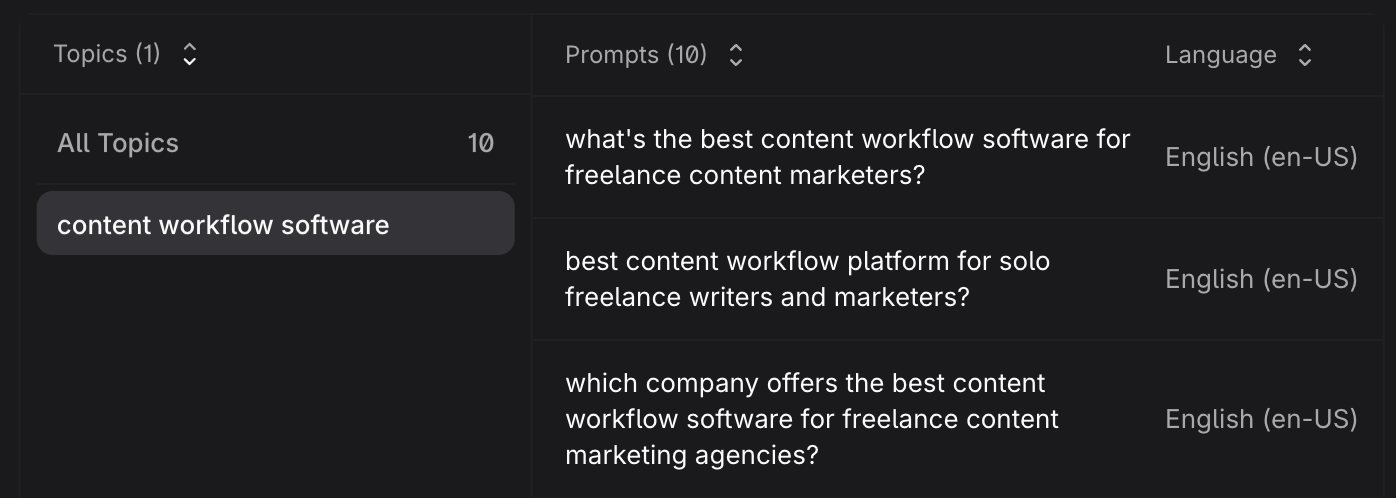
Just select a topic from your list and input the number of prompts you want to generate. Confirm the country, language, and AI engine you want to use to shape these prompts. You can also add custom instructions, such as the customer journey stage or intent type to focus on.
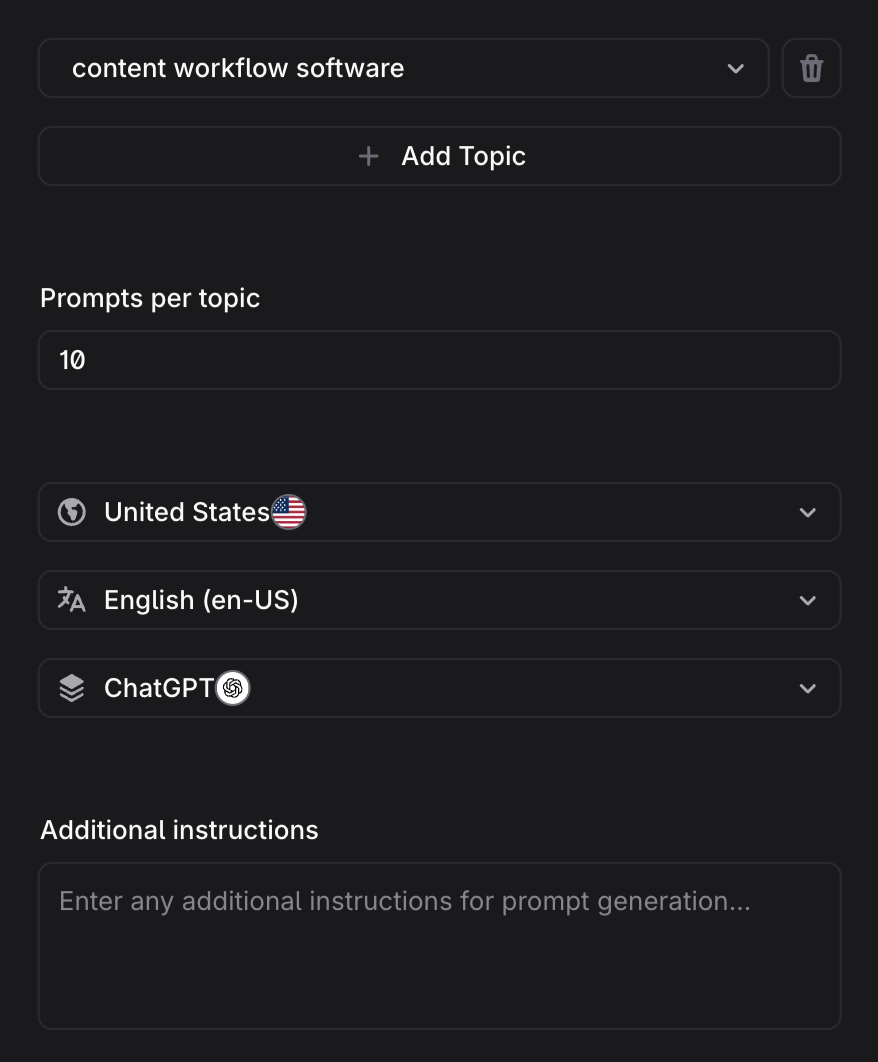
After reviewing your topic and analyzing AI-driven search results, Profound generates a list of relevant prompts that you can add to your list with one click.
5. Validate prompts by checking volume
Some prompts appear in AI tracking data far more often than others. This can make them more valuable since they generate a higher volume of visibility tracking data.
Think about it like this: A prompt might sound great in theory. But if no one is actually using it in practice, tracking it won't tell you anything about your brand's visibility.
As you build your list, validate prompts by checking their search volume. Profound's Prompt Volumes tool makes it easy to explore topic volume across different answer engines.
Input a topic you're thinking about tracking. Then, check the overview to see the total prompt volume, or how often AI user prompts include the keyword or phrase.
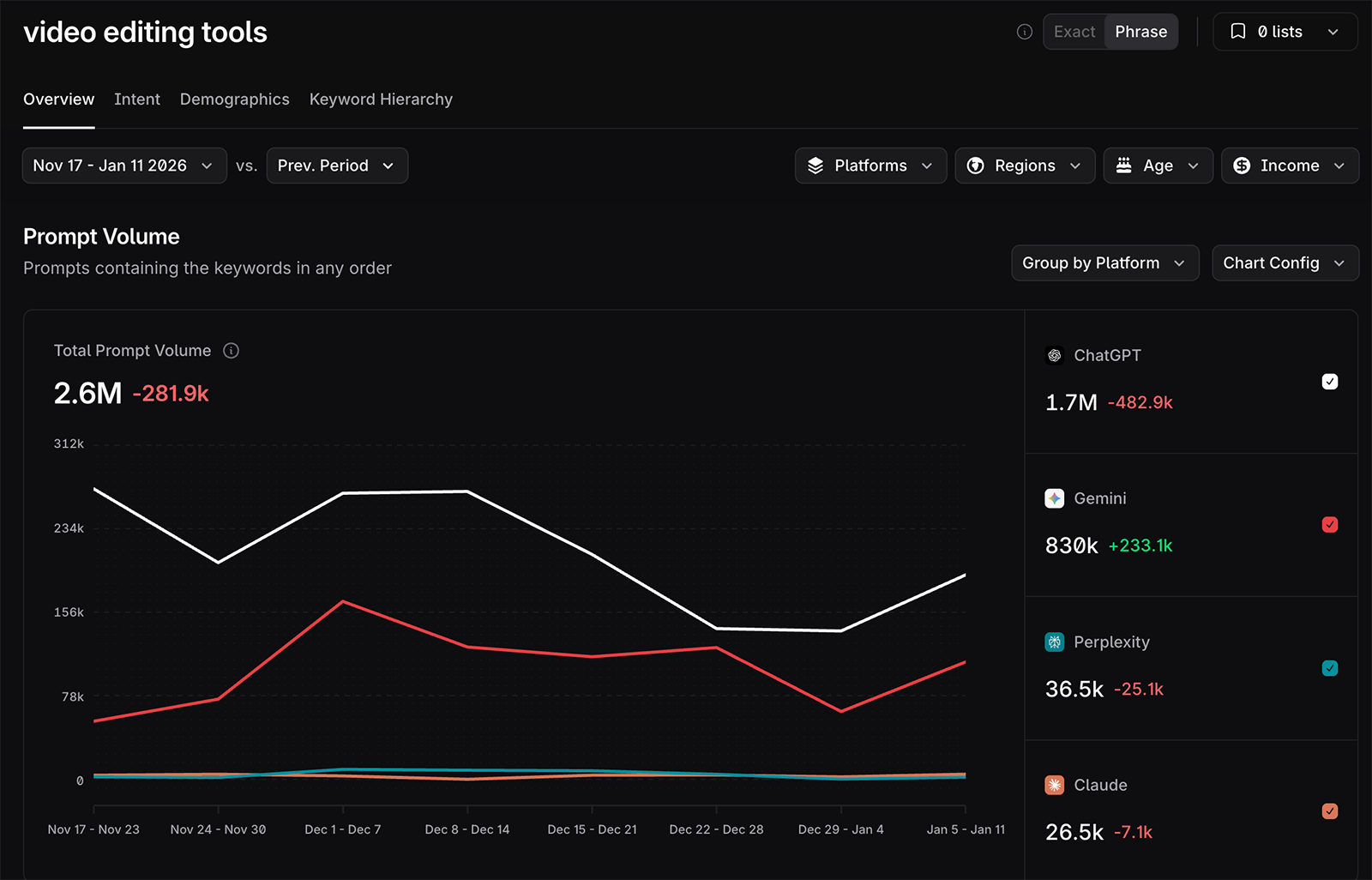
Profound provides comparative data so you can see how the search is trending over time. The platform also breaks down prompt volume by answer engine so you can see which ones are most (or least) important to track.
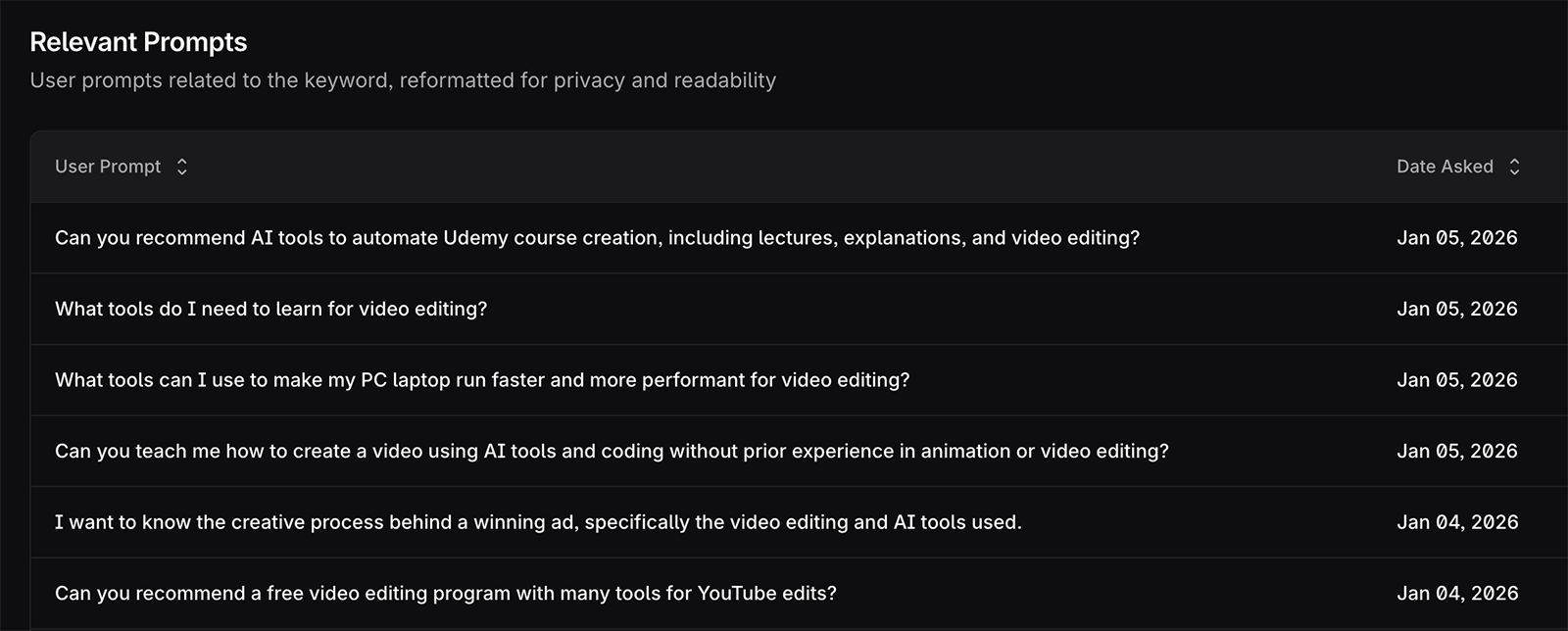
For ideas for specific prompts to track, scroll down to the relevant prompts section. Add any relevant prompts to your list.
6. Track AI visibility and modify your prompt list over time
As you track AI visibility with Profound, your dashboard will automatically suggest relevant prompts based on real user prompts that drove citations to a page on your domain.
You'll find them on your Prompt Volumes dashboard, organized by the page that earned the citation. Like this:
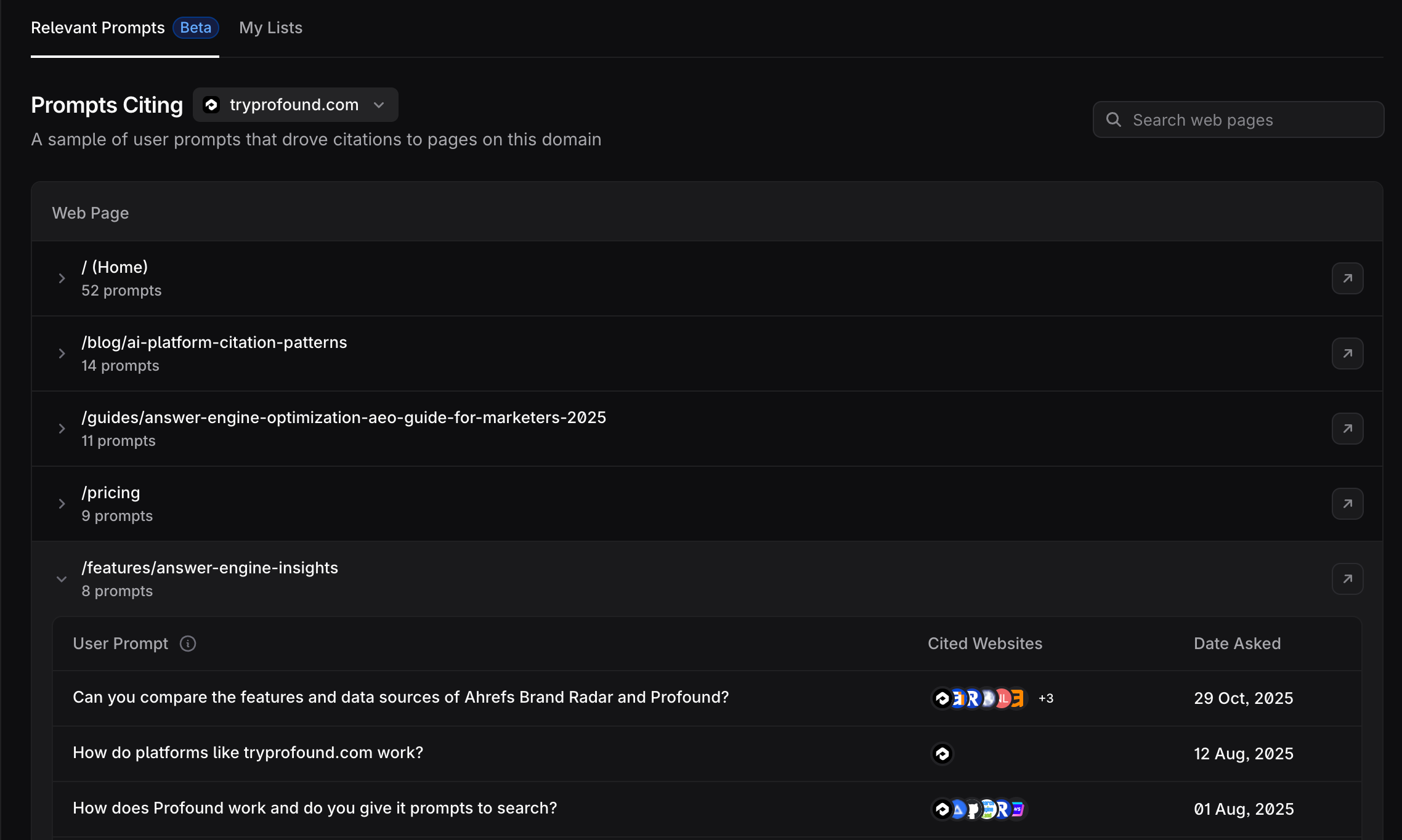
Click any of them to view the full prompt and the complete list of citations.
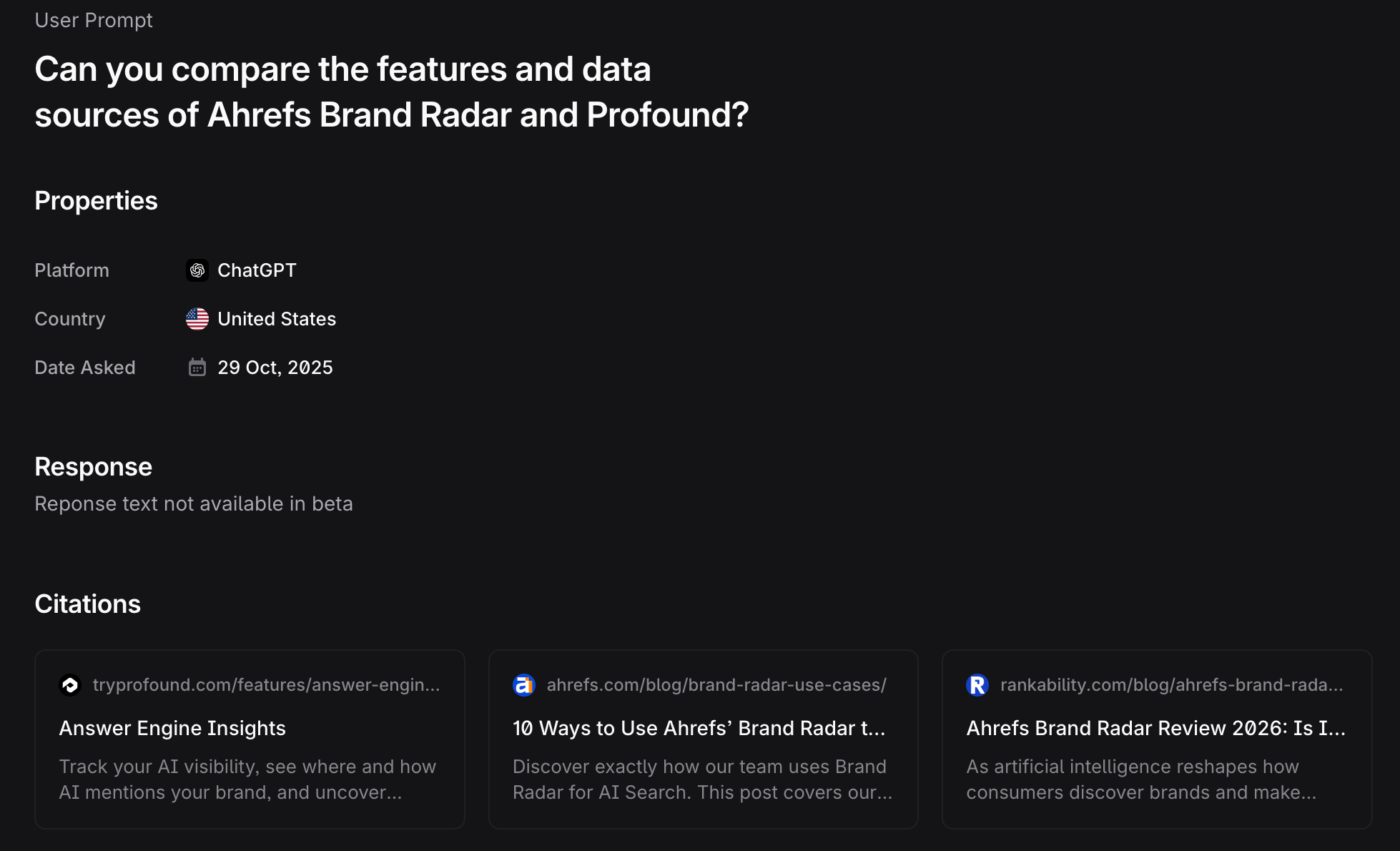
Reviewing these insights can be helpful for discovering which competitors’ prospects compare your brand against, what their most pressing questions are, and how they phrase prompts. Make note of any prompts you want to track and add them to your list.
Whether you add or remove prompts, it's a good idea to modify and optimize your list over time. This way, you track what leads and customers are actually searching now and you continue to build an accurate picture of your brand's visibility.
7. Expand your prompt list with query fanout data
When AI engines generate responses to user questions, they don't usually have fully formed answers ready to share. Instead, they break out prompts into multiple search queries, retrieve information, and synthesize what they learn into a coherent answer.
For example, when a user asks, "what's the best short-form video editing tool?" LLMs might break it into queries like:
- "best TikTok editing tool in 2026"
- "video editing app features"
- "video editing tools for professionals"
In other words, your brand's visibility often depends on how well it answers not just the original prompt but also the multiple other queries that appear in this breakdown.
Known as query fanout, this behind-the-scenes step is largely hidden from users. But Profound's Query Fanout tool automatically reveals the data behind the prompts you track.
Expand any of your tracked prompts to see the average queries per execution, plus the queries themselves and a count for each.
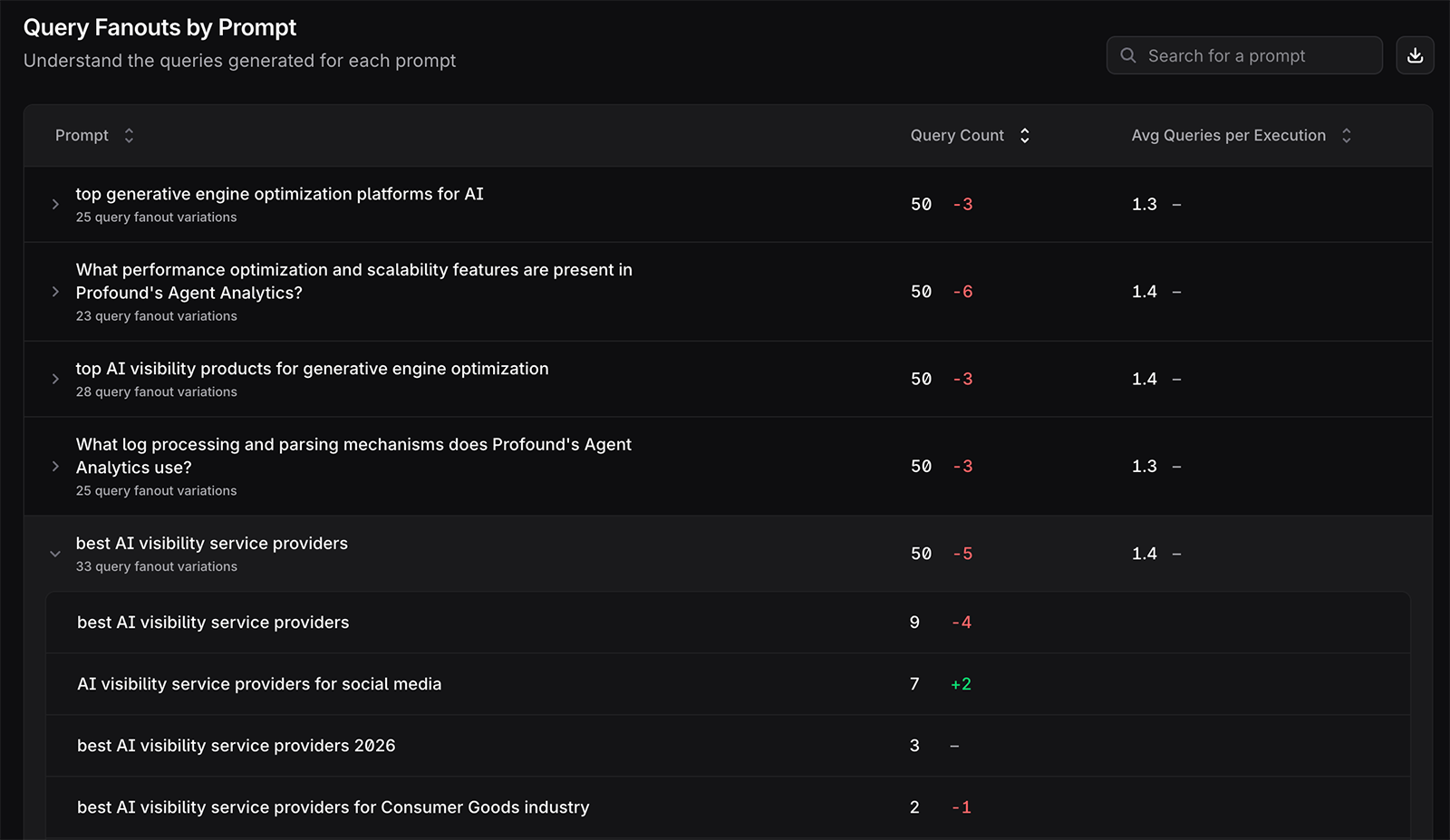
Notice any trending queries with a large positive number shown in green? Consider adding any relevant queries to your list of tracked prompts.
Bonus: Best practices for prompt design
Keep these best practices in mind as you develop and refine your prompt strategy.
Aim for 100 prompts to start
There's no magic number of prompts that every brand should track. The right number for your organization depends on your industry, the depth of your product offering, how specific you want to get with your LLM tracking, and other factors.
Profound users generally track anywhere from 100 to 1,000 prompts. Monitoring a couple hundred prompts is pretty typical.
But that doesn't mean you need exactly 200 prompts to begin monitoring AI visibility data. Aim to start with a list of 100 prompts and add to it as you gather data and get to know which prompts matter most for your brand.
Use natural language for prompts
Keywords and SEO inputs are a great place to start creating a set of prompts to track. But in most cases, you won't want to use these exact inputs.
When developing your list, think about how people interact with answer engines. Compared to keywords, prompts are more conversational and use natural language.
So, instead of entering "best running shoes" into a tool like ChatGPT, they ask something along the lines of "what running shoes are best for my first marathon?"
Prioritize unbranded prompts
Generally, you'll get the most useful data by tracking unbranded prompts at the category level. This approach gives you visibility into the entire dataset of AI responses for a prompt. It's crucial for understanding the bigger picture of how visible your brand is on the topics that matter.
In contrast, primarily tracking branded prompts means you only see what people are asking about your company, products, or services. That's useful for analyzing post-purchase AI mentions. But it won't tell you much about how prospective customers are researching the types of solutions you offer.
Similarly, it's helpful to track "competitor vs competitor" or "alternatives to [brand]" prompts, especially at the evaluation stage of the customer journey. These prompts should make up a small percentage of your overall list, though.
So, branded prompts certainly aren't off limits. But on balance, you should aim to track far more unbranded than branded prompts.
Consider geographic location
All prompts should reflect the location you want to target and should incorporate the phrasing your ideal customer uses when interacting with large language models.
For example, say your customers are based in the US and primarily speak English. Your prompts should reflect the language and phrasing your ideal customer uses when interacting with LLMs.
In some cases, you'll need to add more detail. For example, incorporate relevant regions, cities, or neighborhoods when you track prompts for a local business.
With Profound, you can easily set up country-level analysis out of the box. This allows you to track how your prompts perform in the US, for example.
But you also have the option to set up region-based prompting across 80+ countries. Profound also supports analysis at the state or city level.
These options are ideal for collecting granular data on AI-generated answers to real user prompts and understanding where your brand performs best (and where your visibility needs work).
Tag prompts for added context
As your list grows, it becomes increasingly helpful to organize prompts so you can filter them easily. Tags let you analyze prompts by theme so you can:
- See how your brand performs in a particular area, such as specific product features
- Track prompts across categories when there's overlap between topics
- Filter large prompt sets without getting overwhelmed by the data
It's fastest to add tags via a bulk upload. But you can also add tags from your Profound dashboard. Open the prompt designer, find the one you want to edit, and add a new or existing tag.

Then, apply relevant tags to get deeper insights as you analyze your visibility data.
Ready to begin building your prompt list? Book a demo of Profound and get personalized into shaping your prompt set and tracking your brand's AI visibility.


