


The prompts worth tracking are the ones that match what people actually ask AI. For any topic, some people want the basics, some are comparing options, and some are ready to buy. Each of those questions should have its own prompt in Answer Engine Insights.
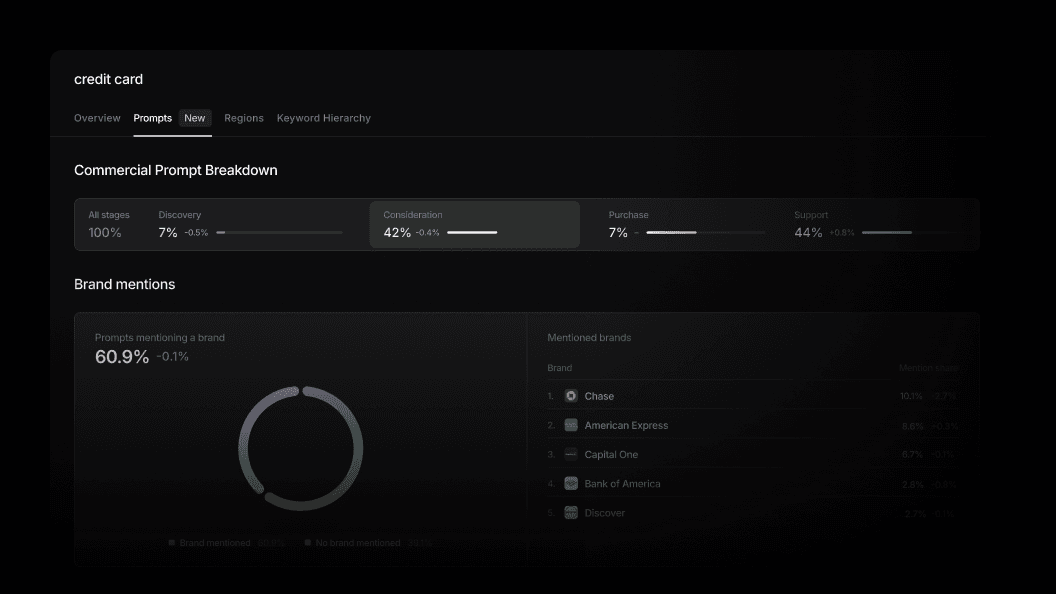
Prompt Analysis, the new Prompts tab in Prompt Volumes, takes keyword demand a level deeper. It uses real conversations to show where people are in their buying journey, whether they name a brand, and what they're asking AI to do. Each pattern comes with example prompts you can track, so the prompts you measure reflect the demand behind them.
What Prompt Analysis shows
Where people are in the buying journey: The Commercial Prompt Analysis shows how a keyword's conversations split across Discovery, Consideration, Purchase, and Support. Compare any date range with the previous period to see which stages are gaining share, and filter by platform and region for in-depth analysis.
Whether people name a brand: Switch between all, branded, and unbranded prompts. Unbranded prompts show where people are still open to any brand, which is where AI visibility is most up for grabs.
What people want from AI: Prompts are grouped into categories such as getting a recommendation, comparing options, and checking the price. Expand any category to see the more specific questions inside it.
Which brands AI mentions: See how often prompts mention a brand, then switch to responses to see how often AI answers do. The mentioned brands list shows which brands lead, so you know who AI recommends while people are still deciding.
Example prompts you can track: Each pattern comes with examples. Tailor them to your brand with the brand-relevant prompts toggle, or turn it off to see the wider market. Track any example in Answer Engine Insights, or ask your AI Marketer to draft more prompts that cover the pattern.
How Profound customers use this
Check your tracked prompts against real demand
Compare the stage and pattern mix for your core keywords with the prompts you track in Answer Engine Insights. Where a pattern carries real demand but has no tracked prompts, track its examples so your prompt set reflects how people actually ask.
Find the recommendation questions to win
Filter to “Consideration” and “Unbranded” prompts, then open the “Recommend” category. See which brands AI recommends and which pages it cites for those questions, brief a page in the format earning those citations, and track those prompts to see whether it moves visibility.
Spot shifts in how your market shops
Compare the current period with the last to see which stages and categories are gaining share. When more people start asking to "Check the price," track prompts for it and update the content that answers it.
Set a visibility baseline before a product launch
Before a new product or product line goes live, run Prompt Analysis on its launch keywords to see how buyers already ask about the category. Ask your AI Marketer to draft prompts for the largest patterns, keep the strongest, and track them in Answer Engine Insights under a launch tag. By launch day, you have a baseline, so you can see whether launch content earns visibility and which brands AI recommends until it does.
Get started
Prompt Analysis is available today for all Profound customers. To try it, open Prompt Volumes, search for a keyword, and select the "Prompts" tab.
If you're not yet a Profound customer, get a demo to see it in action.

