
There is no shortage of signals for marketers to act on: visibility shifts, citations move, sentiment dips, a competitor launches. One of the hardest parts of the job today is knowing which of these signals to act on.
Today, we're launching a completely redesigned Projects feature to answer that question. A Project is a shared workspace for one of your biggest initiatives, where your team and your AI Marketer (Aim) work towards the same goal and with the same shared context. Aim is constantly digging into your data, extracting true signal from noise, and helping you get the work done inside of Profound.
Real marketing work doesn't fit in a single chat
A product launch, a repositioning, or a campaign to repair sentiment runs across many conversations, many weeks, and usually many people. Chats built for one-off questions were never a good home for that.
The friction was familiar. You re-explained the goal every time you opened a new chat. Outputs were hard to find again. Teammates got work as forwarded chat links. And there was no place where your team and Aim could pursue the same outcome over a month or a quarter.
Projects now address exactly that. A Project is a container of chats with a shared goal, shared context, and shared members. Aim learns from everything inside it and surfaces what to do next.
What's in the new Projects
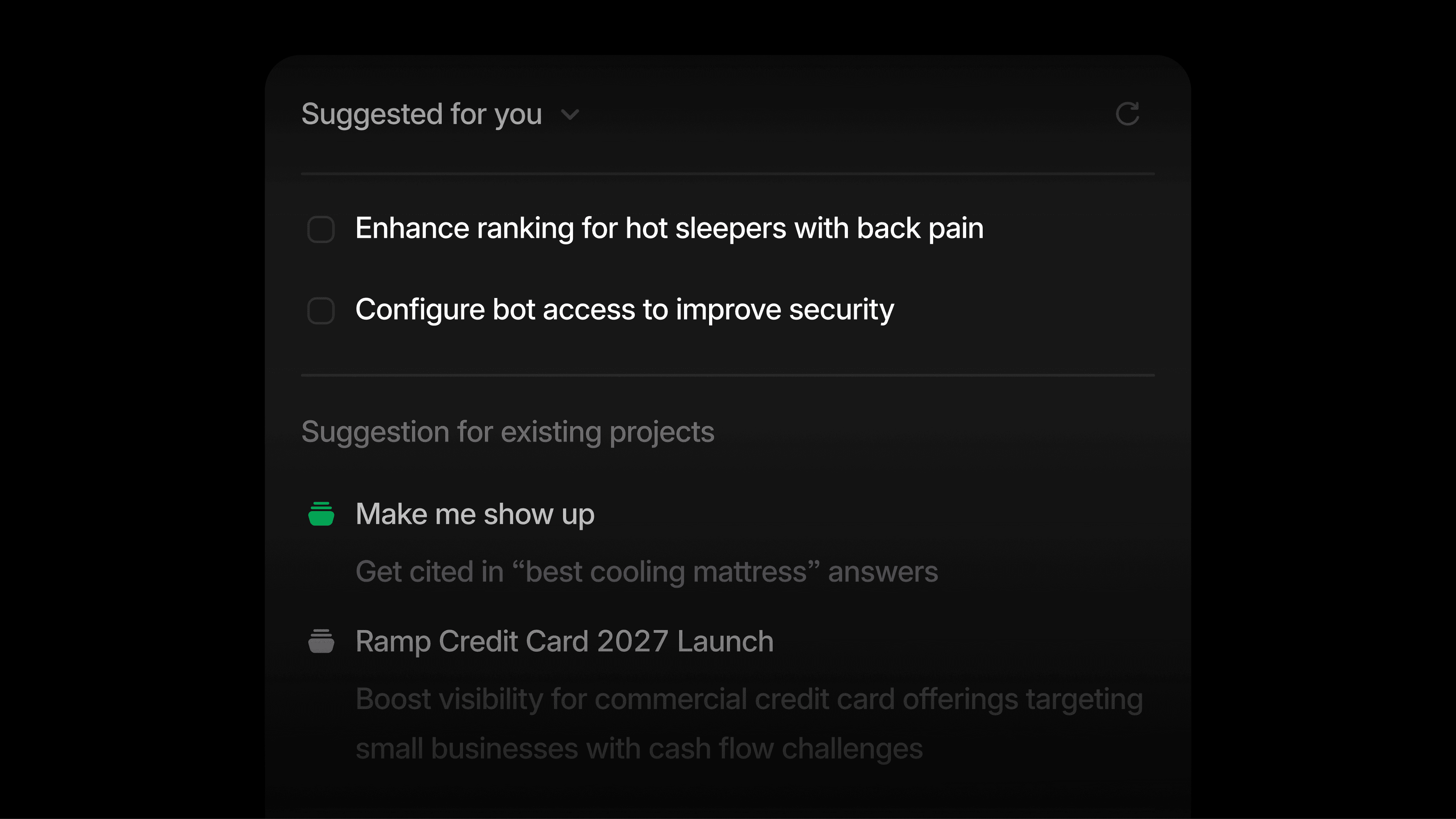
Proactive suggestions for your highest-priority work
Aim continuously analyzes your Profound data, including Answer Engine Insights, Prompt Volumes, and Agent Analytics, along with your brand context. It then suggests work in two ways:
- New Project suggestions. A new initiative Aim thinks your organization should run, with a description and initial tasks. These are generated regularly and visible to your whole organization, so anyone can pick one up.
- Task suggestions. Specific work worth doing next inside an existing Project, based on its context and previous chats.
Every suggestion opens into a detailed view with the evidence grounding it, a summary, the supporting metrics, and a plan. You can adjust the scope, accept it, or archive it. Archiving with feedback helps Aim learn what isn't relevant to you.
Add context once, and the entire Project uses it
Add files, connect Context Manager, or select Knowledge Base items to a Project, and every chat inside it starts with the right information. You can also add instructions to shape how Aim behaves in that Project, such as tone, constraints, and goals.
A shared place to work with Aim
Projects are private by default. Share one with specific teammates or your whole organization, and everyone sees the same chats, context, and outputs, so no one works in a silo or reinvents the wheel. All documents, sheets, and images are collected in one Artifacts section inside the Project, so nothing gets lost.
Agent runs are chats too, which means they can live in a Project. Reference an Agent with "/" to trigger it right where the work is happening.
A new homepage for faster action
With the release of Projects, we’ve also redesigned the Profound homepage to better align with how you work in Profound. It pulls three things into one view: your AI Marketer's suggestions, your active Projects, and anything waiting on your review.
How teams use Projects
A good Project has a clear goal, a body of context, and work that unfolds over weeks. Here are the patterns we see most.
Launches and campaigns
- Product launch visibility. Add the launch brief, positioning doc, and target prompts as context. Use chats for landing page copy, comparison pages, and publisher pitches. Suggestions flag prompts where competitors currently own the answer and citation pages to target before launch day.
- Seasonal or event campaigns. Bring in last year's assets. Suggestions point to pages that still get cited and are worth refreshing, and to new prompts spiking in volume.
Fixing a problem Profound found
- Sentiment repair. A Project like "Rebuild trust in our pricing" often starts from a Project suggestion when negative claims appear. Chats rewrite the pricing page and draft a transparency post. Suggestions track whether the claims recede.
- Accuracy correction. When AI engines state wrong facts about your pricing, features, or availability, use your source-of-truth docs as context to find the pages models cite, draft corrected content, and plan outreach to third-party pages carrying the error.
- Citation displacement. When a competitor replaces you as the cited source on a topic, run a gap analysis of their page versus yours, brief a refresh, and pitch earned media.
Ongoing programs
- Topic ownership. One Project per priority topic, like "Make me show up for hot sleepers with back pain." Suggestions accumulate as new prompts, citation opportunities, and competitor movement appear.
- Competitor watch. One Project per key competitor, with your battlecards as context and suggestions when they overtake you on a prompt or earn new citations.
- Content refresh and digital PR. A standing Project keeps cited pages current, with suggestions for pages losing citation share. Another targets the listicles and roundups AI engines cite for your category, flagging publishers you're missing from.
Teams and agencies
- Agency client workspaces. One Project per client, loaded with their Brand Kit and Knowledge Base, so every chat starts with the right background. Add the client as a Member to share outputs.
- Quarterly AEO planning. An organization-wide Project where leadership reviews Aim's Project suggestions, decides which to accept, and tracks them.
- New market or region entry. Local positioning, translated assets, and regional competitors as context, with suggestions scoped to that region's prompts and engines.
Get started
The new Projects are available now from the Projects page. If you used the previous version of Projects, your tracked Projects have been moved to the Archive in a read-only format, and we'll soon support migrating them into the new version.
Not yet a Profound customer? Get a demo and see what your AI Marketer would suggest first.


