
Surfer has been a loved name in the content optimization space. Its SERP-driven writing suggestions have helped a lot of marketers (including yours truly) tailor their content for Google.
In September 2025, the company added the AI Tracker that monitors how often your brand shows up in AI tools.
While the tool is still new (it’s 2026 as I write this), I tested the AI tracker to see how it performs as an AI visibility tool—and how it stacks up against specialized AEO platforms like Profound.
Here’s what Surfer AI Tracker does well, where it falls short, and whether it’s worth your spend. For this article, I’m using Modash as an example.
Summary: AI Tracker is a solid SEO add-on, but not built for serious AEO
Surfer’s AI Tracker is a solid addition to an already mature content optimization platform. The closed-loop workflow, daily refresh, easy setup, and fanout queries are genuine strengths—and if you’re already paying for Surfer’s Content Editor, AI Tracker slots in without adding another vendor to your stack.
But it’s an SEO tool with an AEO feature bolted on, not a purpose-built AI visibility platform. If you’re looking for deep AI visibility insights, real prompt demand data, actionable recommendations, and purpose-built AEO infrastructure, Surfer isn’t enough. Here’s the TL;DR on the pros and cons:
Surfer’s AI tracker: What it does right
Surfer’s AEO offerings are neat if you already have a subscription to the tool for optimizing your articles for Google. Here’s what I liked about the tool:
It fits perfectly into Surfer’s SEO workflow
The best thing about Surfer’s AI Tracker is that it lives in the same platform where you already write, audit, and optimize content. If you’re a Surfer user, your AEO workflow becomes a single loop instead of three disconnected tools.
Here’s how it plays out:
- The AI tracker shows me the exact prompts where my visibility lacks
- I use the Content Editor to create outlines/content for those prompts
- I optimize the content for AI search myself or by using auto-optimize
- I track my AI and SEO visibility for the topic
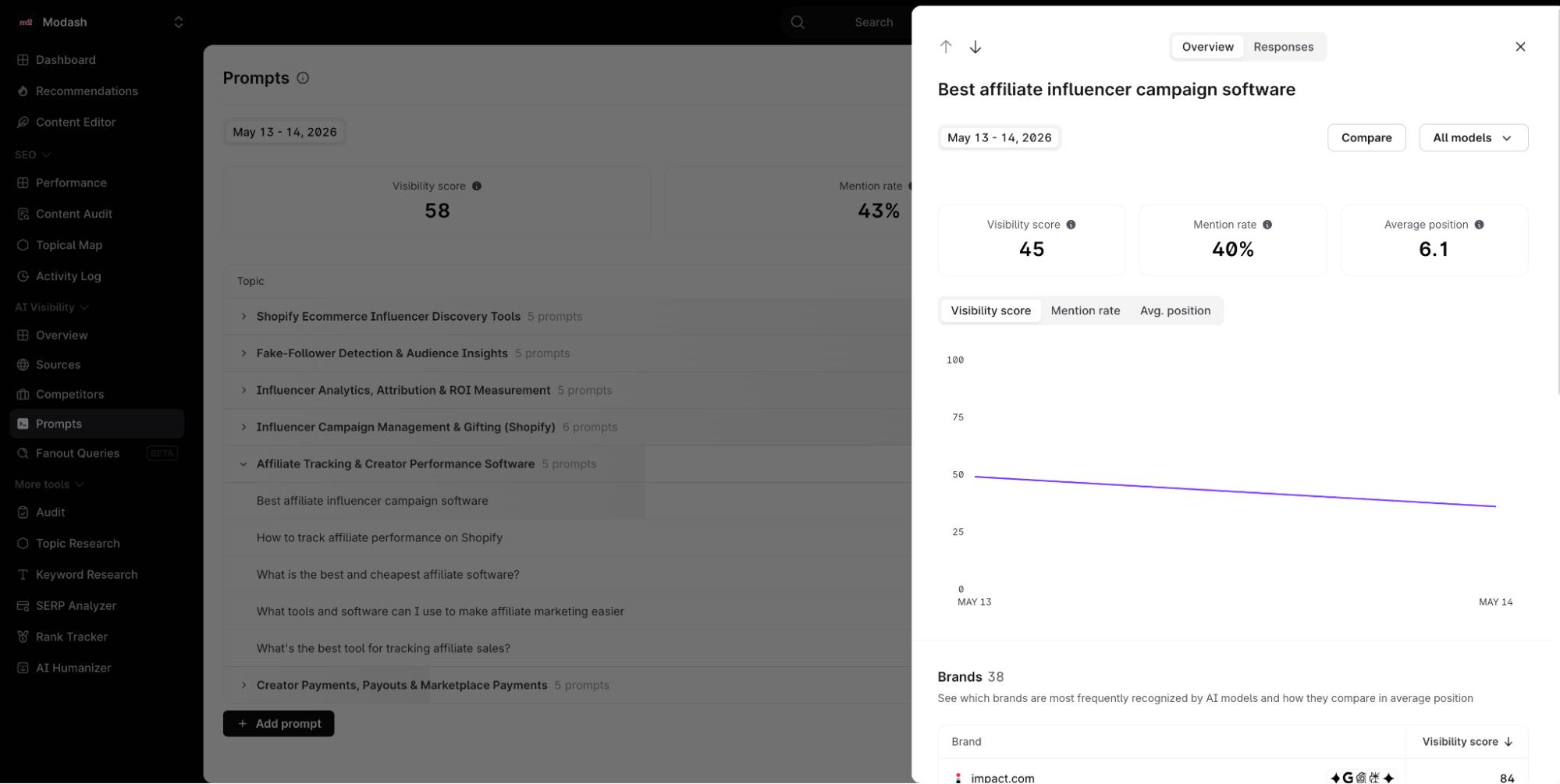
That track → diagnose → fix → monitor loop is well-designed. It cuts down on the context-switching tax most AEO workflows still impose, and it makes the “find and fix AI visibility gaps” feel like a seamless task.
Surfer’s loop is a single article and built around SERP analysis + AI response scraping for the keywords you specify. That means it can tell you how AI engines currently answer your topic, but not what real users are actually asking AI engines in your category (a distinction we’ll come back to).
The prompts refresh daily (in Pro plans and above)
If you’re on the Pro plan or above, AI Tracker pulls fresh data for every tracked prompt every day. That's a meaningful detail for AEO work because AI responses update fast and are non-deterministic—ask ChatGPT the same question twice, and you’ll get two different answers, likely with different brands cited.
Daily refresh means you don’t have to wonder if the visibility data you’re looking at is stale. If a competitor publishes a new piece on Monday that suddenly starts getting cited for “best influencer marketing platforms,” I'll see the shift in my dashboard by Tuesday—not the following week.
For comparison, the Standard plan ($99/month) refreshes weekly and only tracks ChatGPT. The jump to daily refresh + all five models (ChatGPT, Perplexity, Gemini, Google AI Mode, AI Overviews) is one of the strongest reasons to pay the Pro tier difference if you’re committing to Surfer as your AI monitoring tool.
One honest caveat: Surfer acknowledges in their own docs that, “LLMs don't always give the same answer every time, so instead of relying on just one response, we use a self-consistency method that checks for consistency in naming.”
So even with daily refreshes, the underlying data isn’t perfect. Treat the trend lines as directional, not exact—especially in the first few weeks before you have enough data points to spot signal versus noise.
The tool is really easy to use
AEO is hard enough, you don’t need a tool requiring a week of onboarding to make it harder. Thankfully, Surfer’s AI tracker is really easy to use—even if you haven’t used the tool before.
The AI visibility is a separate tab under the tool, which covers:
- An overview of your AI visibility
- The sources that cite you and/or your competitors
- A deeper dive into how your visibility compares to your competitors
- Your tracked prompts and your visibility inside them
- Fanout queries to see the underlying questions for each prompt
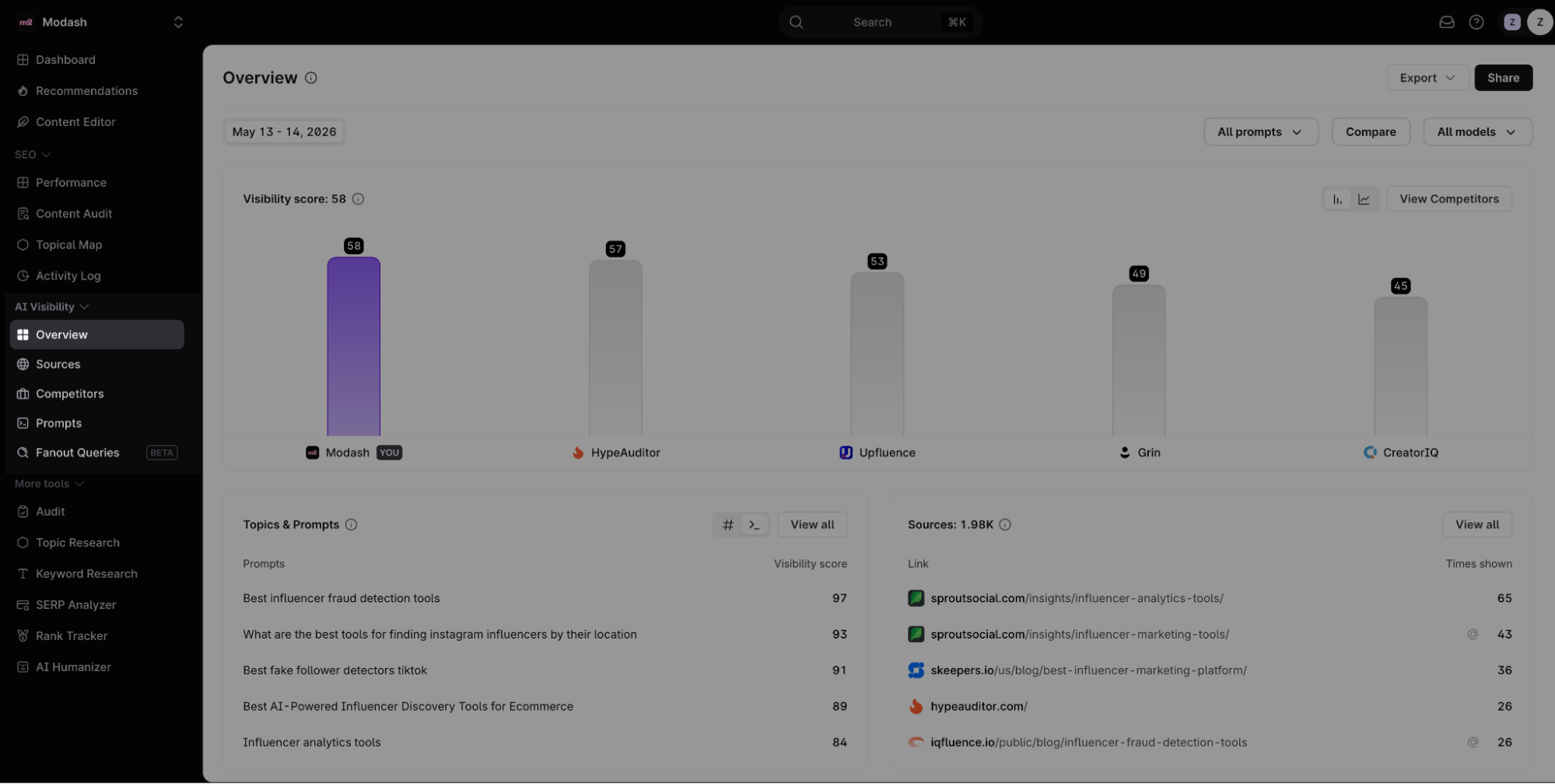
The setup is as easy as it gets. I created an AI Tracker query for Modash, added the prompts I wanted to monitor, and Surfer started pulling daily refreshes across all five AI models. Within 24 hours, I had a working dashboard.
Once data started flowing, the dashboard surfaced the metrics that actually matter for AEO work:
- Visibility Score (how often Modash appeared in AI-generated answers)
- Mention Rate (how often Modash’s domain was mentioned)
- Average Position (where Modash appeared in AI responses)
- Top-performing topics and prompts
- Sources (web pages most referenced by AI models)
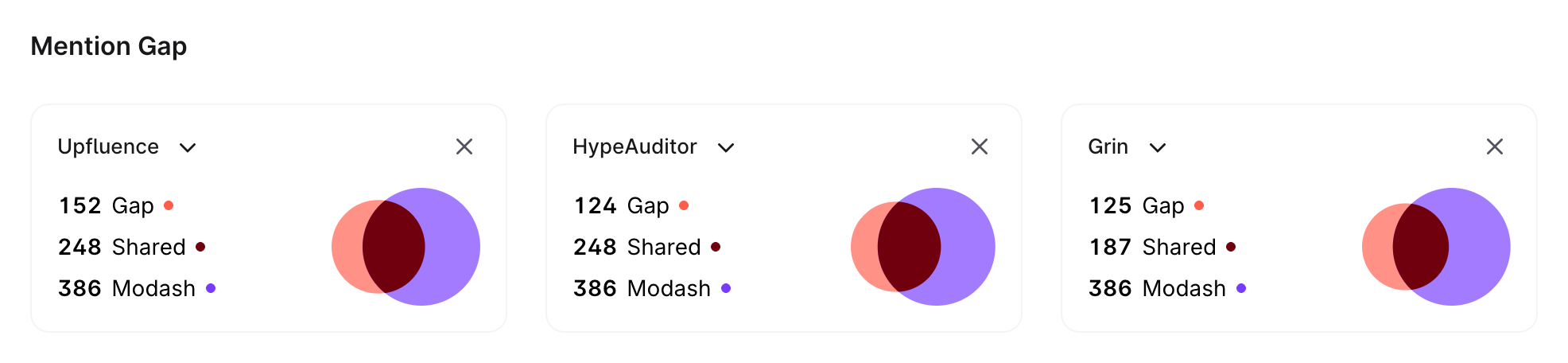
The Mention Gap view is genuinely useful—Venn diagrams showing shared and unique citations between Modash and competitors like Upfluence, HypeAuditor, and Grin. I could see at a glance that Modash shared 248 source domains with Upfluence but had 152 that the competitor didn’t have, and 386 unique to Modash.
I really wish I could filter the URLs just to find the ones where Modash isn’t mentioned, but that’s unavailable. You can still just use the search bar to find your domain, though.
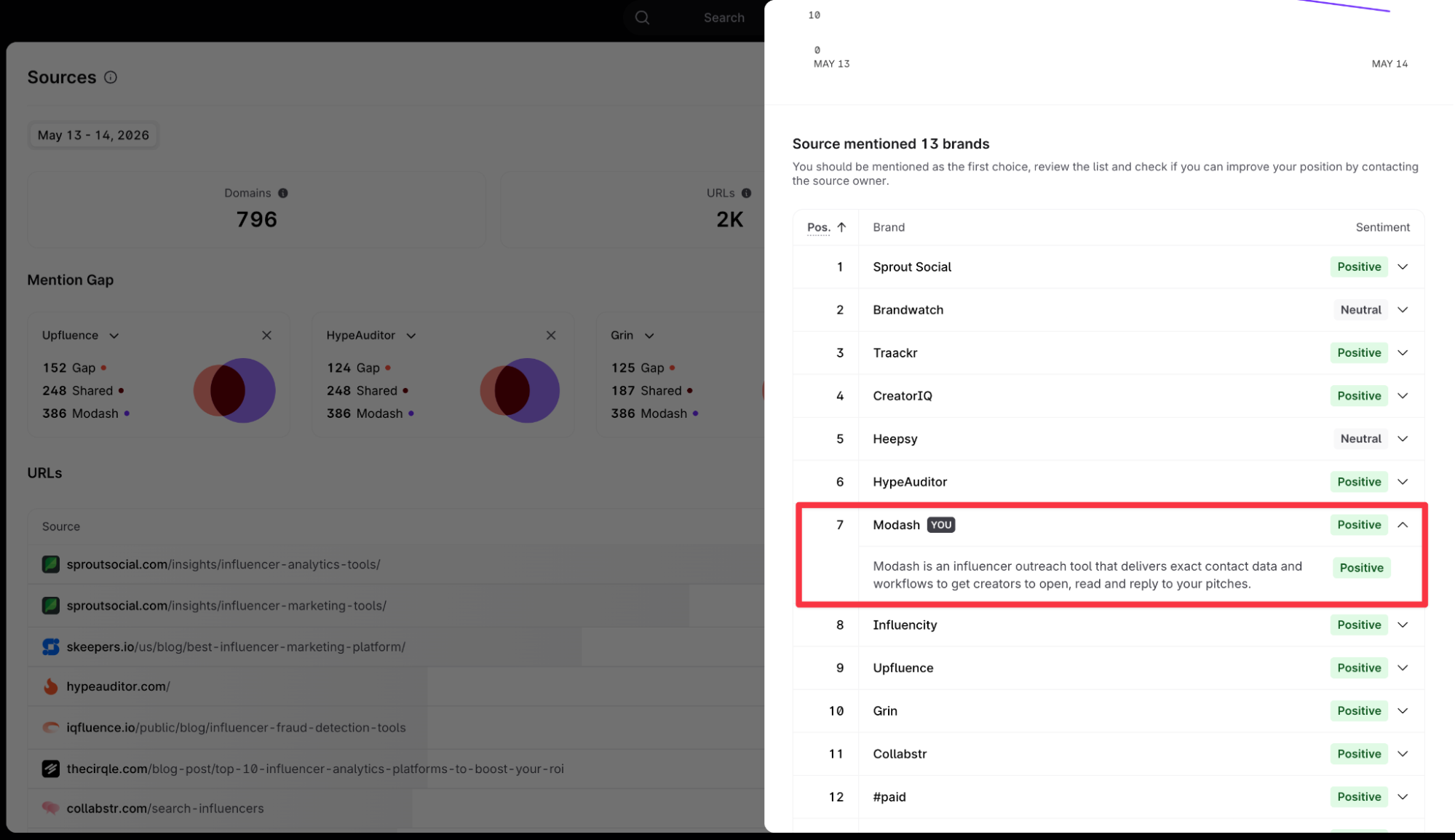
Another thing I wish the tool did more prominently was showing the sentiment analysis separately and more deeply. Right now, I have to click on each prompt to see more details about Modash’s mention.
But there’s no deeper dive like there is in Profound. In Profound, you can see the overall sentiment about your brand, quick details about which features are perceived positively, and which elements of your product are the least liked.
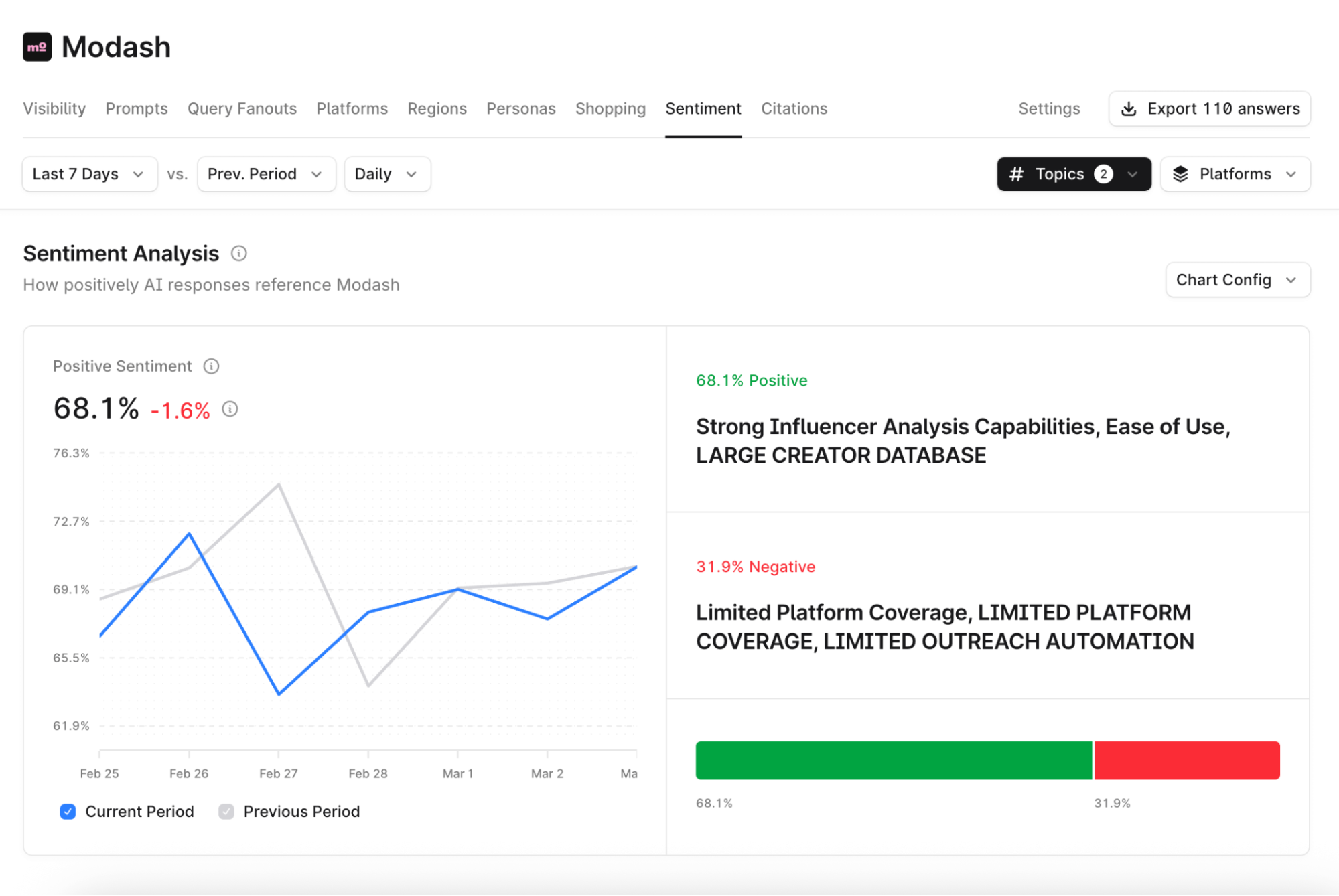
Overall, Surfer’s AI tracker feels designed for someone already comfortable with GSC, Ahrefs, or Semrush. Nothing required a learning curve.
You can create SEO and AEO optimized content (but not at scale)
Surfer, like most other AI visibility tools, allows you to create content while helping you monitor AI visibility. What’s different is the tool has embedded AI optimization in its SEO workflow—so you can write a piece and rewrite it for SEO and AEO.
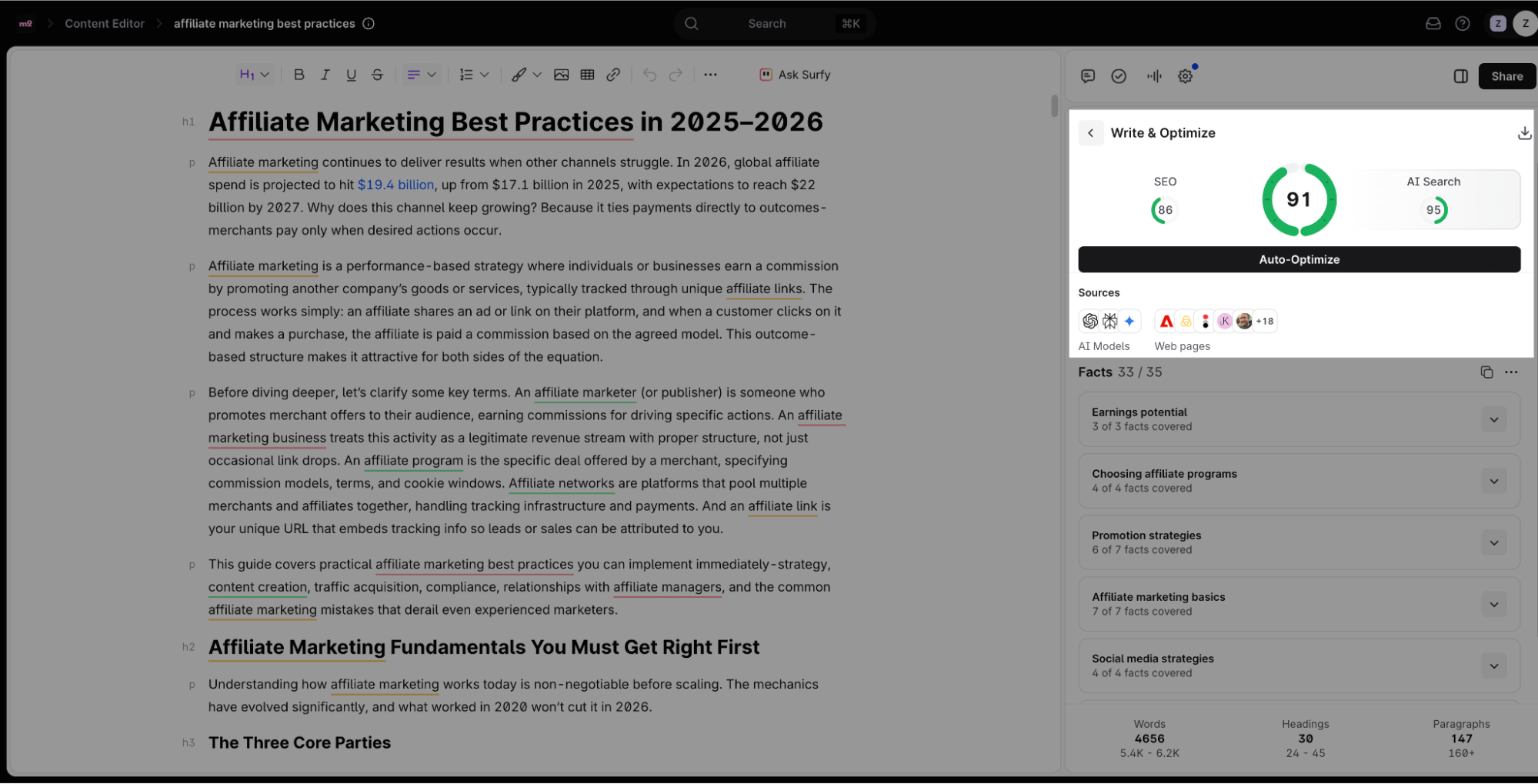
You can also run auto-optimization in your existing articles to automate the process of making your content more accessible to AI tools. This feature isn’t capped to any number yet, which is great for auto-optimizing content at scale (but has to be done individually).
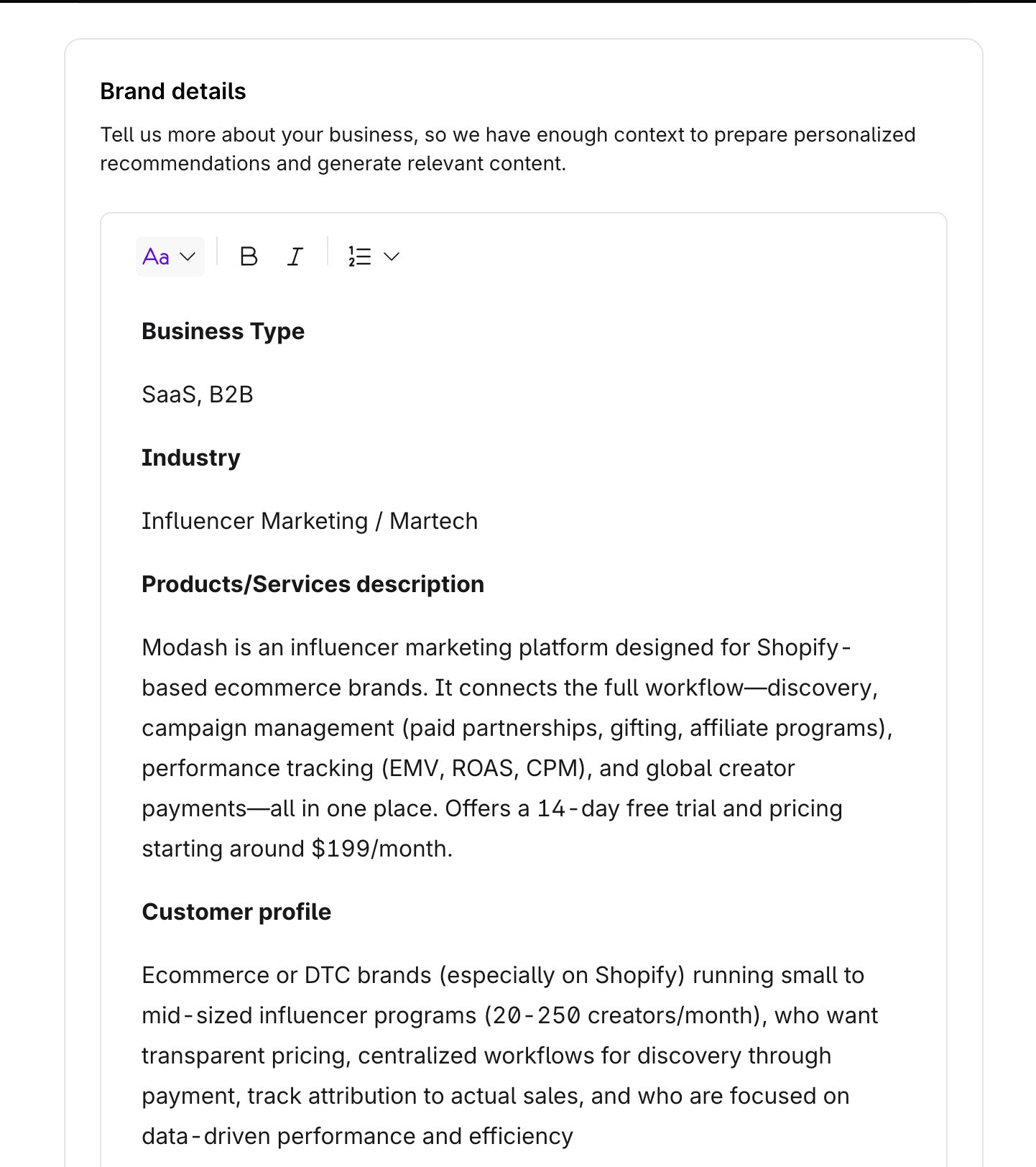
I also liked that you can input your brand knowledge, custom voice, and any additional instructions to ensure the content you generate sounds like your brand. I would recommend first creating an outline, making any changes you need to it, and then asking Surfer AI to create content for a better result. If you don’t do this, the AI content creation tool alone can add a lot of fluff.
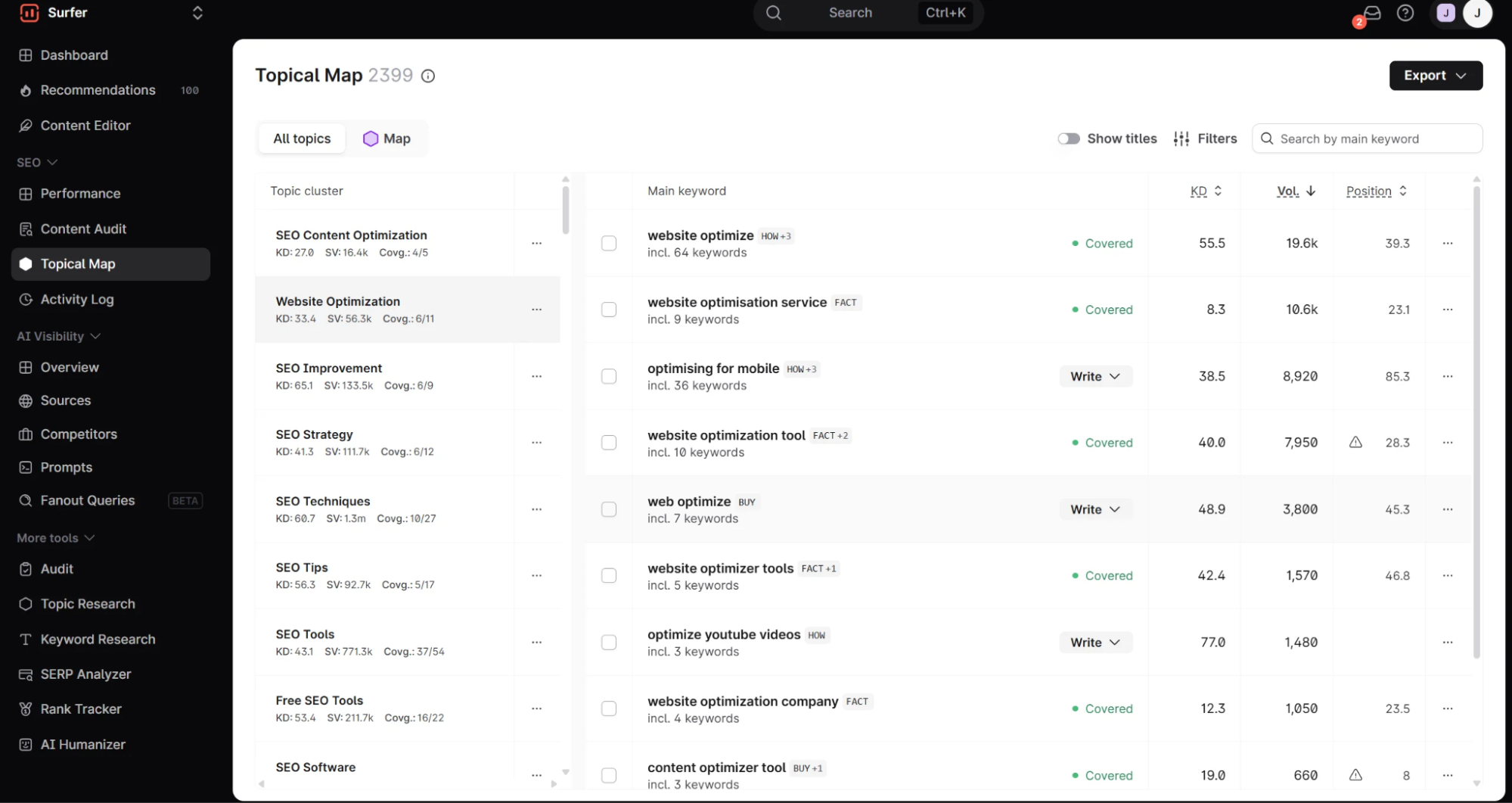
Another feature I love on Surfer is “Topical Map” which allows you to build authority on any topic(s) important to your brand. This is critical for overall AI visibility and it’s easy to monitor this and get good recommendations using Surfer.
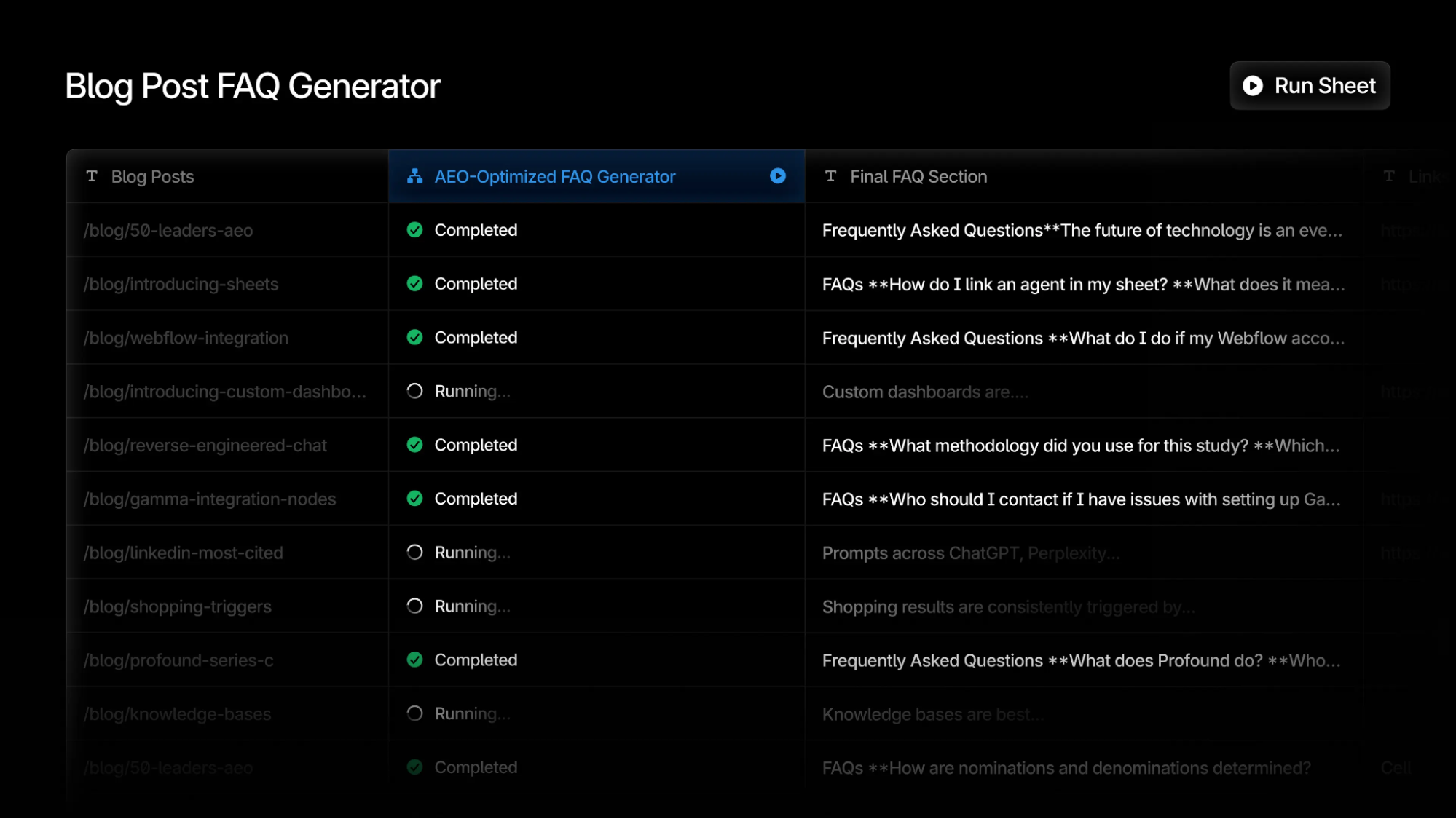
What I do wish the tool had was the ability to create and refresh content at scale. Right now, yes, you can go to the Content Editor and ask AI to write articles, landing pages, and copy, but you have to do it on an individual basis. With Profound, for example, you can build workflows using Agents and execute content creation + refresh at scale using Sheets.
One more thing to remember is how Surfer calculates your AI score. It’s not really very different from how it calculates your SEO score: it reverse engineers the results from the top 20 SERP results and the content in AI models (ChatGPT, Perplexity, and Google AI Overview).
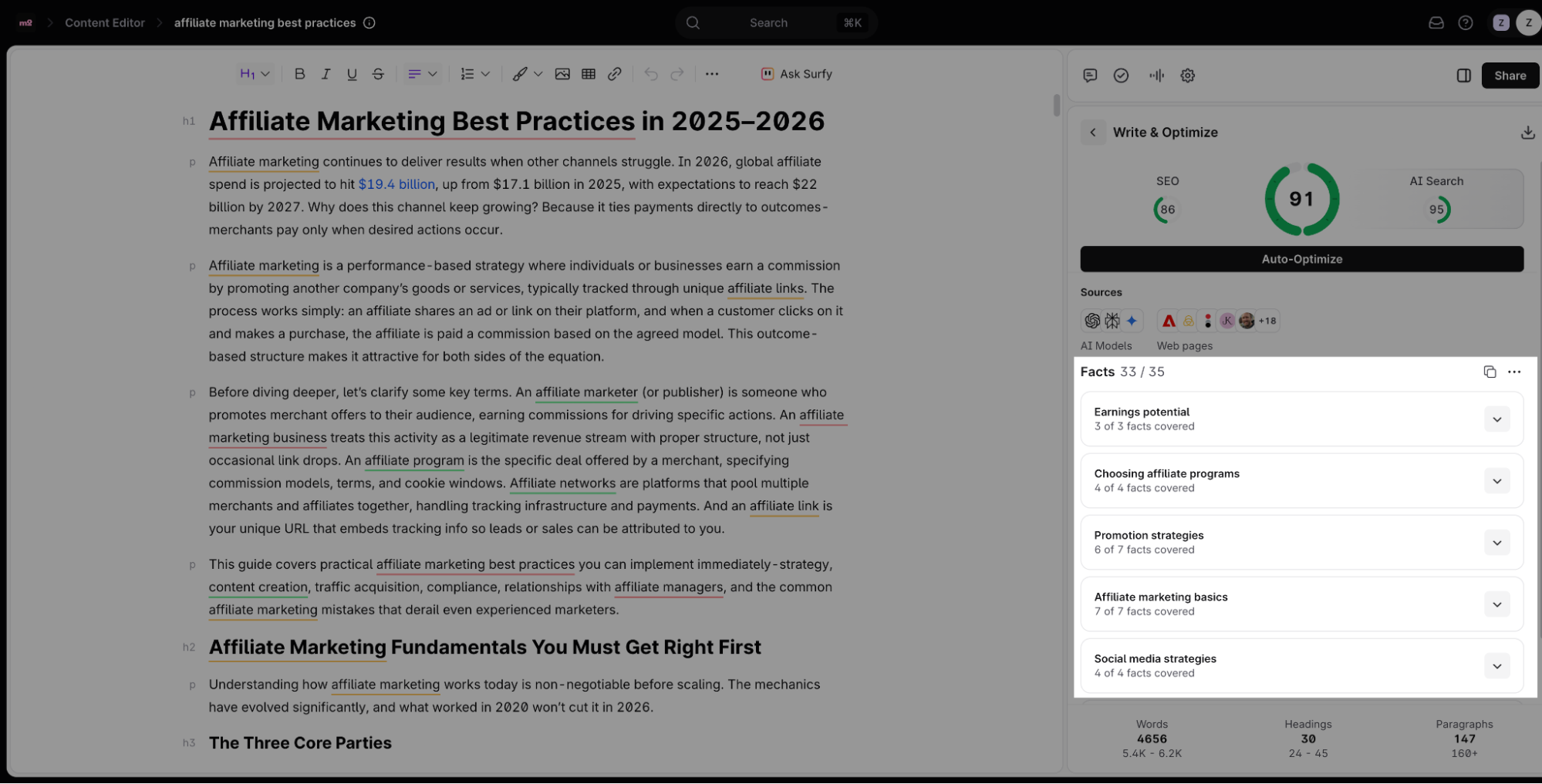
While good SEO can be the foundation of good AEO, it’s not enough—not for the long haul anyway. Plus, it’s not clear how much weight is given to each response to show you the facts and the final score (or which AI models Surfer uses to benchmark your content against existing content in AI tools). And as of today, Surfer doesn’t take your competitors or your AI writing guidelines into account either—but this is likely to change in the future.
Profound’s AEO score, on the other hand, is built on a fundamentally different foundation: an ML model trained on millions of cited pages to predict citation likelihood, not just mirror what’s ranking today.
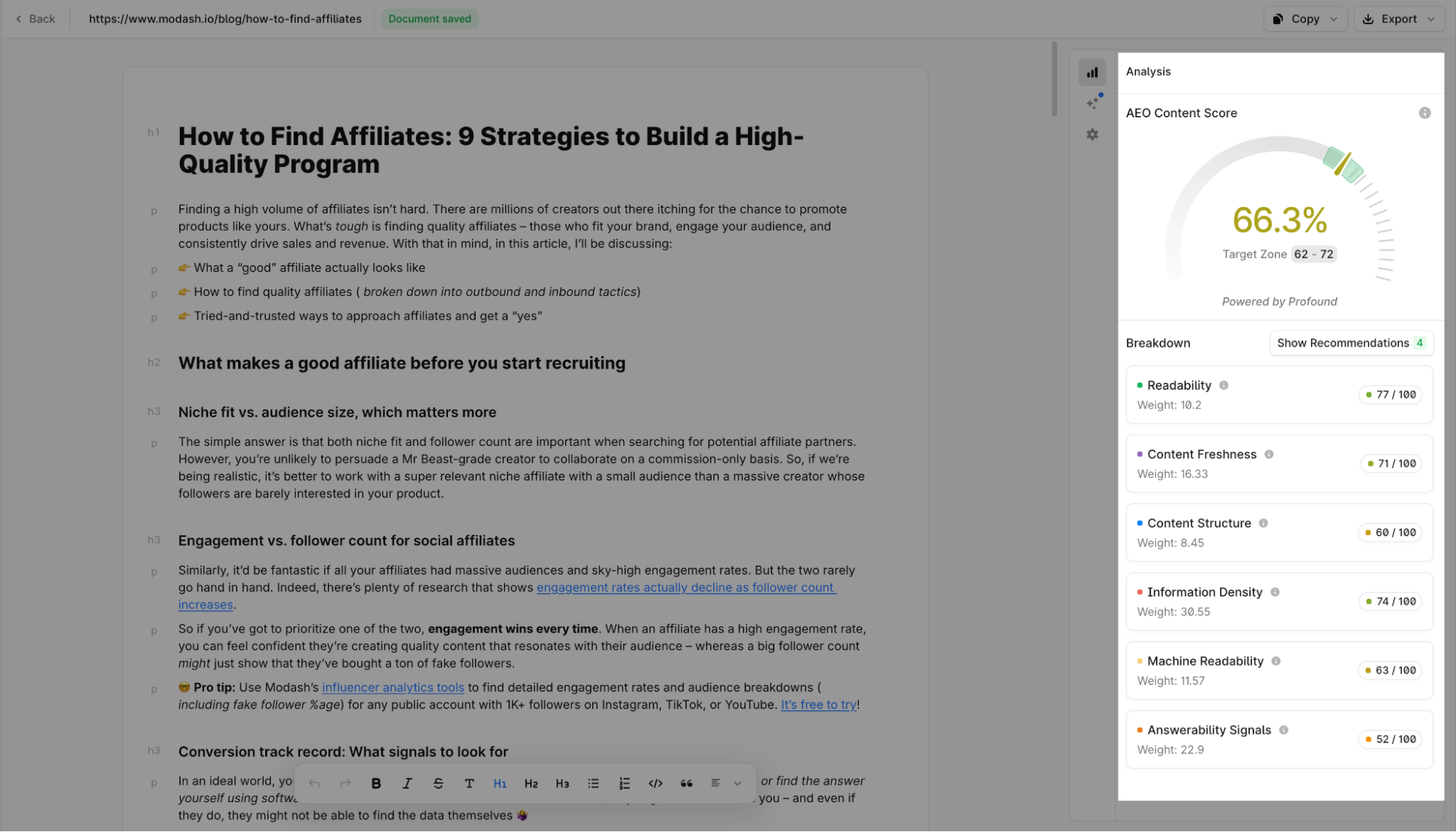
Learn more about how Profound calculates the AEO score for your content.
Surfer’s AI tracker: What it could improve
Surfer’s AI tracker is a great choice for monitoring the basics of your AI visibility and optimizing your content for SEO and AEO in one seamless workflow. But there are significant drawbacks, especially when you compare Surfer to other AI visibility tools in the market.
Limited LLM and language coverage
Surfer’s AI Tracker on the Pro and the Peace of Mind plan tracks five AI engines:
- ChatGPT
- Perplexity
- Gemini
- Google AI Mode
- Google AI Overviews
That’s a reasonable starting set—but it’s missing some of the fastest-growing answer engines in 2026.
Claude, Copilot, Grok, Meta AI, and DeepSeek aren’t tracked at all. That’s a huge gap if your audience uses anything beyond ChatGPT, Perplexity, or Google. For Modash, whose users skew technical and global, not being able to see whether Claude or Copilot mentions the brand means I’m flying blind on a chunk of the AI search landscape.
By comparison, Profound has double the coverage. Its enterprise plan tracks your AI visibility across:
- ChatGPT
- Perplexity
- Gemini
- Google AI Mode
- Google AI Overviews
- Microsoft Copilot
- Meta AI
- Grok
- Deepseek
- Anthropic Claude
Coming to language coverage, it’s unclear if Surfer AI tracker supports tracking prompts in languages beyond English. Data for a Spanish prompt populated when I tried it (although the fanout queries were in English), but there’s no documentation regarding supported languages for tracking prompts.
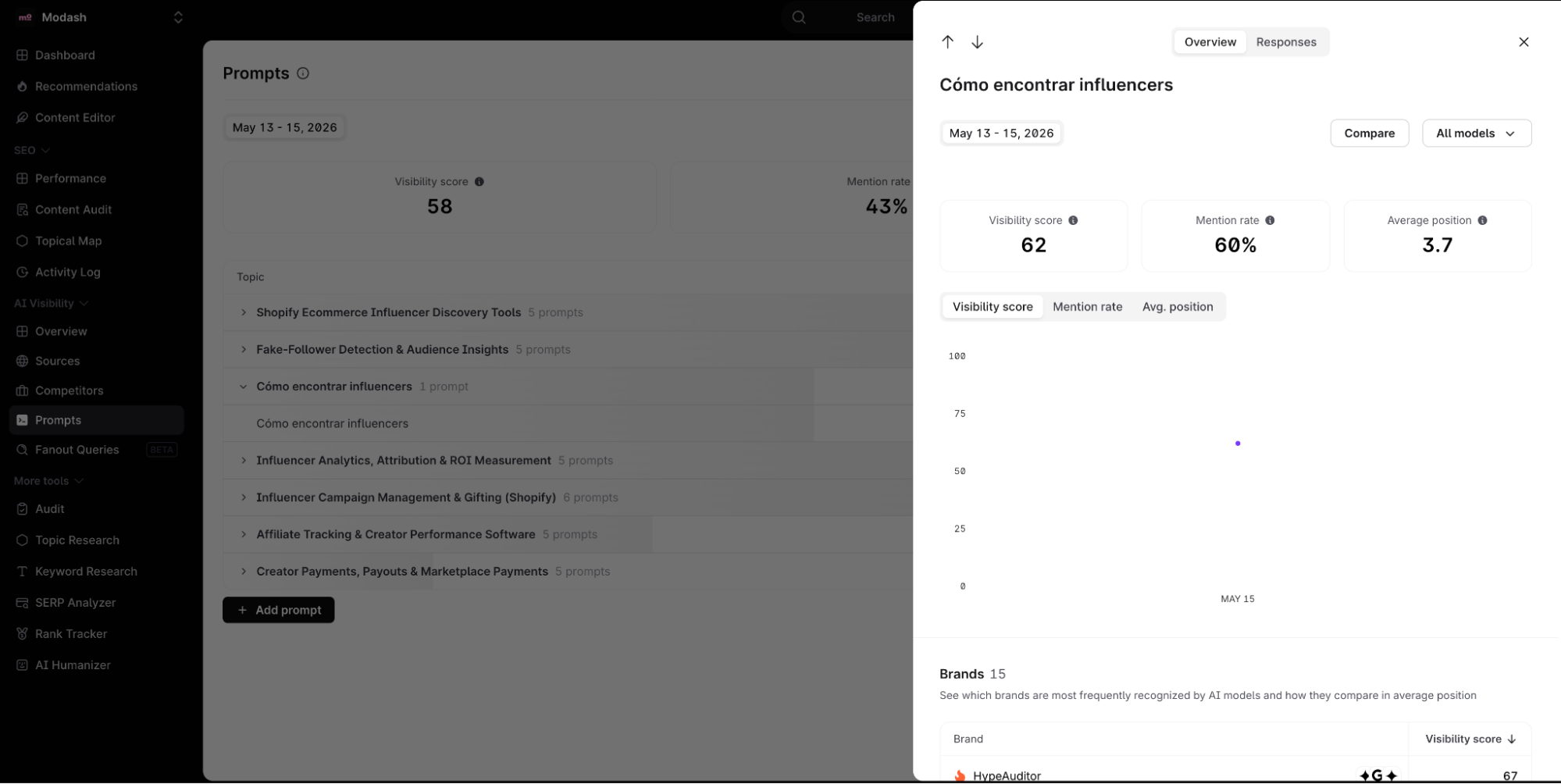
You can create SEO+AEO optimized content in 14 languages. This might not be useful if you ultimately can only track your AI visibility for English prompts. Profound, by comparison, allows you to track your visibility for unlimited languages in its Enterprise plan.
Global brands with consumers spread across the globe need a large coverage of AI tools, models, and languages. Currently, Surfer fails to provide that. It might add more languages and AI tools in the future, but you’re losing visibility on those prompts now (while your competitors steam ahead).
You don’t get any direction on how to improve your AI visibility
Surfer’s AI Tracker is good at showing me where Modash stands—visibility score, mention rate, which competitors are winning, which sources get cited, etc. But it stops there.
It doesn’t tell me what to do about it. When I look at the Sources tab and see that competitors are getting cited instead of modash.io, the obvious next question is: how do I fix that? Surfer offers a nudge—when I click into a specific source, it tells me “you should be mentioned as the first choice, review the list and check if you can improve your position by contacting the source owner.”
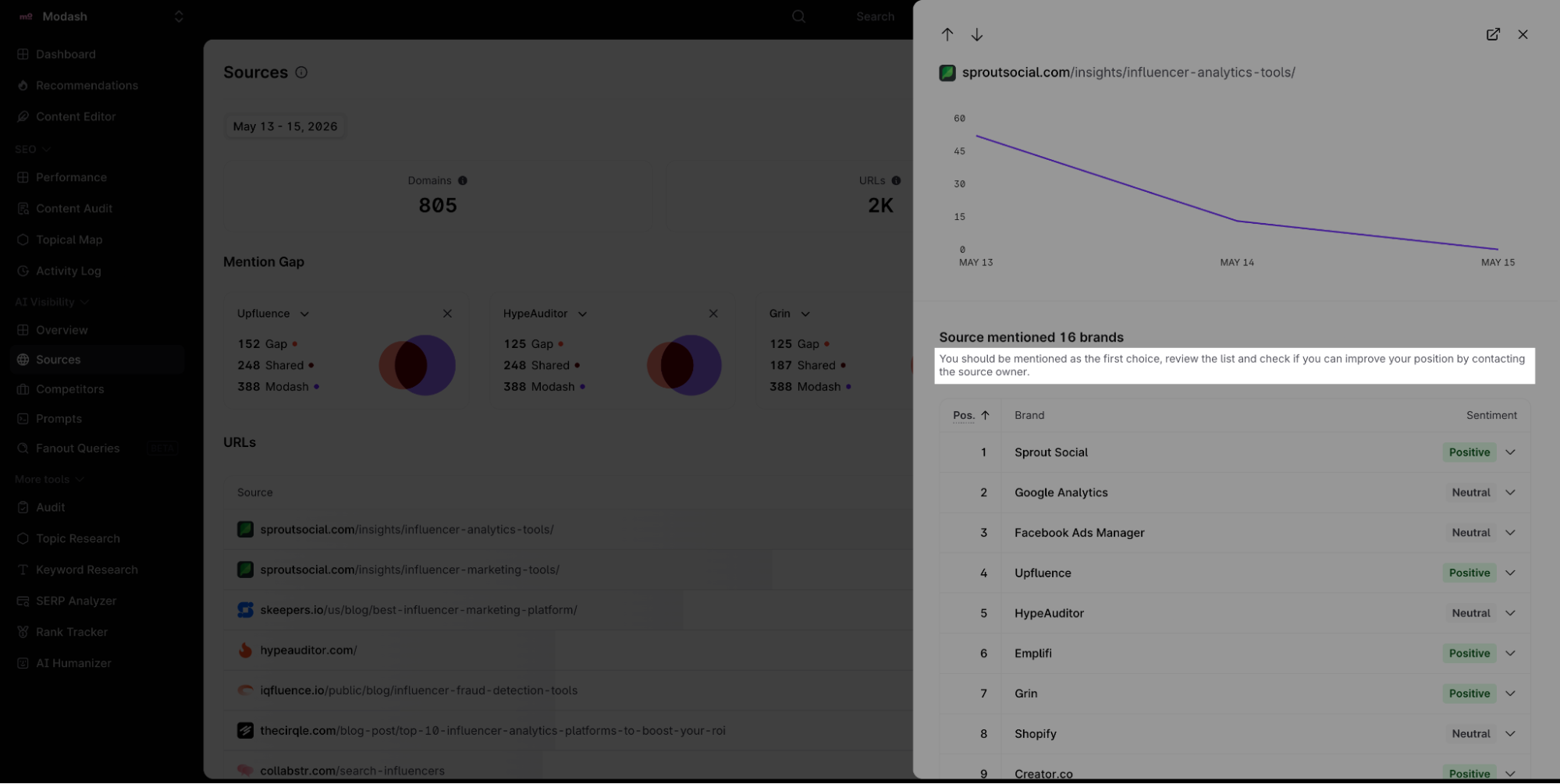
But it's the same one-liner for every source. There’s no prioritization of which sources to go after first, no outreach templates, no explanation of why one page matters more than another, and no content-level recommendations for what to change on my own site. It’s a generic hint, not a strategy.
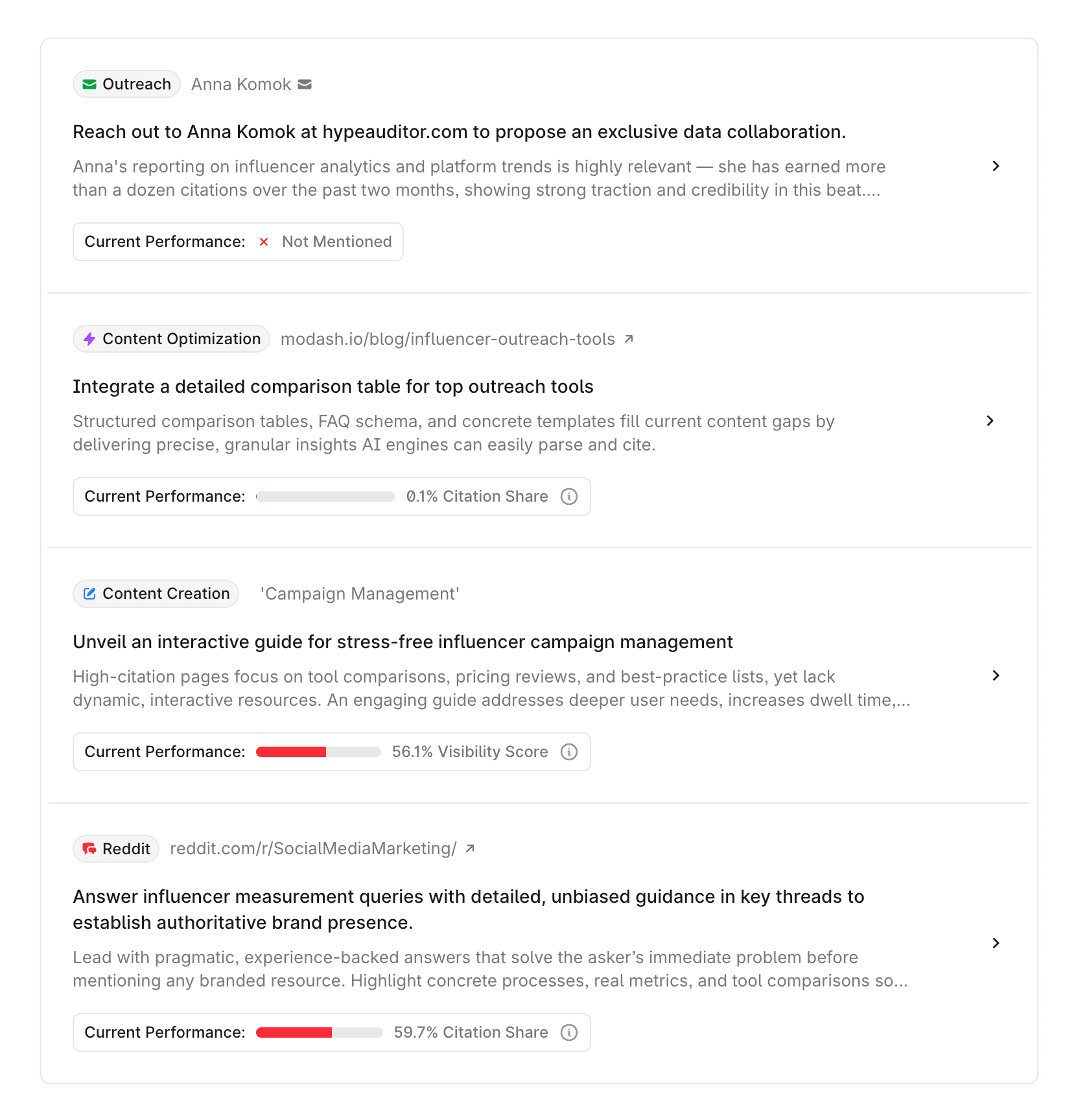
Profound’s Opportunities feature is built specifically for this gap. It surfaces prioritized recommendations—why a specific prompt matters, what content changes would improve citation likelihood, and even draft outreach emails for earning mentions on third-party pages that LLMs trust. The difference is going from “here's your data, good luck” to “here's what to do next and why.”
The sentiment data in Surfer is slightly more granular—when I expand Modash’s entry in a source view, I can see individual statements AI engines make about the brand, each tagged as positive, negative, or neutral.
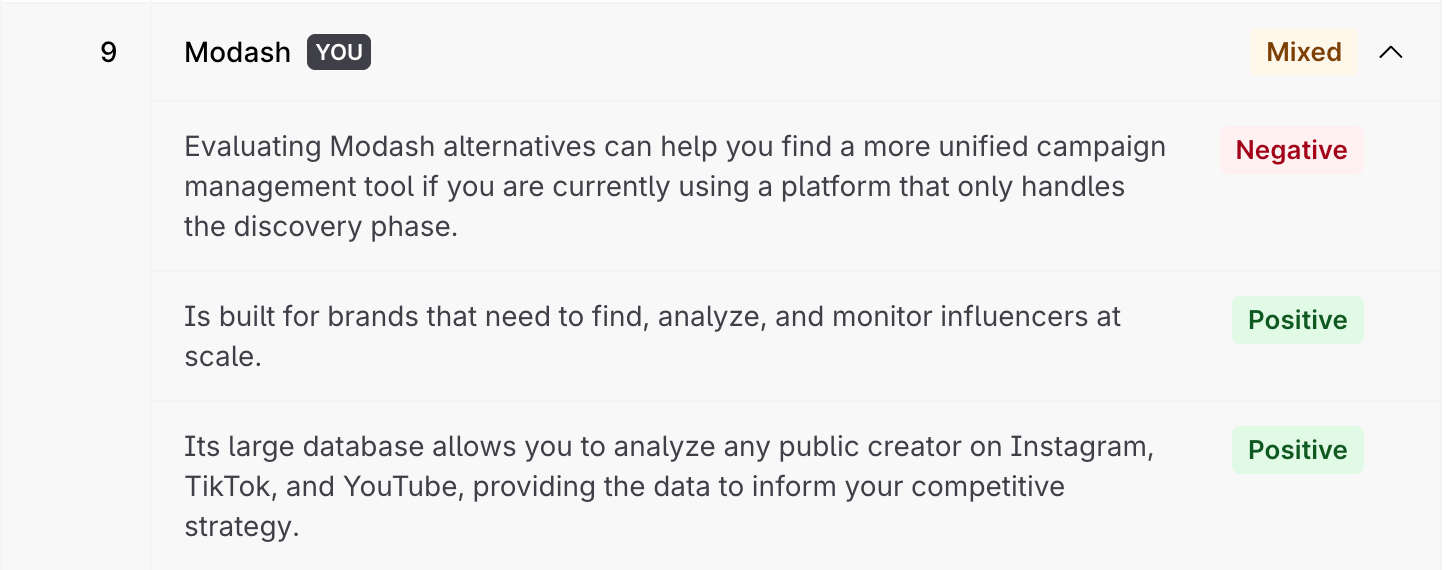
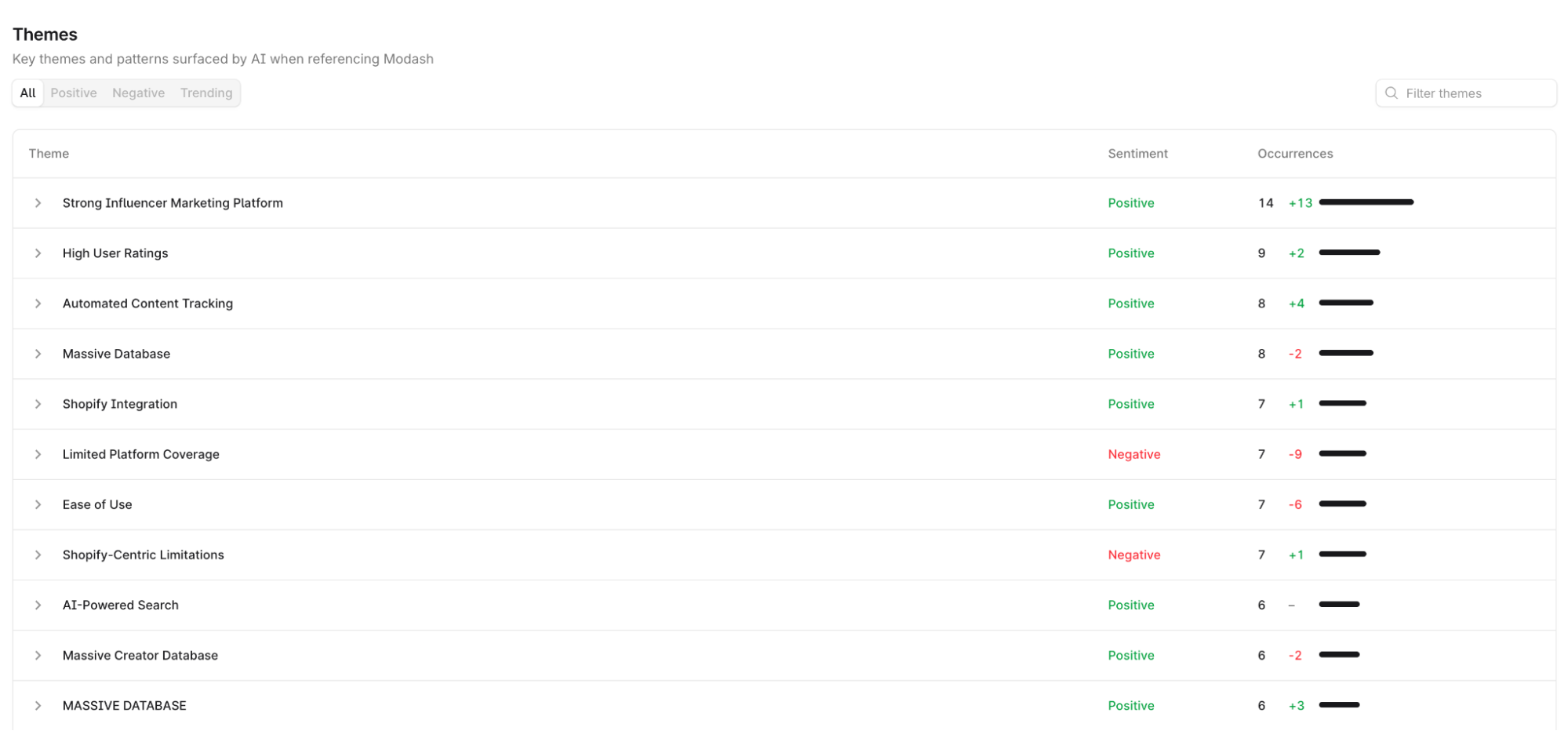
But this only surfaces when I drill into a specific source. There’s no aggregate view that tells me “across all tracked prompts, here are the recurring themes AI engines associate with Modash.” If five different sources all describe Modash as a tool that “only handles the discovery phase,” I’d have to click through each one to spot that pattern.
Profound’s sentiment analysis surfaces those themes at the brand level—so I’d know the narrative without the manual work. Plus, I can filter them for topics and AI models to know exactly which features are deemed positively or negatively across specific LLMs.
For teams with a dedicated AEO strategist who can interpret dashboards and build their own playbooks, Surfer’s data-only approach might be enough. But for most content teams—especially freelancers and small teams without AEO expertise—the gap between “here's your visibility score” and “here’s how to move it” is where the tool falls short.
You have to input your own prompts to analyze them (and they are limited)
By default, Surfer’s AI tracker helps you populate some prompts within topics you care about. But if you want more data on how your consumers are actually searching AI engines, you’ll run into a wall.
You can manually add more prompts based on competitive insights, keyword research, business priorities, and intuition, but it’s a guessing game.
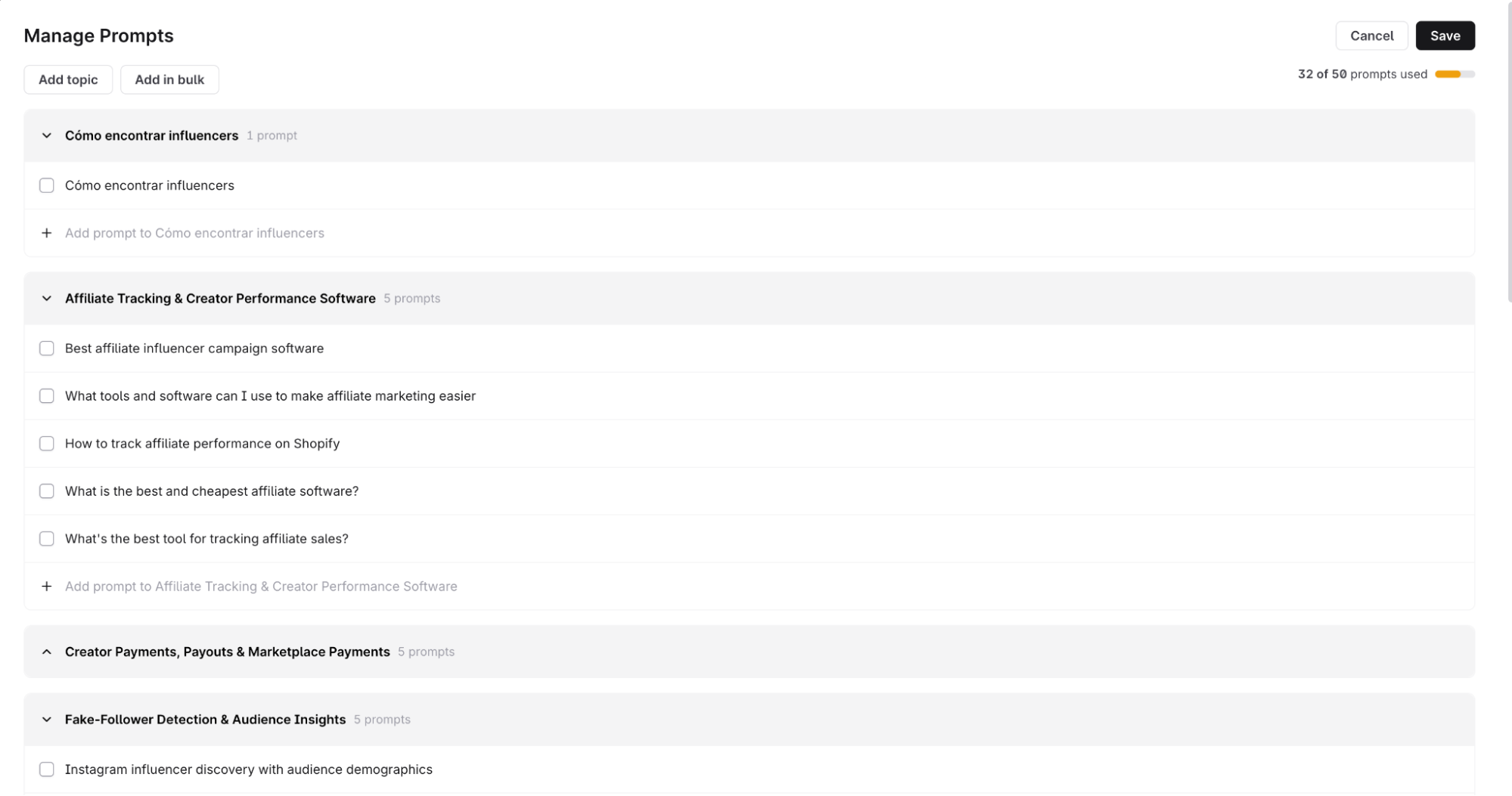
And you can’t afford to go wild in your guessing because you only get a fixed number of prompts to track with each plan. On the Pro plan, you’re limited to 50 prompts.
For Modash, I added prompts like “best influencer marketing platforms,” “Modash alternatives,” and "how to find influencers.” They are reasonable choices. But are those the prompts Modash's actual buyers are typing into ChatGPT? I have no idea.
Maybe the real demand is in longer-tail prompts I’d never think to add—like “how to vet micro-influencers for DTC brands” or “influencer fraud detection tools for Shopify.” But I’d never know these prompts unless I stumbled into them.
The 50-prompt cap in the Pro plan (100 in the highest tier plan) compounds the problem. Fifty prompts across five AI models sounds workable until you realize how fast it fills up—a few competitor comparison angles, a handful of feature-specific queries, and the quota is gone.
Surfer lets me add and remove prompts without resetting the project, which helps—but the ceiling is still low for any brand with a multi-product AEO strategy.
This is where Profound’s Prompt Volumes creates a fundamentally different starting point. Instead of guessing, I can see what real users are actually asking AI engines—pulled from millions of prompts per month from opt-in consumer panels.
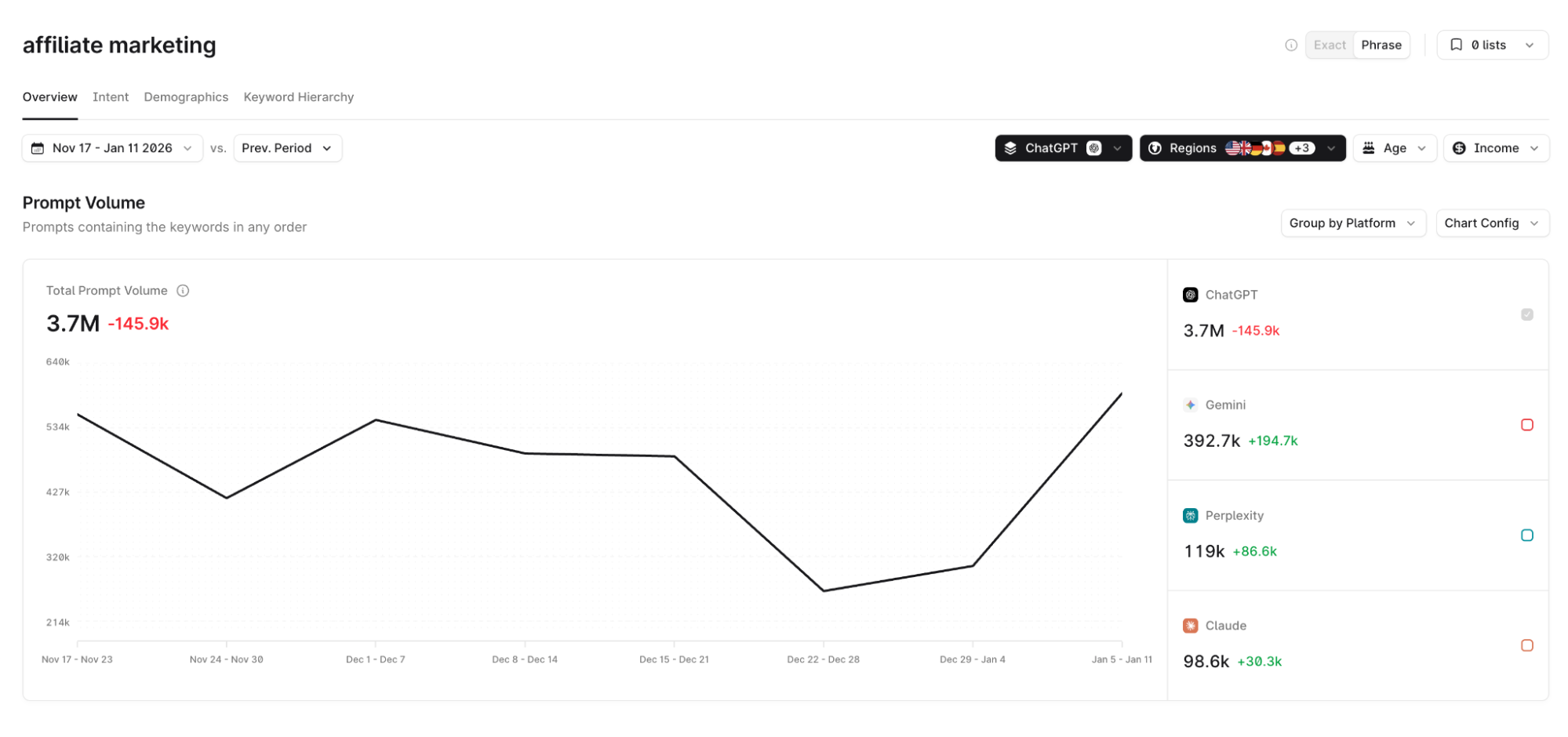
All you have to do is enter a keyword and see the relevant prompts associated with it. You can even filter for these prompts by intent, demographics, platform, and keyword hierarchy. So instead of guessing what prompts I should track, I’d spend time on improving AI visibility for prompts with confirmed demand.
There are no agent or shopping analytics
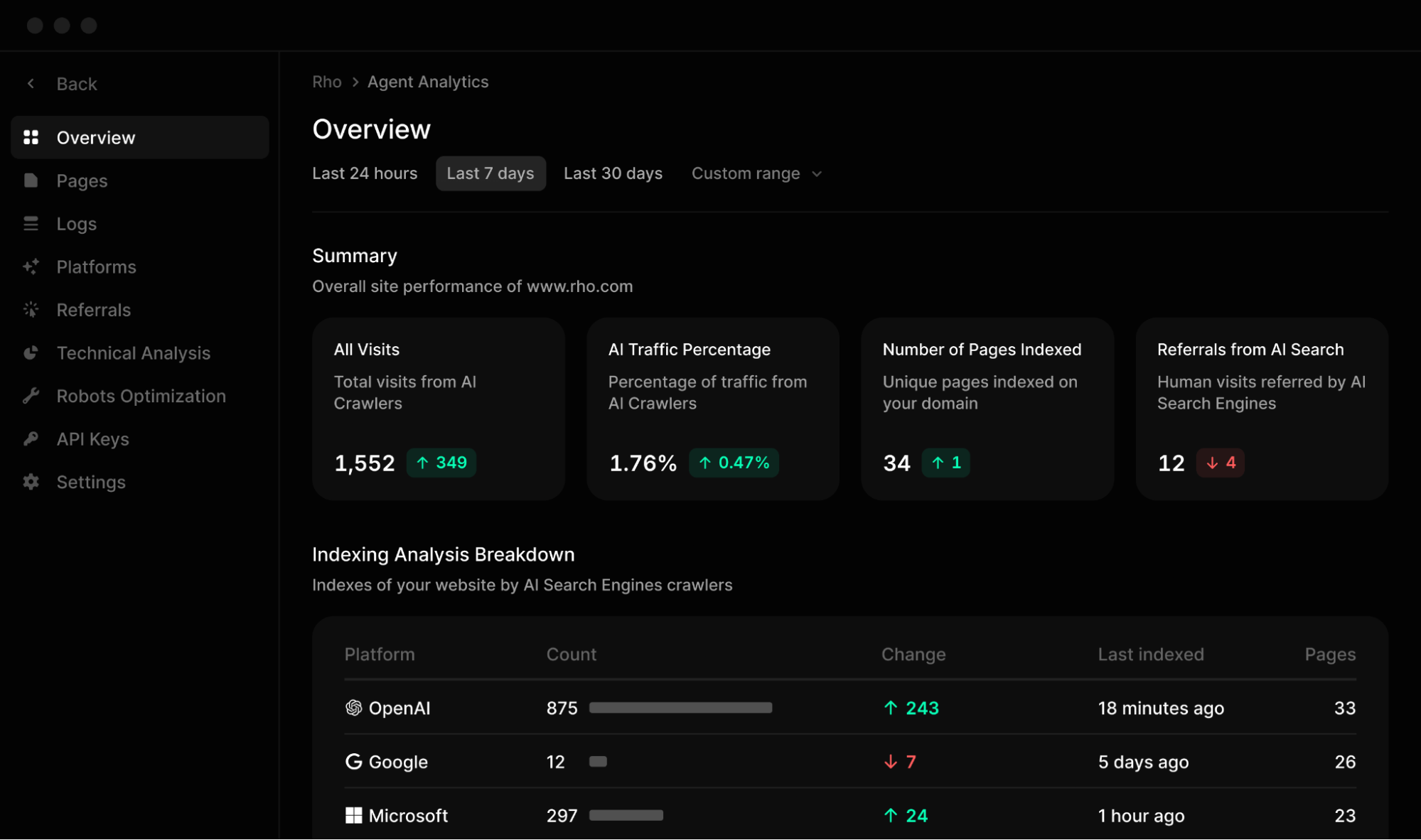
Surfer’s AI Tracker tells me how a brand shows up in AI answers. What it can’t tell me is what’s happening on the other side—how AI crawlers interact with my site and whether my products appear in AI-driven shopping recommendations.
ChatGPT, Perplexity, Gemini—they all send crawlers to your site before generating answers. Knowing which pages they hit, how often, and from which models is critical for understanding why you’re getting cited (or not).
If an AI crawler keeps hitting your pricing page but never touches your comparison guide, that tells you something about what to optimize. Surfer has no visibility into this. Profound’s Agent Analytics tracks AI bot traffic at the CDN level.
When someone asks ChatGPT, “best running shoes for flat feet,” the response increasingly includes structured product recommendations—not just text answers. Tracking whether your product shows up in those responses, how it’s described, and which competitors appear alongside it is a different problem from general visibility tracking.
Surfer doesn’t have anything for this. Profound’s Shopping dashboard tracks how products surface in AI-driven purchase recommendations, which attributes get highlighted, and how competitors are positioned.
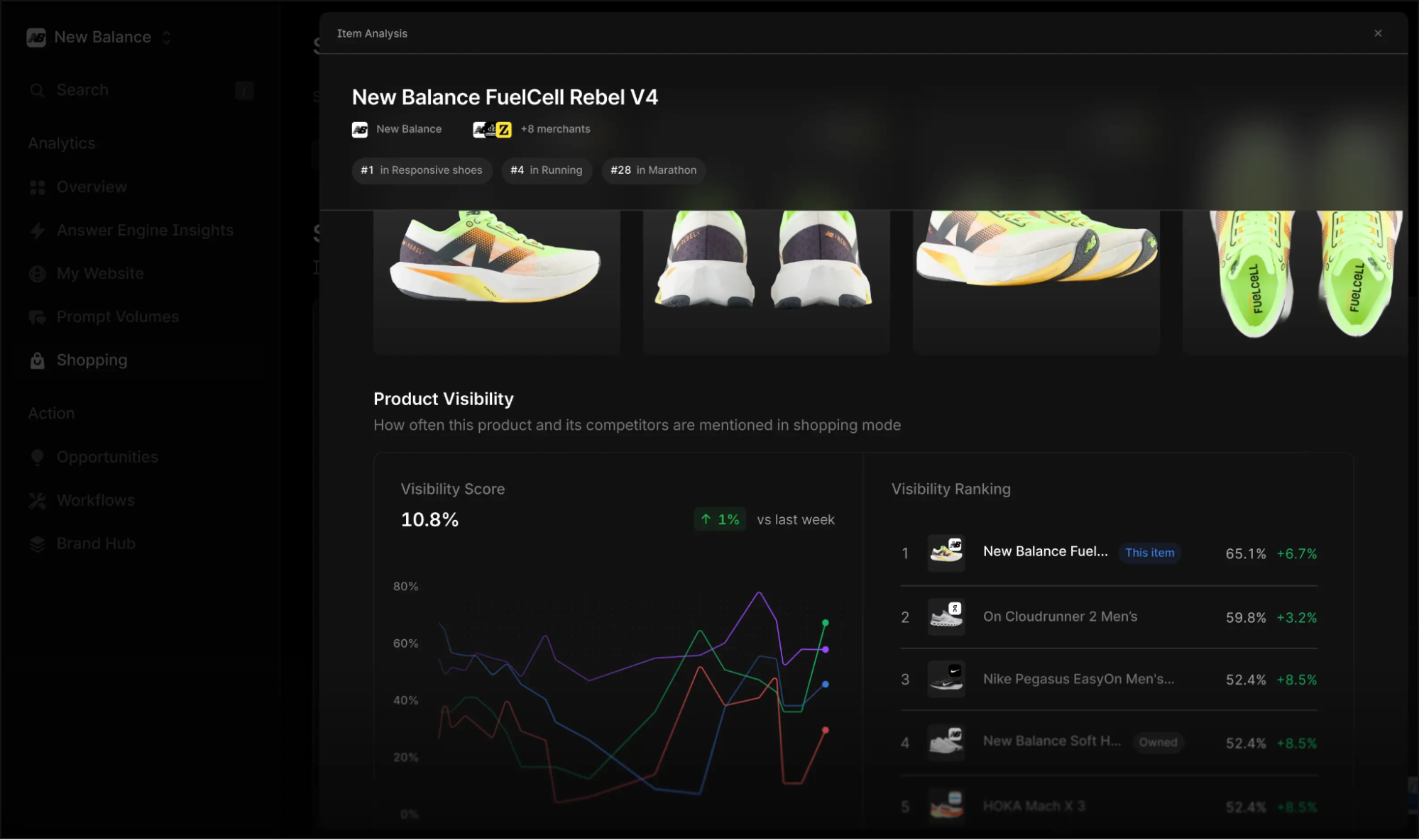
Not every brand needs these features. But if AI-driven product discovery or AI crawler behavior matters to your strategy, Surfer doesn't cover either.
Is Surfer’s AI tracker the right choice for you?
I’d recommend choosing Surfer’s AI tracker if:
- You already use Surfer for content optimization and want basic AI visibility without switching platforms
- You have a small-to-mid sized AEO program where 50 prompts across five models covers your scope
- You have an in-house strategist who can interpret the data and build their own playbooks
- You primarily care about visibility in ChatGPT, Perplexity, and Google’s AI features
Surfer AI Tracker is probably not enough if you:
- Need prioritized, actionable recommendations
- Need visibility across Claude, Copilot, Grok, Meta AI, or DeepSeek
- Want a content score built on a predictive ML model trained on citation patterns, not SERP correlation
- Want to know what prompts real users are actually asking in your category, not just track the ones you guess
- Run a multi-market AEO program that requires agent analytics, shopping tracking, or workflow-scale content optimization
If the second list sounds more like your situation, Profound is built for it. Sign up today and see for yourself.

