
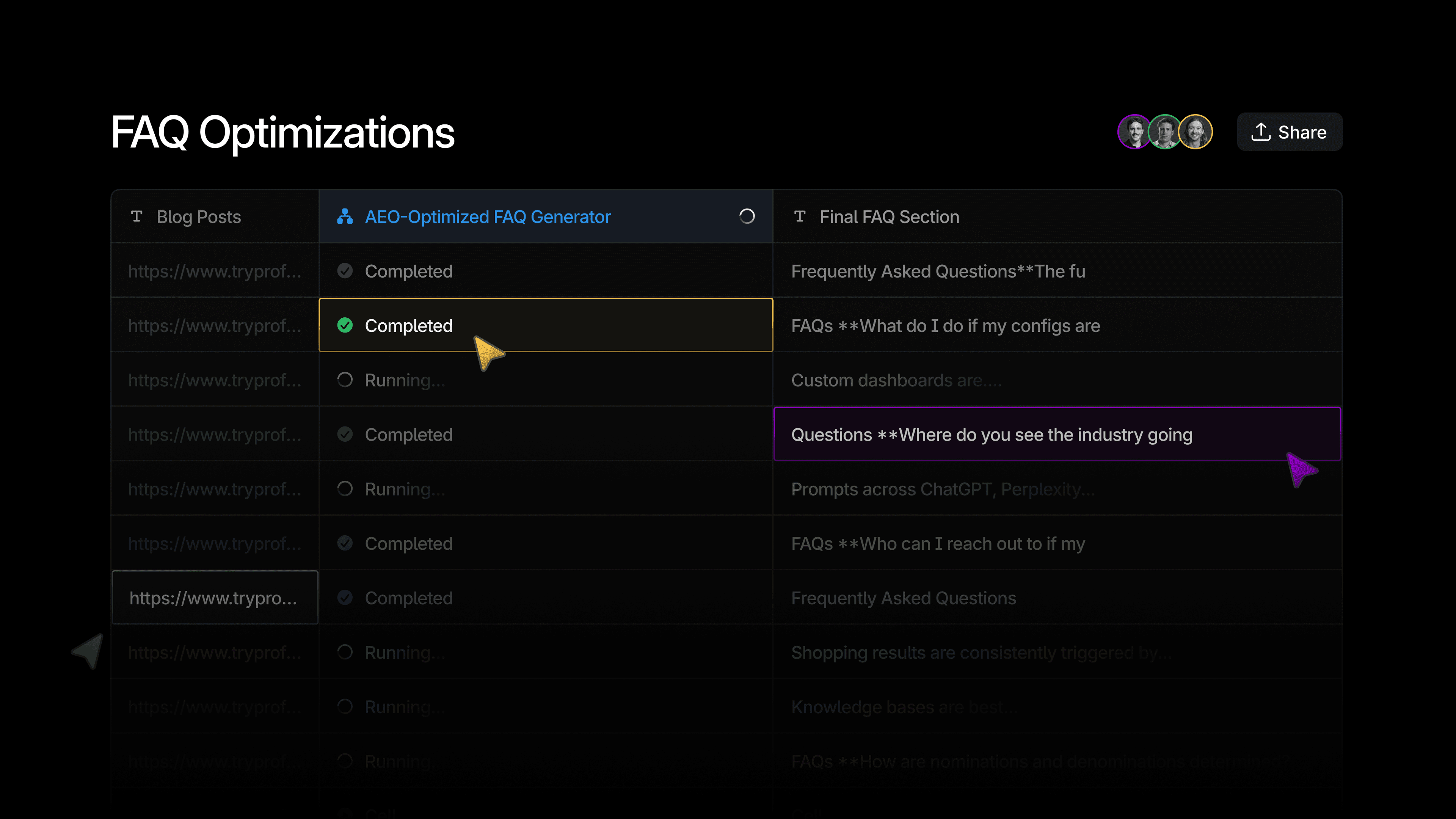
Sheets is Profound's collaborative spreadsheet-style surface for running Workflows over many inputs at once.
We built Sheets to allow customers to scale their Workflows. For example, most of the enterprise retail customers we work with have over 1,000 product detail pages, typical for brands of their size but tricky to systematically change. To optimize each page would mean running a Workflow 1,000 times and manually keeping track of which pages were done.
With Sheets, those product page URLs are rows, the Workflow is a column, and one click runs it against every row. Their team can also collaborate on the same Sheet at the same time, see their teammates' avatars, cursors, and selections.
We built our first version of Sheets in about a month with two full-time engineers, and the way we designed it from the start spared us plenty of scaling and traffic-handling issues that are common in this type of product.
Tech stack that shapes the system
The main challenges we faced while building Sheets were related to scale and seamless live collaboration: handling large amounts of traffic, instantly updating a lot of data, handling concurrent writes, and keeping the UX continuous through backend updates.
A big part of what helped us solve all of these challenges was making the right calls upfront on the tech stack we use: DynamoDB as a storage backend, and Cloudflare Workers as the live collaboration layer.
Rows as blocks
Sheets can have many rows with even more cells, and storing them in a one cell per field in a SQL database table would hurt performance: a Sheet with 1,000 rows and 100 columns becomes 100,000 separate items, and loading it means performing 100,000 reads.
To solve for this, we use a row-as-block model in DynamoDB, a NoSQL storage: each row in a Sheet is one block of data, which is one item in a table. That means a Sheet with 1,000 rows and 100 columns is 1,000 reads, not 100,000. This helps a lot with reducing the traffic and speeding up reads.
Sheet rows themselves can get quite large, so naturally we don't store them all directly in our DynamoDB: the larger values are offloaded to the S3 storage, and the DynamoDB row item keeps a pointer in their place.
One Sheet, one room
For our live collaboration layer, we use Cloudflare Workers with a room model (via the partyserver library) on top of Durable Objects.
Every Sheet is one room. Every change, whether it comes from a person typing in a cell or a Workflow writing its results into a cell, goes through that room. The room keeps transient state in memory (who's connected to the Sheet, where their cursors are) and acts as an in-memory queue for incoming changes before they're persisted.
Sheets was the first product at Profound to use this model for live collaboration. These days many Profound products have adopted it: Agents, Projects, and Documents all use the same pattern.
Live collaboration the distributed way
There are a few products similar to Sheets on the market, but what makes us most proud of our version is live collaboration support.
Sharded by design
The sheets backend is handled as a distributed system: one Sheet maps to one room, so the traffic gets automatically sharded by Sheet. This means that if 100 Sheets are active at any given moment, there are 100 isolated rooms, each with its own queue and its own Durable Object. There is no central process that sees every mutation across every Sheet, so there's nothing to scale as the usage grows - the sharded system scales itself.
Handling concurrent writes
Live collaboration means that multiple people (including Aim, Profound's AI agent) can make changes to the same cell in the same Sheet at the same time. That's also a distributed systems problem, which we solved in a deliberately simple way.
Inside a room, each change is either non-blocking or blocking, and its type determines how it's handled.
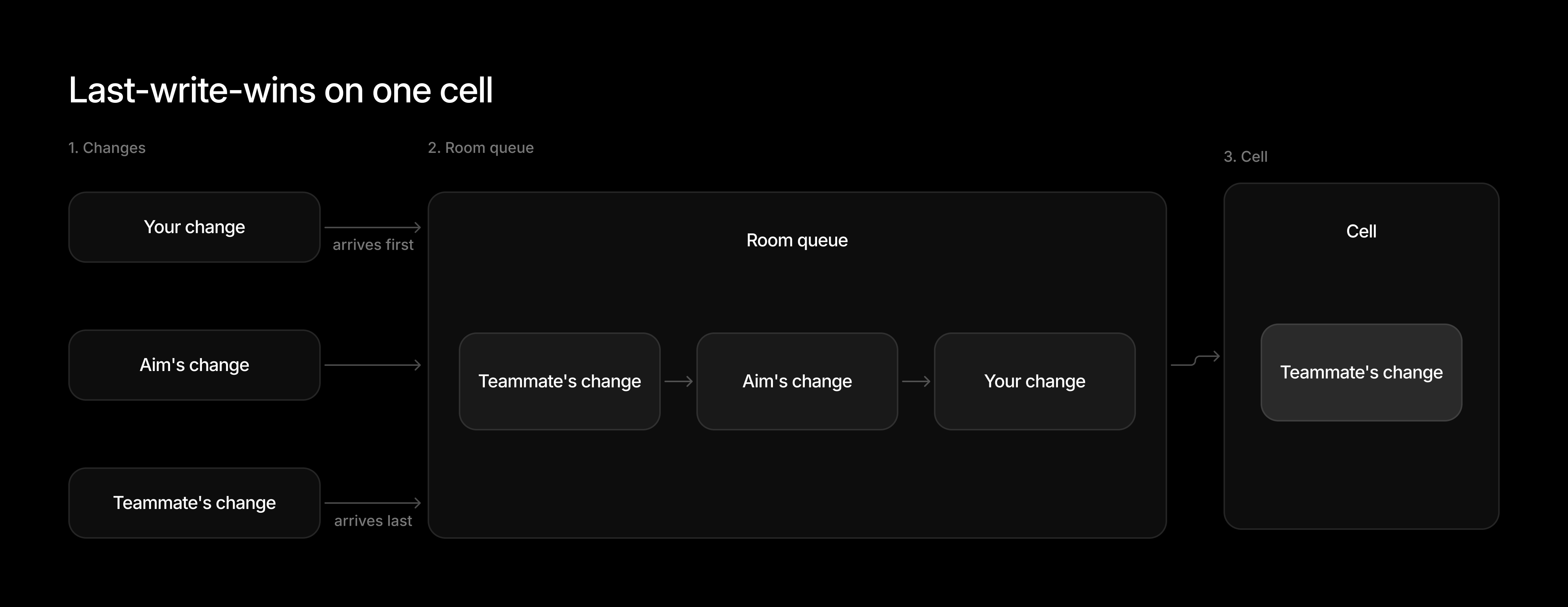
Edits to cells are non-blocking changes. They run concurrently and resolve with the last-write-wins strategy. For example, when you and your teammate change a Sheet's cell at the same time, both cell values go on the queue inside the room. The value that arrived last is the one kept in the cell.
Blocking changes alter the structure of the Sheet: adding, deleting, or moving rows and columns, or updating a column's definition. They need a stable Sheet to apply to, so the room treats them as a barrier in the queue. For example, when your teammate inserts a column while you and Aim are editing cells, the column insert goes on the queue like any other change, and the cell edits queue up behind it. Then, the room waits for the cell edits already in flight to finish, applies the column insert on its own, and resumes running the cell edits.
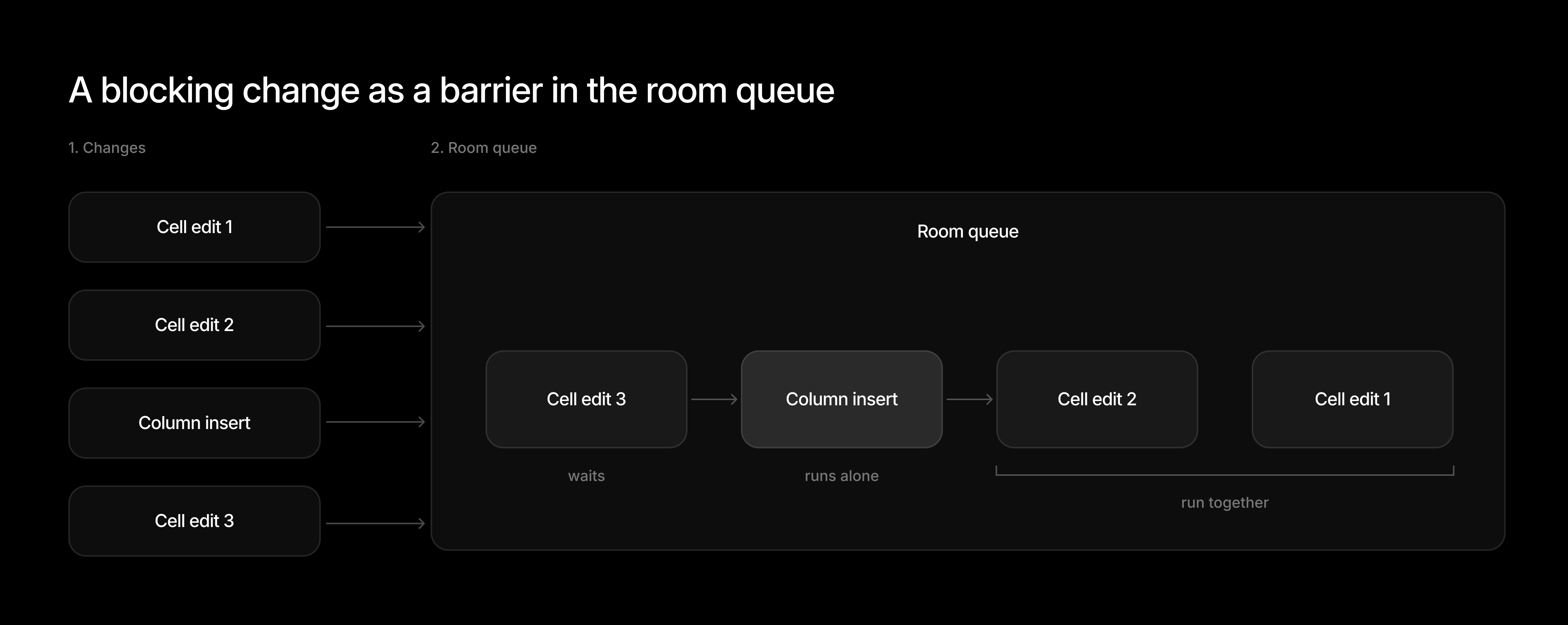
This can create some minimal latency, but the structural changes to the Sheets don't happen as often as cell edits, so it's not a big issue for us.
Surviving our own deploys
At the time we built Sheets, Cloudflare Workers had a limitation that defined a lot of the design: when you deploy a new version of the Worker script, every running room is stopped and restarted on the new code. There was no grace period and no drain. For a stateless request handler that's fine. For a room with people connected and Workflow results in flight, every deploy would disconnect everyone and drop whatever was mid-write.
The fix for this is a write-ahead log (WAL) per room. Each Durable Object comes with its own SQLite database, so a room with 1,000 queued requests has all of those 1,000 requests persisted locally before any of them is processed. When the room restarts, it picks up where it left off.
The frontend caches people's cursors and selections and shows this cached state while it reconnects. This usually takes around half a second, so the user doesn't notice anything happened.
Once a room has drained its queue, it goes to sleep. The SQLite database stays attached to the room and is only removed when the Sheet itself is deleted.
The changes in a request can be quite sizable, but the WAL stays small: it receives only pointers, and the changes themselves go directly to the S3 storage.
Bonus scaling problem: row ordering
When we first built Sheets, they came with the drag-and-drop functionality: a user could change a row's position by dragging and dropping it in the UI.
This sounds trivial until the Sheet has 1,000+ rows. If row order is a plain integer (1, 2, 3, and so on), moving row number 1,000 to the top means renumbering every single row below it: 999 writes to DynamoDB for one drag. At 10,000 rows that's 9,999 writes, and each of them is a change the room has to queue, persist, and broadcast, which makes it impossible to create a smooth user experience.
We avoid the renumbering with fractional indexing. Figma explains it well in their Realtime editing of ordered sequences blog post.
What that means for us is that a row's order key is not its position in a Sheet but a sortable string, and we can always generate a new key that sorts between any two existing ones. For example, move row N between row 1 and row 2, and it becomes row 1.5. No other row key changes, so this operation takes one write and is O(1) complexity, regardless of the size of the Sheet. Columns use the same kind of key, so reordering a column is also one write.
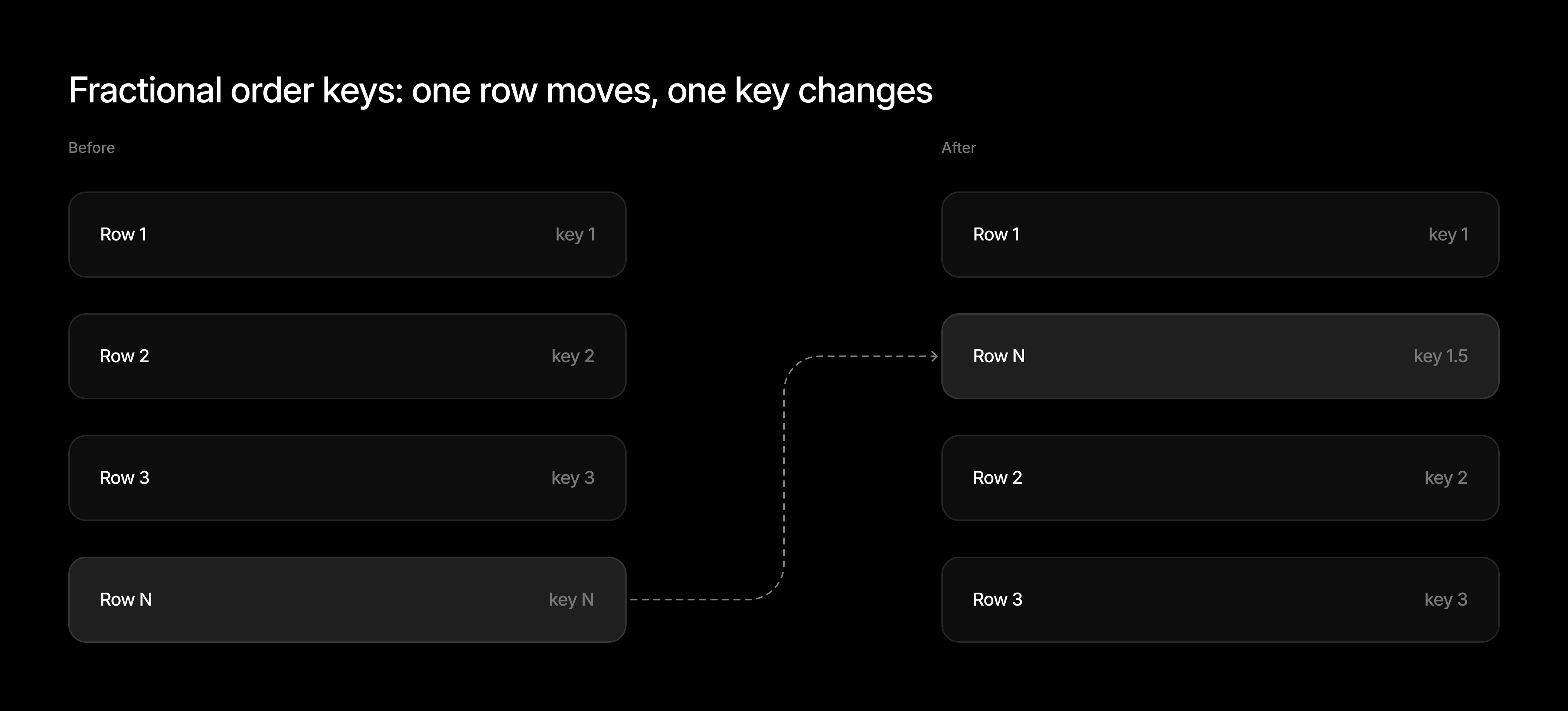
The order key is also part of the sort key in DynamoDB's row-listing index, so loading rows in order is one sorted query rather than a sort in memory.
Moving a block of rows at once still costs one write per row, since each needs its own new key: 20 rows dragged together is 20 writes. But that's still 20 rather than 1,000, so we're fine with it for now.
What's next
There's still a lot of functionality that we plan to build in Sheets, such as:
- Support running our new Aim-powered Agents across a Sheet, the same way Workflows run today. This one is already on our roadmap, and will be released soon.
- Increasing the row limits. Today a single Sheet can have up to 2,000 rows, which doesn't always work for larger customers. To support this, we still need to solve some optimization challenges on the front end, but more on this soon.
- More spreadsheet customization, such as filtering, highlighting, formulas, and version history.
There are also some bigger open-ended problems that we would love to solve. For example, how do we make the backend usable for AI agents?
People increasingly prefer to ask Aim to change a Sheet rather than edit it themselves. Our current solution exposes tools via internal MCP, and Aim calls them for mechanical operations like adding a row or editing a cell. But if we want to do more interesting things, like having Aim to consume a Sheet as context, it gets complicated: Sheets are often too big to fit in a model's context window, and an agent ends up operating with a partial view of it.
So how do we design the backend so that a partial view is enough? What should an agent see, what should it be able to ask for, and how does the backend keep it from making changes based on stale or missing context?
These are the problems we're still working on. If you're interested in joining us, check out our open engineering roles.


